The Original Gay Porn Community - Free Gay Movies and Photos, Gay Porn Site Reviews and Adult Gay Forums

  • Welcome To Just Us Boys - The World's Largest Gay Message Board Community

    In order to comply with recent US Supreme Court rulings regarding adult content, we will be making changes in the future to require that you log into your account to view adult content on the site.
    If you do not have an account, please register.
    REGISTER HERE - 100% FREE / We Will Never Sell Your Info

    PLEASE READ: To register, turn off your VPN (iPhone users- disable iCloud); you can re-enable the VPN after registration. You must maintain an active email address on your account: disposable email addresses cannot be used to register.

A few questions for help

GamerBear

( ̄(エ) ̄)
Joined
Apr 26, 2009
Posts
11,961
Reaction score
10
Points
38
Location
Portland
Not sure if they can be answered.

Question #1
Maybe several years ago on here I doubt that person is still on here at JUB. Someone posted a thread about how they wanted to look up their serial code for their program and even look at their Windows updates to see if they were missing any. Someone posted up a link of a program can't really remember what it was called might need to go through some old CD's to see if I had the program listed.

What the program did was open up and gather all the information on your computer, then listed all the programs and their serial numbers. Then it listed all sorts of Windows updates that were installed, showed you the Windows operating system and even had the serial code for that as well. Wasn't sure what other things it listed but it looked very useful and was wondering if anyone knew what that program could be.

Question #2
I can't remember when I did a factory restore on my computer and sadly I'm running Vista still and so I've backed up all my personal stuff on a 1TB external hard drive including my music on my iTunes. My problem is when I start my computer it will go to the desktop, then the desktop will just freeze first the taskbar freezes and when I try to click the icons on the deskop they freeze too. Sometimes it will stay frozen to about 2 to 4 minutes long before my other programs start opening up like my virus program and my widgets.

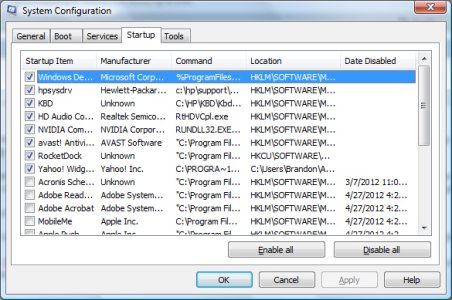
I've done just about everything. I unchecked the start up processes at the beginning and it still does it. When I check them back the weird thing is I only have about 8 processes in my Startup list that are opening. I figured it might be some Services but I've checked Hide all Microsoft services and then just unchecked things I really didn't need like my Amazon Download Agent, Google Update Service (I hardly use Chrome), Steam and Yahoo Updater.

I've done virus scans and spyware scans with Malwarebytes, Spybot and AVAST, they've all come up with nothing. I sort of hate using Window's Defrag because it can take HOURS and HOURS to do.

I downloaded a program called MyDefrag which has some great reviews. It seems to do the job with speeding up my computer, just need to do it every week it seems and I've even done the really heavy duty defrags like monthly scans and it helps but still that start up freezes every time. I'm not sure what might be running in the background or what's causing it to freeze up for 4 minutes during start up.

Does anyone know what or how to fix this? Has anyone ran across such a problem before? I've done online searches but most of the time they talk about Superfetch service being turned off and deleting the Prefetch folder in WINDOWS folder. I've done more research on this service some people say to NEVER turn the service off because it makes it boot up even more slower than before. I've even deleted the stuff in the Prefetch folder and still no change in the desktop freezing at startup.

What's going on? Do I need to get a new computer even though I can't really afford it, do I reinstalled Vista? My computer is about 5 years old, that seems to be the amount of years before a computer starts to slow down hardware wise and even in operating system.

I really didn't want to go through having to reinstall since I have all these programs and such with serial codes. And I sort of want to keep everything organized and it giving me a list of all the programs installed and serial numbers put into a file or JPG or some other file format.

Thanks to anyone whose read all this text and hopefully anyone who can be of any help to me. It's a pain in the ass having to start my computer.
 
It sounds like something Left2Right would have done. He was a crafty one.
 
It sounds like something Left2Right would have done. He was a crafty one.

Well I think it might of been Mike that gave it out but I'm not so sure, old age has taken it's toll on me and I can't remember all the computer whiz techs from 6 years ago when they helped people with issues.
 
Dude! Phrase one, simple question clearly, cleanly and coherently in as few words as possible and I, for one, will try to help.
BUt I won't sit or listen to 681 words of blather to "try and help".

Aiyooo!
 
Well shit, did you really need to be a douche about it? Would of it been better if I just asked the questions and not explained to you what I did? Maybe it would of helped with process of elimination so I wouldn't waste your time trying to answer questions if I explained my situation. To make it simple for you

"What program can do what I explained in my first question?"

"Why is my taskbar and desktop freezing at start up?"
 
The free program Belarc Advisor will tell every program that you have on your computer. And it will also give you every serial number of each program. It is excellent.

Belarc Advisor - Free Personal PC Audit

I think that might actually be it. Looks very similar, I remember now that it was just something that gave detail information about your system. Thank you so much for your help, now I can save the page or print it out in case I need to have my serial numbers all on one page.
 
About your 2nd question - do you have all those virus/spyware programs running simultaneously?
 
Corny, no I only have AVAST running from what I can understand, might have MalwareBytes opening up but I have that disabled and Spybot disabled. So I only have AVAST running. I've had Hijack this installed for a while looseliam not sure what good it was for but I guess I can use it now. It confuses the hell out of me but here is the log.
Logfile of Trend Micro HijackThis v2.0.2
Scan saved at 2:51:13 PM, on 5/16/2012
Platform: Windows Vista SP2 (WinNT 6.00.1906)
MSIE: Internet Explorer v9.00 (9.00.8112.16421)
Boot mode: Normal

Running processes:
C:\Windows\system32\Dwm*****
C:\Windows\Explorer*****
C:\Windows\system32\taskeng*****
C:\Program Files\Windows Defender\MSASCui*****
C:\hp\support\hpsysdrv*****
C:\WINDOWS\RtHDVCpl*****
C:\Program Files\Alwil Software\Avast5\AvastUI*****
C:\Program Files\RocketDock\RocketDock*****
C:\Program Files\Yahoo!\Widgets\YahooWidgets*****
C:\hp\kbd\kbd*****
C:\Program Files\Yahoo!\Messenger\YahooMessenger*****
C:\Program Files\Winamp\winamp*****
C:\Program Files\Mozilla Firefox\firefox*****
C:\Program Files\Trend Micro\HijackThis\HijackThis*****

R1 - HKCU\Software\Microsoft\Internet Explorer\Main,Search Page = Bing
R0 - HKCU\Software\Microsoft\Internet Explorer\Main,Start Page = about:blank
R1 - HKLM\Software\Microsoft\Internet Explorer\Main,Default_Page_URL = AOL.com - News, Sports, Weather, Entertainment, Stocks & Local
R1 - HKLM\Software\Microsoft\Internet Explorer\Main,Default_Search_URL = Bing
R1 - HKLM\Software\Microsoft\Internet Explorer\Main,Search Page = Bing
R0 - HKLM\Software\Microsoft\Internet Explorer\Main,Start Page = AOL.com - News, Sports, Weather, Entertainment, Stocks & Local
R0 - HKLM\Software\Microsoft\Internet Explorer\Search,SearchAssistant =
R0 - HKLM\Software\Microsoft\Internet Explorer\Search,CustomizeSearch =
R1 - HKCU\Software\Microsoft\Windows\CurrentVersion\Internet Settings,ProxyOverride = *.local
R0 - HKCU\Software\Microsoft\Internet Explorer\Toolbar,LinksFolderName =
O1 - Hosts: # Copyright (c) 1993-2006 Microsoft Corp.
O1 - Hosts: ::1 localhost
O2 - BHO: (no name) - {02478D38-C3F9-4efb-9B51-7695ECA05670} - (no file)
O2 - BHO: HP Print Enhancer - {0347C33E-8762-4905-BF09-768834316C61} - C:\Program Files\Hewlett-Packard\Digital Imaging\Smart Web Printing\hpswp_printenhancer.dll
O2 - BHO: Adobe PDF Reader Link Helper - {06849E9F-C8D7-4D59-B87D-784B7D6BE0B3} - C:\Program Files\Common Files\Adobe\Acrobat\ActiveX\AcroIEHelper.dll
O2 - BHO: AcroIEHelperStub - {18DF081C-E8AD-4283-A596-FA578C2EBDC3} - C:\Program Files\Common Files\Adobe\Acrobat\ActiveX\AcroIEHelperShim.dll
O2 - BHO: Increase performance and video formats for your HTML5 <video> - {326E768D-4182-46FD-9C16-1449A49795F4} - C:\Program Files\DivX\DivX Plus Web Player\ie\DivXHTML5\DivXHTML5.dll
O2 - BHO: Spybot-S&D IE Protection - {53707962-6F74-2D53-2644-206D7942484F} - C:\PROGRA~1\SPYBOT~1\SDHelper.dll
O2 - BHO: (no name) - {7E853D72-626A-48EC-A868-BA8D5E23E045} - (no file)
O2 - BHO: avast! WebRep - {8E5E2654-AD2D-48bf-AC2D-D17F00898D06} - C:\Program Files\Alwil Software\Avast5\aswWebRepIE.dll
O2 - BHO: Java(tm) Plug-In 2 SSV Helper - {DBC80044-A445-435b-BC74-9C25C1C588A9} - C:\Program Files\Java\jre6\bin\jp2ssv.dll
O2 - BHO: HP Smart BHO Class - {FFFFFFFF-CF4E-4F2B-BDC2-0E72E116A856} - C:\Program Files\Hewlett-Packard\Digital Imaging\Smart Web Printing\hpswp_BHO.dll
O3 - Toolbar: avast! WebRep - {8E5E2654-AD2D-48bf-AC2D-D17F00898D06} - C:\Program Files\Alwil Software\Avast5\aswWebRepIE.dll
O4 - HKLM\..\Run: [Windows Defender] %ProgramFiles%\Windows Defender\MSASCui***** -hide
O4 - HKLM\..\Run: [hpsysdrv] c:\hp\support\hpsysdrv*****
O4 - HKLM\..\Run: [KBD] C:\HP\KBD\KbdStub*****
O4 - HKLM\..\Run: [RtHDVCpl] RtHDVCpl*****
O4 - HKLM\..\Run: [NvCplDaemon] RUNDLL32***** C:\Windows\system32\NvCpl.dll,NvStartup
O4 - HKLM\..\Run: [avast] "C:\Program Files\Alwil Software\Avast5\avastUI*****" /nogui
O4 - HKCU\..\Run: [RocketDock] "C:\Program Files\RocketDock\RocketDock*****"
O4 - Startup: Yahoo! Widgets.lnk = C:\Program Files\Yahoo!\Widgets\YahooWidgets*****
O8 - Extra context menu item: E&xport to Microsoft Excel - res://C:\PROGRA~1\MICROS~3\Office12\EXCEL*****/3000
O9 - Extra button: Show or hide HP Smart Web Printing - {DDE87865-83C5-48c4-8357-2F5B1AA84522} - C:\Program Files\Hewlett-Packard\Digital Imaging\Smart Web Printing\hpswp_BHO.dll
O9 - Extra button: (no name) - {DFB852A3-47F8-48C4-A200-58CAB36FD2A2} - C:\PROGRA~1\SPYBOT~1\SDHelper.dll
O9 - Extra 'Tools' menuitem: Spybot - Search & Destroy Configuration - {DFB852A3-47F8-48C4-A200-58CAB36FD2A2} - C:\PROGRA~1\SPYBOT~1\SDHelper.dll
O11 - Options group: [ACCELERATED_GRAPHICS] Accelerated graphics
O13 - Gopher Prefix:
O18 - Protocol: skype4com - {FFC8B962-9B40-4DFF-9458-1830C7DD7F5D} - C:\PROGRA~1\COMMON~1\Skype\SKYPE4~1.DLL
O23 - Service: Apple Mobile Device - Apple Inc. - C:\Program Files\Common Files\Apple\Mobile Device Support\AppleMobileDeviceService*****
O23 - Service: avast! Antivirus - AVAST Software - C:\Program Files\Alwil Software\Avast5\AvastSvc*****
O23 - Service: Bonjour Service - Apple Inc. - C:\Program Files\Bonjour\mDNSResponder*****
O23 - Service: FLEXnet Licensing Service - Acresso Software Inc. - C:\Program Files\Common Files\Macrovision Shared\FLEXnet Publisher\FNPLicensingService*****
O23 - Service: iPod Service - Apple Inc. - C:\Program Files\iPod\bin\iPodService*****
O23 - Service: Logitech Solar Keyboard Service (L4301_Solar) - Logitech, Inc. - C:\Program Files\Logitech\SolarApp\L4301_Solar*****
O23 - Service: Logitech Bluetooth Service (LBTServ) - Logitech, Inc. - C:\Program Files\Common Files\LogiShrd\Bluetooth\lbtserv*****
O23 - Service: Process Monitor (LVPrcSrv) - Logitech Inc. - C:\Program Files\Common Files\LogiShrd\LVMVFM\LVPrcSrv*****
O23 - Service: MBAMService - Malwarebytes Corporation - C:\Program Files\Malwarebytes' Anti-Malware\mbamservice*****
O23 - Service: NVIDIA Display Driver Service (nvsvc) - NVIDIA Corporation - C:\Windows\system32\nvvsvc*****
O23 - Service: SBSD Security Center Service (SBSDWSCService) - Safer Networking Ltd. - C:\Program Files\Spybot - Search & Destroy\SDWinSec*****
O23 - Service: StarWind AE Service (StarWindServiceAE) - Rocket Division Software - C:\Program Files\Alcohol Soft\Alcohol 120\StarWind\StarWindServiceAE*****
O23 - Service: XAudioService - Conexant Systems, Inc. - C:\Windows\system32\DRIVERS\xaudio*****

--
End of file - 6433 bytes
 
^ I use hijackthis to quickly see what's queued to run and what services have been added. I don't see anything abnormal with your setup. I was half-expecting a boat-load of entries for run or runonce.

When you first login, try and spawn the task manager (ctrl+shift+esc) and switch to the 'processes' tab and monitor cpu consumption. See if there's one process that's hogging system resources for the first couple minutes.

Have you updated .net lately? Have you disabled prefetch, superfetch, et al. by chance?

btw, I love your siggy! When I was like 5 or 6 I would get up early before school to watch Jem (as if that wasn't an early warning sign). IIRC, All in the Family was on before it.
 
^ I use hijackthis to quickly see what's queued to run and what services have been added. I don't see anything abnormal with your setup. I was half-expecting a boat-load of entries for run or runonce.

When you first login, try and spawn the task manager (ctrl+shift+esc) and switch to the 'processes' tab and monitor cpu consumption. See if there's one process that's hogging system resources for the first couple minutes.

Have you updated .net lately? Have you disabled prefetch, superfetch, et al. by chance?

btw, I love your siggy! When I was like 5 or 6 I would get up early before school to watch Jem (as if that wasn't an early warning sign). IIRC, All in the Family was on before it.

When I tried the task manager method, it would freeze making it hard to even open it up to see what was taking up all my resources. I think the only one taking up a lot of CPU consumption was explorer and then it would freeze.

I had some .net updates but never updated them in a long time but when I just recently downloaded Belarc Advisor, it told me that missing updates were 3 .net updates and 1 SQL update that were set to critical and important. I downloaded the updates and the Advisor still listed 1 missing update which was this.

MS09-062: Description of the security update for GDI+ for SQL Server 2005 Service Pack 2 GDR: October 13, 2009

I don't even know if I use SQL, I believe it installed SQL when I was doing some Windows Phone app designing but I later uninstalled all those programs not sure if I even still need SQL or not.

My start up only has 8 items booting up, it's just weird why my computer would be acting up during start up.

attachment.php


I had just recently disabled Superfetch but seen that it did no good. When I restarted actually the only difference I saw in disabling Superfetish was when the green bar moves during the boot up process there was a black screen for 1 to 2 minutes and then the windows logo pops up. I enabled superfetch again and went into the prefetch folder and deleted whatever content was in there cause I read that it was the problem with some computers. Deleting the folder didn't do much help but within two or three days later the folder was full of files again.

I do see KBD on there, I just recently got a Logitech keyboard so I'm wondering if I should just disable KBD or do I need it to do the shortcut keys like when I want to change the next track on my media player or when I want to increase the volume. I'm sure that's what KBD means since I looked up the process on Spybot and it said it was for multimedia key strokes.

Could it be services that may be causing the problem? I know I only disabled services that I never used like MalwareBytes and Spybot's shield. I also opened the computer in Safe Mode, it all opens fine without any issues to the desktop or taskbar. Maybe there might be a service causing the problem, I just don''t know which one it is.

My friend got me into watching Jem, recorded about 58 episodes when they broadcasted it on The HUB but there are only a few episodes missing and I can find those online if I want to watch those. I'm almost finished with Season 2 and about to start Season 3 but missing like 2 or 3 episodes which seem to be broadcasting recently. It's a great show really a lot better then the cartoons they show today.
 

Attachments

  • Startup.jpg
    Startup.jpg
    212.4 KB · Views: 42
Well, I have a couple options for you:

1) start disabling non-critical service and see which one provides relief
2) backup, tell vista to sod-off and install 7 =]

As for option 1, start by disabling spybot and it's teatime(r?) application first. Hell, disable malwarebytes and spybot and give a reboot a try and see if it changes anything.
 
Alright, some of the things I have in Services that are checked are (with Microsoft hidden) decided to go through it and type it all out because hijackthis looked like a complete mess.

- Apple Mobile Devices
- avast! Antivirus
- Bonjour service
- FLEXnet Licensing Service (I believe that is for Photoshop)
- iPod service
- Logitech solar keyboard service
- Logitech Bluetooth service
- Logitech Process Monitor
- MBAMService
- NVIDIA display driver service
- SBSD Security Center Service
- Starwind AE service
- xAudioService

So I start off with disabling the MBAM service and Spybot? I take it NEVER to disable avast cause it will stop my software from running properly?

I want to install Windows 7 but I'm scared that it might not work or my computer might not be fast enough to run it or come across an error when installing it. Vista came with this mission so that was the reason why I was not so paranoid about installing a new operating system on it.

I backed up all my files onto a 1TB external hard drive except for maybe the new music I imported last night. But will start doing that just in cast my computer takes a shit. I did a virus scan with avast and MBAM and nothing weird has come up on it's detectors.

Also one last question, I noticed Starwind is for Alcohol 120% which I only use when I'm burning a ISO image or mounting an ISO. Will disabling that service mess up the program?
 
You can try this:
How to use the System File Checker tool to troubleshoot missing or corrupted system files on Windows Vista or on Windows 7

you can try to remove all your desktop icons and files (just move them into a folder on c:\)

you can try to create a new user profile and see if it hangs there, too.

you can try to boot with all USB devices except keyboard/mouse removed, also disable the internet (remove cable or disable wlan)

you can try to remove avg, use one of the available removal tools (google), the uninstaller might not be sufficient.
 
You can try this:
How to use the System File Checker tool to troubleshoot missing or corrupted system files on Windows Vista or on Windows 7

you can try to remove all your desktop icons and files (just move them into a folder on c:\)

you can try to create a new user profile and see if it hangs there, too.

you can try to boot with all USB devices except keyboard/mouse removed, also disable the internet (remove cable or disable wlan)

you can try to remove avg, use one of the available removal tools (google), the uninstaller might not be sufficient.

I am doing the System File Checker tool right now to see if any files are corrupted.

I have removed all desktop icons before but it still froze on me, I think I might have a better shot disabling some of those services that looseliam said I should turn off it could very well be one of those services giving me problems, I don't use Spybot as much and I only use it when I want to check processes to find definitions or examples of what they might be.

Haven't restarted yet since I was waiting for virus scans and they've all come back clean with no viruses or trojans or spyware. Will do the disable services soon. Just hope this fixes my problem. *Crosses fingers*
 
you said that explorer. exe is using the cpu. my suggestions are based on this. in the process tree, services do not derive from explorer. exe, that's why I am not going further into that direction.
 
Well I might be wrong about the explorer but that's whats freezing right when it boots up and the desktop and taskbar freeze. When my Rocket dock opens before the freeze the dock works but the desktop freezes so that makes me think that it's just something that freezes windows. The checker tool came back with.

Windows Resource Protection did not find any integrity violations.

I guess that means that nothing is corrupt? Going to try to do the services and then see where that takes me, will disable one by one and see if it did the trick.
 
Ok did the methods of disabling MBAM and Spybot even did the KBD for the keyboard and the Starwind software, still freezes on me. Actually even the mouse freezes too, and it will stay locked up for about 2 minutes and then the mouse moves and then all my stuff opens up.

Not sure what it is, is there any kind of program that will tell me stuff that is opening up during startup that might be causing the issue for the freezing?
 
Back
Top