The Original Gay Porn Community - Free Gay Movies and Photos, Gay Porn Site Reviews and Adult Gay Forums

  • Welcome To Just Us Boys - The World's Largest Gay Message Board Community

    In order to comply with recent US Supreme Court rulings regarding adult content, we will be making changes in the future to require that you log into your account to view adult content on the site.
    If you do not have an account, please register.
    REGISTER HERE - 100% FREE / We Will Never Sell Your Info

    PLEASE READ: To register, turn off your VPN (iPhone users- disable iCloud); you can re-enable the VPN after registration. You must maintain an active email address on your account: disposable email addresses cannot be used to register.

double entry in start up

Peterdragin

JUB Addict
Joined
Feb 3, 2009
Posts
1,004
Reaction score
19
Points
0
Location
No Where
my 'puter has been loading slowly for a couple of weeks and while investigating for a problem ,I came across this. I ain't to smart, but I don't think this is right. Should I eliminate one? scrnshot.jpg
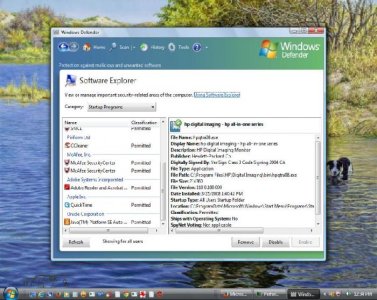
 
2nd picture.jpg

here's another try, why are the s/s so small. my IQ is only 108, so help me out,pleeze
 
I can help make the picture bigger... but that's about it.

attachment.php
 
After you upload the pic, you have to link back to the original upload link using [ IMG ]link[/ IMG ] tags (no spaces) in the post around the link.

Clear as mud?? ;) It too me a while and practice to figure it out too!!
 
It's a bit odd to see the two startup entries for McAfee.

You need to ensure they're not two pieces of the program running as separate processes though.
(One might be the engine while the other represents the app's control panel that lets you manage the engine)

To verify whether they're the same, or not, you'll need to compare the following:

File Name
Startup Value*
File Path
Startup Type*
Location*


* Pay particular attention to any "switch" commands that append to the "Startup Value" (like "/runkey" in the screenshot you presented) entries. Also, do double-check the "Startup Type" and "Location" values.
These three are where the 'different' functionalities, engine/control, might be initiated.

If they match exactly... one can go.

If they don't match... 10-1 they're both required.
 
Burke67: They are the same. after thinking this over last night, I think what happened is that I switched ISPs 3 months ago and each one supplied McAfee, and when the switch was made, I guess it was my responsibility to remove the original program before "Cox" installed theirs. I just assumed it would be automatic, which of coarse it wasn't. Now the problem is that when i tried to disable one, the computer wouldn't let me. (the disable function was grayed out.) Sooo... I'll keep screwing around with it and see if I can really fuck things up. Thanks very much for your help.
 
After you upload the pic, you have to link back to the original upload link using [ IMG ]link[/ IMG ] tags (no spaces) in the post around the link.

Clear as mud?? ;) It too me a while and practice to figure it out too!!

ya know, this is really stoopid, 'cause I belong to other sites (OMG! YOU DO? ) that use this same exact format for their BBs and there are no problems. Kinda tells you something about the guys in charge don't it? might be 'cause they are "Brits". OH well
 
If you have two versions of the program installed on your hard drive you could simply uninstall the older version. If you uninstall it through the control panel it should also remove the start up entry as well
 
You're welcome. I might have gone a bit too far with my suggestions. Do follow-up on Epod85's excellent suggestion by going into the Control Panel and seeing if there are, in fact, two versions of McAfee installed.

It would seem you've got two kids (versions of McAfee) fighting over one ball (the computer and it's resources).
 
If you have two versions of the program installed on your hard drive you could simply uninstall the older version. If you uninstall it through the control panel it should also remove the start up entry as well

Yes. And worst-case scenario, if it gets confused during the uninstall process and actually then tries to uninstall both, after a reboot he can just reinstall a single instance afterwards and should be good-to-go.
 
If you have two versions of the program installed on your hard drive you could simply uninstall the older version. If you uninstall it through the control panel it should also remove the start up entry as well

Well, that's what I thought I'd do, but it only shows ONE listed, so, I just disabled one in the start up program and it "seemed" to work. maybe one is superimposed over the other? I doubt it, computers ain't that clever. Any way Thanks to all you sexy guys for your interest and help. If I could I'd give y'all a sample of my "appreciation" now to figger how to post a full size picture. this is the reason I never renewed my membership.
 
Back
Top