The Original Gay Porn Community - Free Gay Movies and Photos, Gay Porn Site Reviews and Adult Gay Forums

  • Welcome To Just Us Boys - The World's Largest Gay Message Board Community

    In order to comply with recent US Supreme Court rulings regarding adult content, we will be making changes in the future to require that you log into your account to view adult content on the site.
    If you do not have an account, please register.
    REGISTER HERE - 100% FREE / We Will Never Sell Your Info

    PLEASE READ: To register, turn off your VPN (iPhone users- disable iCloud); you can re-enable the VPN after registration. You must maintain an active email address on your account: disposable email addresses cannot be used to register.

Firefox 27 issues

Falcon16

longo vivas tempore et prospero
JUB Supporter
Joined
Jun 3, 2012
Posts
28,723
Reaction score
42
Points
48
Location
Boston
The other day Firefox automatically updated to version 27 and I've had nothing but problems with it. I'm running an older Windows XP pc. It seems to be a javascript issue, I've updated all Java and deleted old versions, but Firefox just hangs. When I disable Java, Firefox runs fine, but so many websites (including JUB) incorporate it. Is anyone else having these problems?
 
Same here -

Trying to watch some (not all) videos that use Java and I keep getting the message that video load failed -

Hopefully they will have a patch soon!
 
Crap I have yet to update to the new Firefox, maybe I should just ignore the update until they fix the issues.
 
It's so bad I've gone to another browser for the time being.
 
I haven't experienced any issues yet using Firefox 27 (which I updated to yesterday), although I installed a JAVA update that took me to Java 7 Update 51 before doing the Firefox 27 upgrade. If you have any specific sites that are causing issues I can try them out as well to see if I can reproduce the error.

The JAVA test page might be worth trying to see if things load fine for you there. (If something on Java.com itself won't co-operate, there's maybe not much hope for other sites. :) ) Falcon16, I know you already did this, but for anybody else - they also have a link to the left side on removing older versions, especially if you have a Java 6 version hanging around (some software doesn't like them to co-exist side-by-side).
 
Trinket, thanks for your response. Yeah, the Java test page works fine and I do have Java 7 Update 51 and no previous versions installed. But that's a good test for other users.

I've narrowed it down, really bizarre, but it seems to be a tab problem. When I open a new browser tab with javascript enabled, Firefox hangs and just chews up all my pc's memory and with high cpu usage. I have to force close Firefox. But it I open new browser tabs with javascript disabled, it's fine. After opening multiple tabs with js off, I can go and re-enable javascript and proceed as normal.

You can toggle javascript on/off by going to "about:config" sans quote in the address bar (not advised, be very careful here), but Mozilla does have a plug in or add-on that will do this, which has come in very handy, lol.

I'm sending reports to Mozilla about this, we'll see what develops...

...Bill
 
Years ago I had problems with Firefox's updates using Firefox to do so, but that stopped when I started downloading the entire app then deleting the old one.

I've no idea, though, whether this method would present any problems with Windows.
 
You are wildly mixing Java and Javascript. And you possibly might be talking about Flash instead.

It might help if you describe your problem more precisely .. what is happening on which website? Are you sure those are JAVA Videos?
 
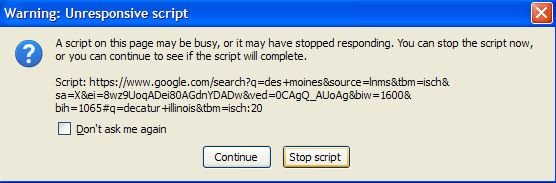
Hi Corny. Well, I've disabled Java via the Control Panel and the problems continue. New browser tabs just don't respond normally and the website that is causing the most headaches is Google, especially when searching Google Images. This warning constantly pops up and basically freezes Firefox.

Unresponsive script warning.jpg

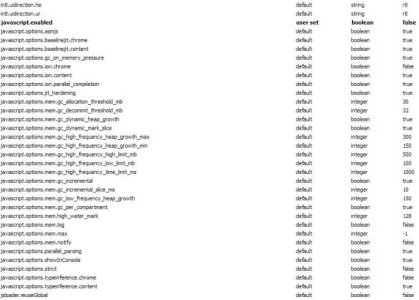
When I disable javascript in Firefox's configuration panel all the problems go away. In this screenshot, I have it disabled as evidenced by the "false" notation.

JS config.jpg

All of this started with Firefox release 27.
 
I had the freezing Google Images problem a while ago too and it was caused by one of the add-ons which I can't remember.

I suggest you turn Java and Javascript back on and start Firefox without add-ons (look up on how to do that). If Images now works properly, it's one of the add-ons. And yes, learn the difference between Java and Javascript.
 
My Firefox has been crashing for a few months.

I just upgraded to 27 hoping it would fix it, but it's still crashing.

I have to run it in it's "Safe Mode" to not crash, which is annoying because I can't use the add blocker/Flash add-on's which is the main reason I use Fire Fox.
 
How difficult is it in Windows to save the bookmarks, kill the rest and start all over again with a new one?
 
How difficult is it in Windows to save the bookmarks, kill the rest and start all over again with a new one?

FEBE 7.3.0.1 is an addon for Firefox that will back up everything, bookmarks, addons, cookies, etc., or just the stuff you want it to back up.

After you completely remove and reinstall Firefox, you can then open your FEBE backup folder and drag and drop each of your favorite addons to install them and test them one at a time.
 
Kahaih, that's a nifty addon. I got it and backed up and will narrow this down tomorrow. Saturday night is not the time, lol.

Thanks all for your help!!!!!!!!!!!
 
One thing I stumbled on by accident that's helped me so far with Firefox crashing is, even though I have Windows 7, I'm running Firefox in Windows XP compatibility mode...

So far so good... Knock on Wood...

It crashed about 8 times this morning until I changed it, and so far NO crashes!!!
 
Did you guys see that Firefox 27.0.1 was released?

Some fixes from the change log:

- Fixed stability issues with Greasemonkey and other JS that used ClearTimeoutOrInterval
- JS math correctness issue


Don't know . . . may help
 
You might try installing an older version. Disable the automatic upgrade. I play Kingdoms of Camelot via Facebook and one of our techies suggested to not upgrade the newest FF. My2 cents.
 
Back
Top