The Original Gay Porn Community - Free Gay Movies and Photos, Gay Porn Site Reviews and Adult Gay Forums

  • Welcome To Just Us Boys - The World's Largest Gay Message Board Community

    In order to comply with recent US Supreme Court rulings regarding adult content, we will be making changes in the future to require that you log into your account to view adult content on the site.
    If you do not have an account, please register.
    REGISTER HERE - 100% FREE / We Will Never Sell Your Info

    PLEASE READ: To register, turn off your VPN (iPhone users- disable iCloud); you can re-enable the VPN after registration. You must maintain an active email address on your account: disposable email addresses cannot be used to register.

How do you set a custom MTU level in Lion...

swerve

Slippery When Wet
Joined
May 16, 2004
Posts
12,843
Reaction score
4
Points
0
Location
Los Angeles
Website
tedg99.wordpress.com
And have it STAY there...

I use mobile internet -- which, in MY case REQUIRES me to have an MTU setting of 1400 -- NOT the "standard" 1500 that Lion is CONSTANTLY changing it BACK to automatically...

I have to go into setting/network/wifi/advanced/hardware and change it back to 1400 EVERY time I power up the computer -- and SOME nights -- I have to CONSTANTLY go back every 15 minutes or so...

If the setting ISN'T at 1400 MOST web pages won't load...

I've PINGED the "internet" -- and although packets will SEND at levels ABOVE 1400 (factoring in the 28 addition -- or 1372) -- they will NOT receive...

I've also done a bunch of other trouble shooting that HASN'T worked...

I'm HOPING that one of JUB's brightest has the answer... ..|


:):):)
 
Ok I have to admit, I was fully expecting a thread where someone read some guide which claims that changing the MTU will increase your speed or similar. Positive surprise .. yep in your case it makes sense ..|

I am not sure how similar this stuff is to linux, but afaik the whole network stack from mac os is the same.

So what you would want to do is:

ifconfig en0 mtu 1400

in a terminal window

maybe that already helps. If it still resets after boot, you need to create a script and place it in the autostart folder/script. Maybe in /etc/rc.local

I hope a machead can tell you the details for the autostart.
 
Since you are using a wireless card for mobile the above command will probably be 'en1' rather than 'en0'.

For running at startup, the easiest way is to save a shell script as an app and then add it to the login items.
steps here: http://stackoverflow.com/questions/6442364/running-script-upon-login-mac

The rc files are deprecated in Snow Leopard and I don't know if they work in Lion.
 
Hi guys!!! :wave:

Thanks for the reply...

I typed the command in terminal and received this response (using the en1)...

ifconfig: ioctl (set mtu): Operation not permitted

Do I need to maybe set up a user with root authority??? And if so -- how do I do that???

I think you guys are on the right track -- its just driving me nuts...

THANKS!!!

:):):)
 
YAY!!!

I got it to work!!! (!)

The command I used was (without the quotes)...

"sudo ifconfig en1 mtu 1400"

You would NOT believe the amount of hours I've spent on the phone with Apple tech's and NO ONE could help me... ](*,)

Yet -- I posted it here -- and had BOTH of your CORRECT responses in less than ONE day!!! ..|

NOW -- I'm ONCE AGAIN on the phone with apple ASSUMING they'll know how to add this at start up (since it requires my password entered in terminal AFTER I enter the command) -- I know, easy for you, but still a little complicated for me... :lol:

THANKS AGAIN GUYS!!! (*8*)

:):):)
 
Well...

I finished speaking with the Apple tech -- and guess what...

They WON'T HELP ME to add this command (requiring my password) to startup... :cry:

She said that they LEGALLY cannot... [-X

She ALSO said that it wouldn't work anyways because it is a "user setting" -- EVEN THOUGH -- IF she had READ THE NOTES -- she WOULD HAVE KNOWN that we had TESTED this EARLIER in the week and DETERMINED that it was a SYSTEM setting... ](*,)

So -- any idea how to add the code -- THEN my password -- into the startup???

Automator seemed REALLY complicated to me -- so I would probably need step by step instructions... :help:

THANKS!!!

:):):)
 
actually yeah I forgot about that, the login items run as the user so they wouldn't have access to the network config.

You would need to add it to one of the startup scripts that run as root.

If the rc scripts are still valid in Lion, you can try adding the command to /etc/rc.common. You would not include the sudo part since that script would run as root.
 
I am not sure if I should consider it funny or sad, how this emphasizes my opinion of apple as a company ..
 
^It is probably a little bit of both...

For me -- it is just too frustrating...

And HotATL -- Those instructions are not nearly thorough enough for me to even attempt...

What is REALLY sad -- is I spent $2,360 (ON SALE) for a laptop (to replace the SAME one I had that died last week) that I could get the SAME windows system for almost half price -- but I REALLY like the Apple interface enough to hold out and see if the Apple engineers come up with a solution before my 14 day right to return expires...

:(:(:(
 
While it's obviously possible to fix the problem with the appropriate Terminal know-how, it's clearly a total pain in the arse!

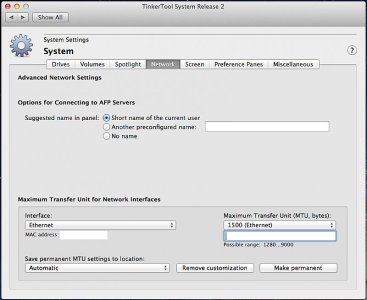
A German software engineer has written a utility called TinkerTool, which is a nice and easy control panel to adjust tons of hidden stuff within Mac OS, that is otherwise only controllable through the Terminal.

This page of TinkerTool should be of most interest to you:

attachment.php


Note that custom MTU settings can be permanently saved.

TinkerTool costs 10 Euro/about $13, but you can run it in Evaluation Mode for free five times. In your case, if you just want to set the MTU and forget it, you shouldn't need to purchase, unless you want to support the developer.
 

Attachments

  • tinkertool.jpg
    tinkertool.jpg
    64.1 KB · Views: 52
I am not sure if I should consider it funny or sad, how this emphasizes my opinion of apple as a company ..

Well this is a very unusual tweak.

I'm a network admin and I don't recall ever having to change the MTU on any device for any reason.
 
depending on your ISP and your network behind your router, it can be quite usefull to adjust the MTU.

but that aside, for what is customer services if not for the unusual problems that you can't solve on your own?
 
^ You're right. Even though it's an unusual problem, the Support people SHOULD be able to solve it.

I've been discussing the issue with Swerve via a few PMs. I've confirmed that I can definitely fix the issue easily on my own MBP - hopefully he's been able to as well. The problem seems to be that the default network profile (called a "Location" in Mac-speak) which is called Automatic, is actually automatic, so it doesn't store the MTU change permanently. By creating a second network "Location", the MTU change is remembered fine.
 
aren't you just able to edit the interfaces file?

and I am still confused why it seems to be so difficult to get a suid script somewhere into a start script like rc.local
 
aren't you just able to edit the interfaces file?

and I am still confused why it seems to be so difficult to get a suid script somewhere into a start script like rc.local

There is no interface file in OS X that I'm aware of. In general there are much fewer flat config files than in say Linux. A lot of stuff is either in .plist files or is buried in custom object files.
 
At this point -- I'm hoping to hear back from Andy...

It did not work for me when I set up a second location -- but maybe I did it wrong...

As soon as I hit the 'Make Permanent" button (in Tinkertool) -- it changed back to 1500 (automatic)...

:(:(:(
 
Have you stopped by the apple store at all? Perhaps the *cringe* genii can assist.

Being *nix-based, I'm surprised it's this difficult.
 
Back
Top