The Original Gay Porn Community - Free Gay Movies and Photos, Gay Porn Site Reviews and Adult Gay Forums

  • Welcome To Just Us Boys - The World's Largest Gay Message Board Community

    In order to comply with recent US Supreme Court rulings regarding adult content, we will be making changes in the future to require that you log into your account to view adult content on the site.
    If you do not have an account, please register.
    REGISTER HERE - 100% FREE / We Will Never Sell Your Info

    PLEASE READ: To register, turn off your VPN (iPhone users- disable iCloud); you can re-enable the VPN after registration. You must maintain an active email address on your account: disposable email addresses cannot be used to register.

How to copy a dvd movie into your PC hardrive?

Piquechampion

JUB Addict
Joined
Feb 10, 2007
Posts
3,923
Reaction score
2
Points
0
I just bought myself a very expensive KristenBjorn movie and I don´t want to wear out or ruin the CD so I want to copy it into my harddrive and watch it all the times that I want.

How to do it?

Thanks
 
Get a copy of DVD Ripper and use it convert it to an AVI file. then you can watch it whenever you like.

The better the quality of the DVD the better the reproduction will be
 
If you want to be able to make a copy of it. I would try DVDshrink first. It might be able to decrypt the DVD and copy the whole movie to your hard drive so you can burn it to another DVD later. You'll also be able to open the DVD files on your computer so you can play it from your hard drive also if you want.

you can get it here, it's free: http://www.mrbass.org/dvdshrink/
the english download link is near the top of the page and then the instructions on how to use it follow.
 
you can get it here, it's free: http://www.mrbass.org/dvdshrink/
the english download link is near the top of the page and then the instructions on how to use it follow.

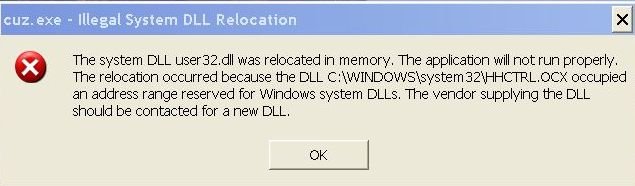
I tried to download this programme and got the attached response on my screen. I have had this result before when trying to download 'free' programmes. Is there any way round this or is it Windows protecting its self from un-authorised programmes?
 

Attachments

  • Screen.jpg
    Screen.jpg
    24.7 KB · Views: 83
Thank you Noelie . Downloaded the Windows fix and have successfully downloaded the DVD programme not had the time to test it yet.
 
It appears that Windows does not like the Dvd/Shrink programme.
After running the programme to check the Dvd, I wanted to load on my HD, I then clicked for it to load a back-up copy.
All went well but after nearly 2 hours ,with 90% of the Dvd downloaded , the screen changed and a green warning notice appeared saying that a Kernel error had been detected and Windows was closing down to protect my computer. It advised me to remove any new programmes or hardware and to restart Windows in Safe mode!
I did as I was told and all seems to work as before! I think I will not bother to attempt to obtain a HD copy of a Dvd by this method.
 
WOW i'm shocked. the only DVDs dvdshrink has not been able to backup for me were those newish ones made by sony.

DVD decrypter would be my next suggestion as well.
 
Thanks Noelie and Mike for your advise . The problem seems to lie in my PC since I get the same result when trying DvD Decrtpter. It has been suggested that I re-load my Windows programme but since this will mean re-loading my PC with the original start-up disc which is 5 years old I do not want all that hazzle.
I think I am due to buy a new PC after all the various up-dates and to give me more capacity. If Vista had rceived rave reviews that would have been a good reason, but that is not the case!
 
Back
Top