The Original Gay Porn Community - Free Gay Movies and Photos, Gay Porn Site Reviews and Adult Gay Forums

  • Welcome To Just Us Boys - The World's Largest Gay Message Board Community

    In order to comply with recent US Supreme Court rulings regarding adult content, we will be making changes in the future to require that you log into your account to view adult content on the site.
    If you do not have an account, please register.
    REGISTER HERE - 100% FREE / We Will Never Sell Your Info

    PLEASE READ: To register, turn off your VPN (iPhone users- disable iCloud); you can re-enable the VPN after registration. You must maintain an active email address on your account: disposable email addresses cannot be used to register.

Is there a way to access and inaccessible CD?

gsdx

Festina lente
JUB Supporter
50K Posts
Joined
Oct 10, 2003
Posts
57,249
Reaction score
1,622
Points
113
Location
Peterborough Ontario
I had a complete system crash yesterday and lost everything on my hard drive. And now, the backup CD I had of all my important things is inaccessible. Is there a way to gain access again? Much of that stuff was irreplaceable, and I'm not talking porn. I'm talking about some very serious and personal stuff there, including photos of my Mom and Dad.

If you can help, I would really appreciate it.
 
I saw it and downloaded it and installed it.

Didn't work.

Thanks anyway, though.
 
Have you tried it in a different computer? Perhaps a newer one at a friend's place?

If that doesn't work, the prospects aren't good that YOU can get the data. Now if it's really important (which obviously it is) you can send it to a data retrieval company that might be able to pull some data off of it. For a nominal fee of course.
 
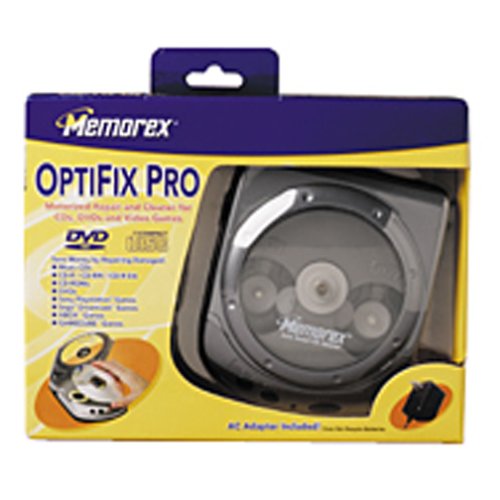
It depends on what's wrong with the CD. it could be scratched. if it's scratched i've had a great deal of success with memoeix optiplex CD/DVD repair, that i got for like 20 bucks at wal mart. sometimes i've had to run it twice on the same CD/DVD in a row to get it to work.

51RZBNKMNYL._SS500_.jpg


if it's not scratched you could try data recovery software. here is some links i posted in a data recovery thread a while back.

i've not used any free programs that due data recovery. I have paid for and used something called file scavenger here: (http://www.quetek.com/prod02.htm) for files that i had to pull back it was worth the 39 dollars, although i see it's up to 49 now.

i've heard zero assumption recovery is also good, but again it's not free (and is even higher than the previously mentioned program): http://www.z-a-recovery.com/download.htm

here is one that says it's free, but i've never used and don't know if that is true or not: http://www.pcinspector.de/file_recovery/uk/download.htm

again here is one that says it's free, but i've not used it:http://www.freedownloadscenter.com/U..._Recovery.html

here is one more free one: http://www.freedownloadscenter.com/U..._Recovery.html

good luck :shamrock
 
I have to say that I am sorry and it may be too late now but this is where a linux distro comes into its own to enable you to backup when your primary O/S crashes. I just pray that you either used a new hard drive or, even if you reinstalled windows, that you didn't format your old drive. I know it is easy to be wise after the event but this is more so that others can benefit from your experience. I am hoping all is not lost for you. As Noelie says more info and also avoid saving anything to the affected drive lest it overwrites otherwise recoverable data.
 
As for my hard drive, a simple desktop setting which I selected whilst 'tinkering' caused an error in 'rundll32' and 'kernel32'. We simply could not make it go away despite two attempts to reinstall Windows over the old (to replace the 2 files) and several attempts to copy the files through DOS from another system.

The only way out was to wipe everything clean and start over.

I spent hours zipping and backing up everything I wanted (and needed) onto several CDs. After that, the drives were formatted and repartitioned and the installations began.

My roommate (who has been very sober for several weeks now) was doing the installations but needed a video driver. We installed my internet service on his computer, I came online and retrieved the driver to his system.

Unknown to me, he tried to burn the driver to the CD which just happened to be the one with all my backed up and most precious things. Whatever he did made the CD 'inaccessible'.

By the way, I certainly can't afford data retrieval programs, and I doubt if I could affort to pay a professional to do it.
 
ok .. leave the disc alone for now.

FIRST DO NOT DO ANYTHING with your machine now.
most important DO NOT DO any write operations to your harddrive (saving files etc, even just running windows can overwrite lost data!).

boot up from eg a knoppix cd or similar and post here. tell us what happened before and after your crash and what you did do.

about that CD - be carefull with those repair kits. they physically alter the disc structure. they *could* make things worse. so if it is super important, send it to a recovery company.

and as a rule - always have more than one backup. do verify your backups ("replay test").
 
sorry .. you must have wrote this while i was writing my reply.

.. reinstalling certainly was the worst option here. as I said - if you lost data you have to minimize write access. you did A LOT of writing. as noelie said .. maybe there still is something to retrieve. reformating isn't a problem as long as it is just a "quick format". i don't know about repartitioning though - i believe it you change the partitions, this might confuse some programs since it changes the data-structure in which files are stored. good luck with the programme.

i don*t know what he did with your CD, but if you finished the session it's somewhat strange that he managed to break it. it doesn't sound as if it has scratches or so, so the kits mike recommend won't help in your case.

i believe there are tools out there that can recognized missformated CDs as well. but i don't know any..
 
Back
Top