The Original Gay Porn Community - Free Gay Movies and Photos, Gay Porn Site Reviews and Adult Gay Forums

  • Welcome To Just Us Boys - The World's Largest Gay Message Board Community

    In order to comply with recent US Supreme Court rulings regarding adult content, we will be making changes in the future to require that you log into your account to view adult content on the site.
    If you do not have an account, please register.
    REGISTER HERE - 100% FREE / We Will Never Sell Your Info

    PLEASE READ: To register, turn off your VPN (iPhone users- disable iCloud); you can re-enable the VPN after registration. You must maintain an active email address on your account: disposable email addresses cannot be used to register.

Is there a way to be notified whenever my computer is logged onto / logged off?

Joined
Jul 18, 2016
Posts
254
Reaction score
468
Points
63
I share my computer with family, that they can use during an emergency. Yet I was wondering, is there some way I can get an email or smart phone notification any time that my computer is logged onto and logged off (while I am away from home)?

I don’t care what type of activity is done on my computer . . . so I am not looking for any type of tracking to be done (i.e. what sites were visited or track everything that was typed on the keyboard), I just want to know whenever my computer is logged onto and logged off. Or is there an information section on most computers, where you can go to see when the last time the computer was logged onto and logged off?

I am not very tech savvy, so if there is something out there that can help me, it needs to be user friendly. :confused:

Thank you in advance for your help.
 
With Windows, there's a built-in Task Scheduler that performs an action when certain things happen. One option is sending you a message when someone logs in. I haven't used it, but it seems clear enough.

There are also an assortment of logs that Windows keeps -- the Event Viewer has this, but I don't know enough to tell you how to use it. I only used it when my computer had problems, since it logged that. There are categories for security and such, but routine activities are also in there.

You can probably find instructions on YouTube and elsewhere for using these features (if Microsoft isn't helpful).
 
That shows when the computer is turned on or off but I think he looking for logging on and off. Windows event viewer can track that too but there some set up you have to do. I set up computers for such logging at work so I can walk you through that. As far as getting a message that will take some start up script or third party app.
 
This is what I posted about earlier

From https://msdn.microsoft.com/en-us/library/windows/desktop/aa383614(v=vs.85).aspx

The Task Scheduler enables you to automatically perform routine tasks on a chosen computer. The Task Scheduler does this by monitoring whatever criteria you choose to initiate the tasks (referred to as triggers) and then executing the tasks when the criteria is met.


The Task Scheduler can be used to execute tasks such as starting an application, sending an email message, or showing a message box.

Tasks can be scheduled to execute:

When a specific system event occurs.
At a specific time.
...
When the system is booted.
When a user logs on.
 
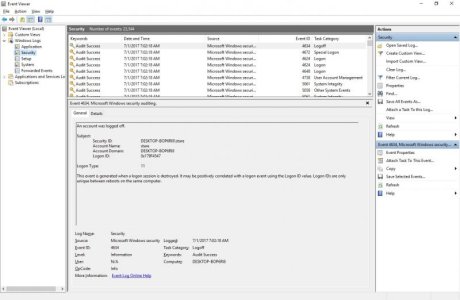
So assuming you are running Windows 10, suggest upgrading if you are not but if not I can provide a Windows 7 walkthrough, log on as an Administrator. On the start menu scroll down to Windows Administrative Tools and select Event Viewer. On the left-hand side of the Event Viewer, expand Windows Logs and select Security. The result should look like this:

Event_Viewer.jpg

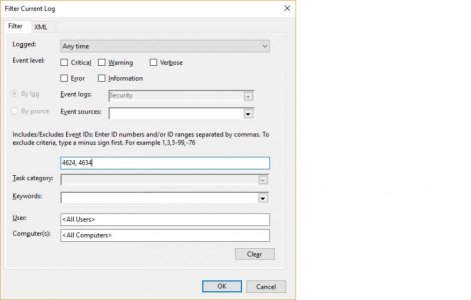
You are looking for entries marked with event ID numbers of 4624 and 4634, these are log on and log off events. Selecting one will provide the details including which account that logged on or off. To make it easier, select Filter Current Log on the right and this window will pop up:
Filter_Event.jpg

Put in the event IDs you want to see separated by commas (I put the two you are looking for in the example picture) and hit OK. That will only show entries of those IDs.

If those IDs are not showing up get back to me and I'll walk you through turning them on in logging.
 
Thank you, Guys! ..|

I sincerely and greatly appreciate your help, suggestions, and comments to my question. Thanks a MILLION for everything! :gogirl:
 
Back
Top