



user9430961
Slut
- Joined
- Jul 18, 2016
- Posts
- 254
- Reaction score
- 467
- Points
- 63
Hello.
During the summer, I purchased a brand new i7 Dell laptop computer with Windows 10. I really like my computer, BUT, 25% of the time, I can not fully wake it up to give me the option to put in my password, so I can actually use it.
I prefer to turn-off my computer, and turn it back on again rather than logoff and log back on.
So lately when I turn my computer back on, it will come on to the point of having the wallpaper, but it will not (25% of the time) continue to boot-up to give me my password box. It will sit there up to 5 minutes and will not do anything, but display a blank wallpaper screen. Yet if I turn it on, let it sit for a minute without it doing anything, then I just randomly start pressing keys . . . often the CTL+ALT+DEL keys, this seems to force it to switch over to give me the password box often, but not all the time.
Normally, I would be happy just to removed the power cord and take out the battery and force the computer to do a hardboot, like I did on my previous laptop (whenever it froze-up). However I did not discover that the battery on my new Dell laptop, is screwed in and looks like it would take a Rocket Scientist to remove it.
When I first got this computer, I use to logoff each day and logon again the next day, but I found that it was just taking too long to boot-up, but found that just turning it off each day and turning it back on again the next day, it would boot back up in less than 60 seconds and then offer the password box. Yet I guess it takes it about 4 - 5 minutes to totally boot-up (any time I logoff), before it offers the password box.
Since I ordered my laptop online, had I known before I purchased my computer, I would have never purchased it, since I can’t easily remove the battery and there is no easy way to do a hard reboot on it (when needed), since the battery is majorily screwed-in. Even looking at some of the online videos to replace the battery in this type of laptop, it does not look like it is something simple or easy, and it looks like it would be very time consuming.
Any ideas/suggestions on how to get my password box in a timely manner? Or what may be causing my computer to sit motionless with a blank wallpaper screen and not offering a password/logon box?
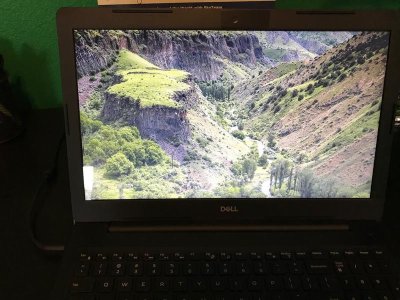
Attached is a photo of my computer and the blank screen, when it just sat there and would not produce the password box yesterday. The last 2 photos are the 2 screens I "should get" when my computer is booted-up and is ready to continue after I enter my password in the box.


During the summer, I purchased a brand new i7 Dell laptop computer with Windows 10. I really like my computer, BUT, 25% of the time, I can not fully wake it up to give me the option to put in my password, so I can actually use it.
I prefer to turn-off my computer, and turn it back on again rather than logoff and log back on.
So lately when I turn my computer back on, it will come on to the point of having the wallpaper, but it will not (25% of the time) continue to boot-up to give me my password box. It will sit there up to 5 minutes and will not do anything, but display a blank wallpaper screen.
Yet if I turn it on, let it sit for a minute without it doing anything, then I just randomly start pressing keys . . . often the CTL+ALT+DEL keys, this seems to force it to switch over to give me the password box often, but not all the time. Normally, I would be happy just to removed the power cord and take out the battery and force the computer to do a hardboot, like I did on my previous laptop (whenever it froze-up). However I did not discover that the battery on my new Dell laptop, is screwed in and looks like it would take a Rocket Scientist to remove it.
When I first got this computer, I use to logoff each day and logon again the next day, but I found that it was just taking too long to boot-up, but found that just turning it off each day and turning it back on again the next day, it would boot back up in less than 60 seconds and then offer the password box. Yet I guess it takes it about 4 - 5 minutes to totally boot-up (any time I logoff), before it offers the password box.
Since I ordered my laptop online, had I known before I purchased my computer, I would have never purchased it, since I can’t easily remove the battery and there is no easy way to do a hard reboot on it (when needed), since the battery is majorily screwed-in. Even looking at some of the online videos to replace the battery in this type of laptop, it does not look like it is something simple or easy, and it looks like it would be very time consuming.
Any ideas/suggestions on how to get my password box in a timely manner? Or what may be causing my computer to sit motionless with a blank wallpaper screen and not offering a password/logon box?
Attached is a photo of my computer and the blank screen, when it just sat there and would not produce the password box yesterday. The last 2 photos are the 2 screens I "should get" when my computer is booted-up and is ready to continue after I enter my password in the box.

