The Original Gay Porn Community - Free Gay Movies and Photos, Gay Porn Site Reviews and Adult Gay Forums

  • Welcome To Just Us Boys - The World's Largest Gay Message Board Community

    In order to comply with recent US Supreme Court rulings regarding adult content, we will be making changes in the future to require that you log into your account to view adult content on the site.
    If you do not have an account, please register.
    REGISTER HERE - 100% FREE / We Will Never Sell Your Info

    PLEASE READ: To register, turn off your VPN (iPhone users- disable iCloud); you can re-enable the VPN after registration. You must maintain an active email address on your account: disposable email addresses cannot be used to register.

New Hard disk

BlueLantern

Hope?
Joined
Apr 24, 2004
Posts
3,163
Reaction score
11
Points
0
Location
In the Central Battery
I bougth one new hard disk today, but I can't install it! I already put it inside and conected the cables, but don't know how to make it be detected by the computer =/. I might need to rearrange the cables...

 
You don't say what your setup is. Assuming it is a PATA drive with the wide IDE cable and assuming it is an extra drive rather than a replacement, check you have the relevant jumper set to slave on the back of it. More info will be required to give a satisfactory answer.
 
A. Determine if your Drive is IDE or SATA, if it's IDE, make sure the jumper is set to "slave" if it's the second drive on the cable.
B. The drive will come unpartitioned and unformated. You'll need to open Disk Management and select the drive and partition and then format it.
 
The most likely thing is that you probably have what is called an IDE hard drive or EIDE drive if it's an enhanced one. These are in contrast to SCSI and SATA hard drives. Make sure you when you messing around with stuff in your computer you touch your hand to the metal part of the case so that you discharge static before touching any of the computer parts.

Assuming you have a IDE/EIDE drive you will need to look at the drive to see about setting it's jumpers. here is a picture of where the jumpers are and what they look like (mine are usually black and not white as in the photo). the jumpers in the picture are the two little white rectangle things just to the left of where you connect the power cable.

255508.jpg


these types of hard drives will usually need to be set to one of three things. either "master" or "slave" or "cable select." Some times they have a "single" setting. Assuming your existing hard drive is also a IDE/EIDE drive and is set to "master" you should look for a diagram on the hard drive that shows you how the jumpers need to be set to make your drive a "slave." in the picture they are on the little pictures on the bottom right. with the cable select picture being on the bottom left.
wd1200jb_label_closeup.jpg


so next you set the jumpers so they match the diagram on your hard drive. then you slid the drive into the spot where you want to screw it into the case and then put in the screws. then plug in the ribbon cable and the power cable. here is a picture of a ribbon cable (usually these can only be plugged in one way so you get it right. ;) )
gray_connector_closeup.jpg


if you can't figure out how to set the jumpers. see if you can give us the name brand name and model of your new hard drive one of I'll see if i can find it for you.

i got these photos from here: http://www.harddriveupgrade.com/jumper_pins.shtml
 
the hard disk is running, but, my friend turned it in the master, and now the old one is the slave. I want to know if it is possible a) change back b) take my ********** stuff to the new HD because it don't seems to be working in the new one =P
 
Hujawajahumahuh? He made the new HDD the master? Did he reinstall windows for you? Or change the boot orders? That kinda seems like a weird thing to do to me... Without more information as to what he did, it's not easy to say what you need to do. He could have changed the BIOS settings to make the computer boot from the old HDD that's now at a different physical address... or he could have cloned your old HDD, or reinstalled windows onto the new HDD... We need some more info on what he did.
 
oh, sorry, not ********** >.< I mean shareaza

I talked with him today, he said that he did so my computer would be faster, the old hard drive was slower to boot.

Today I tried to change things turning the old HD as the master but it din't worked, I was able of put the new HD alone, but din't was able to let the Old HD as a master and the new HD as a slave.

I think I tried to put the old HD as master (alone) but it din't worked too =/

any help?

at moment the new HD is the master and the old is the slave, with the data acessible =P
 
Well, step 1: stop changing things if you don't know what you're doing.

Type a really detailed, clear explanation of your computer system and it's components, to help people here understand your setup. For example:

Dell Inspiron 1234
2.33 Ghz Dual Core Intel CPU
1 GB RAM
Windows Xp SP2
Original Hard drive (set as Slave): 300GB Seagate ATA100 (Model No. if you can)
New Hard Drive (Set as master): 500GB Samsung ATA100 (Model No. if you can)
System currently booting Windows from new drive

That's all garbage, but an example of the detail you need to go into if you want practical help.
 
Can you see if you can give us the manufacturer and model numbers of the two hard drives you are working with? Then we can maybe look up the jumper settings and see if we can get the right settings for you to have your old drive set back as master and the new one as the slave.

But if your friend installed a clean copy of windows on the new drive...i'm wondering why he didn't just do a drive to drive copy so that everything from your old drive was copied to your new drive. then you could have (if you wanted to) deleted everything off your old drive because you'd have it on the new one. But i'm not sure if he did that.

is it possible for your friend to come back over and switch the drives back out for you? maybe have him show you how he does it so you can understand it better. it's not too hard once someone shows you, but that first few times can seem very frustrating. ;)


I will say that i've had some issues with some Western Digital drives that when one (lets call it drive A) was set as the master and the other one was set as a slave (lets call it drive B) the computer couldn't see one of the drives. But then when i switched them around the computer saw them both just fine. I don't know why, but sometimes I've had that happn.
 
It sounds to me as if he has cloned your old drive onto the new one and set it as master. He may have deleted windows from the old drive hence why you can't boot from it when you change it to master. As the others have said this thread is a mess due to incomplete information. We are all trying to help but are just guessing. Perhaps your friend could type out exactly what he has done. Presumably he knows what he is doing as cloning a drive is not always as straight forward as it sounds. Perhaps he could help yu with your problems.
 
Folks... i don't think this thread is a mess due to lack of information. Blue doesn't know what he needs to provide us. we've given him some questions and i'm sure he'll try his best to answer them. Please remember is he not from an english speaking country and there may be a bit of a language barrier on some of the terms we are using. he also likely doesn't have a digital camera sitting around. be gentle with him. ;)
 
It sounds to me as if he has cloned your old drive onto the new one and set it as master. He may have deleted windows from the old drive hence why you can't boot from it when you change it to master. As the others have said this thread is a mess due to incomplete information. We are all trying to help but are just guessing. Perhaps your friend could type out exactly what he has done. Presumably he knows what he is doing as cloning a drive is not always as straight forward as it sounds. Perhaps he could help yu with your problems.

I will try to explain, I can't afford to spare my computer for a day or more, I need to homework/class projects and stuff, so he took my new hard disk and formated (instaled the windows whatever), he din't cloned.untouched (well mostly) and today I tested both and they seem to be working completely normal when separeted, but they only work together when I put the new one as master, I followed the instructions in the HD to how to put the jumpers but it din't worked.

another problem, the windows from the new hard disk appears to be a ilegal copy =/ I don't know if this makes him unable to be a slave.

What do you mean by your shareaza stuff isn't working?

You really need to sit down and start typing stuff BlueLantern - this hit and run method isn't going anywhere. Get a cup of coffee/tea (keep it away from your PC), clear a good 30 minutes and answer all the questions. If the technical details are too much for you take some digital photos of your PC and hard drives and upload them.

Well, when I posted the shareaza din't seem to be worked at all, but was likely just a problem with the bit torrents and he is working okay now, what I can't do is see the unfinished files in the old HD, when I put the old HD alone I can see they, and they seem to download fine, but when I put the two together they don't show, also I reinstalled the shareazaa in the new HD the program is now in both HD.

Well, step 1: stop changing things if you don't know what you're doing.

Type a really detailed, clear explanation of your computer system and it's components, to help people here understand your setup. For example:

Dell Inspiron 1234
2.33 Ghz Dual Core Intel CPU
1 GB RAM
Windows Xp SP2
Original Hard drive (set as Slave): 300GB Seagate ATA100 (Model No. if you can)
New Hard Drive (Set as master): 500GB Samsung ATA100 (Model No. if you can)
System currently booting Windows from new drive

That's all garbage, but an example of the detail you need to go into if you want practical help.
I don't know how to find out that =/

Can you see if you can give us the manufacturer and model numbers of the two hard drives you are working with? Then we can maybe look up the jumper settings and see if we can get the right settings for you to have your old drive set back as master and the new one as the slave.
I think I following the jumpers settings correctly, they are in written in the HD, but anyway the new HD is a samsung with 80gb
But if your friend installed a clean copy of windows on the new drive...i'm wondering why he didn't just do a drive to drive copy so that everything from your old drive was copied to your new drive. then you could have (if you wanted to) deleted everything off your old drive because you'd have it on the new one. But i'm not sure if he did that.
Like I said before he din't created a copy from my old drive =/

is it possible for your friend to come back over and switch the drives back out for you? maybe have him show you how he does it so you can understand it better. it's not too hard once someone shows you, but that first few times can seem very frustrating. ;)
I trying to convincing him u.u

he said that he put the new hd as slave because the old one was slow (it needs that thing that makes the files in one big piece, I don't know the english word for it, reformating?)

I will say that i've had some issues with some Western Digital drives that when one (lets call it drive A) was set as the master and the other one was set as a slave (lets call it drive B) the computer couldn't see one of the drives. But then when i switched them around the computer saw them both just fine. I don't know why, but sometimes I've had that happn.
Oh, one thing, when I set the old HD as master the computer don't work at all, in fact, I need to shut it off by taking the no break off. =P
 
I will try to explain, I can't afford to spare my computer for a day or more, I need to homework/class projects and stuff, so he took my new hard disk and formated (instaled the windows whatever), he din't cloned.untouched (well mostly) and today I tested both and they seem to be working completely normal when separeted, but they only work together when I put the new one as master, I followed the instructions in the HD to how to put the jumpers but it din't worked.

ok i think i understand that. he didn't do a clone of the old drive because that might have taken a couple hours to do. sounds like you couldn't afford the time for that. But if your old hard drive is like 20-40 GB or something it wouldn't have taken much more than an hour i don't think.

another problem, the windows from the new hard disk appears to be a ilegal copy =/ I don't know if this makes him unable to be a slave.

no that wouldn't make any difference, but depending on what message you are getting it might stop working after 30 days.

Well, when I posted the shareaza din't seem to be worked at all, but was likely just a problem with the bit torrents and he is working okay now, what I can't do is see the unfinished files in the old HD, when I put the old HD alone I can see they, and they seem to download fine, but when I put the two together they don't show, also I reinstalled the shareazaa in the new HD the program is now in both HD.

ok most programs unless your friend installed them new on the new hard drive are not going to work properly or even at all. if it's working now, it's probably because you installed it on the new drive.

I don't know how to find out that =/
most of the information he said to post isn't important to this discussion. what your processor speed is or how much memory you have doesn't matter in your problem. so don't worry about that.

I think I following the jumpers settings correctly, they are in written in the HD, but anyway the new HD is a samsung with 80gb

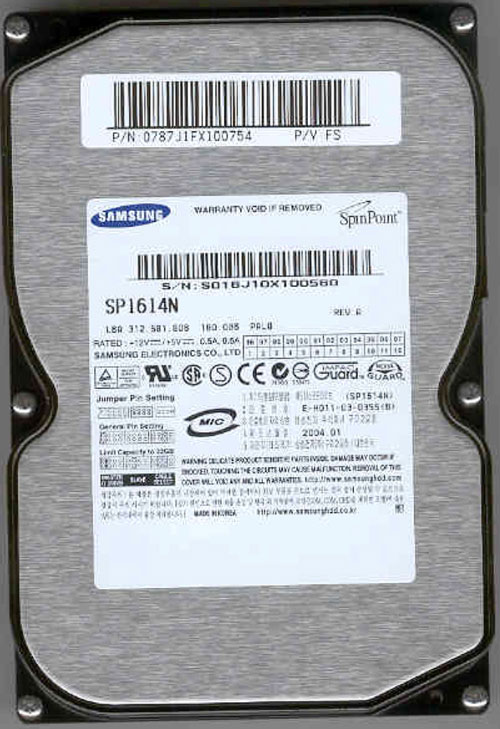
ok that's good, but the 80gb is the size of the drive, not the model number. a model number for a samsung drive might be something like SP8004H (or SP1614N like in the picture i show here)? also you will need to change the jumpers on the old drive as well and you'll need to look at how it says to have the jumpers set up on that drive since they may be different than what your new samsung one says. can you give me the name and model number of your old drive also?

GraphicB2.jpg


he said that he put the new hd as slave because the old one was slow (it needs that thing that makes the files in one big piece, I don't know the english word for it, reformating?)

reformatting would be erasing the whole drive (you'd loose all the information on it), i think the english word for what he means is defragmenting. ;) that moves all your files so they are in one place.

Oh, one thing, when I set the old HD as master the computer don't work at all, in fact, I need to shut it off by taking the no break off. =P

i really hope you are not changing the jumpers and stuff with the power on? i unplug the power before i start working on the inside of my computer and make sure I touch the metal parts of the case so I don't have static electricity. ;)
 
Hey blue i just remembered. you can download and install a free program called belarc advisor. it will tell you what model number of hard drives you have along with everything else in your computer. you can get it here: http://www.belarc.com/free_download.html

i've been using this program for 2-3 years and it's great for getting general info off your computer. that's all it does.
 
Back
Top



