I got an emac with OSX 10.3! I'm so fucking happy!


PLEASE READ: To register, turn off your VPN (iPhone users- disable iCloud); you can re-enable the VPN after registration. You must maintain an active email address on your account: disposable email addresses cannot be used to register.


 But to be fair it seems that was a limit from that software, because you could rename them afterwards
Oh yesterday I also had the "pleasure" of setting up a mac for an elder guy. It started with absolutely non-informational error messages why networking wasn't working, and ended with Quicktime crashing everytime I wanted to access the settings, and once Quicktime crashed, and you "killed" it - you couldn't access the general system settings at all without the complete machine freezing
Quicktime update helped though. And if that wasn't enough he wanted to use a fancy-ass-expensive Nikon slide scanner with it, connecte, installed - no problem. Just that the funny software with it has been crashing like every 5-6 scans .. and the best part: you were not able to use filenames with more than like ~25 characters for your scans
Oh why is it that some stupid software can override the system settings about what program to use for a file on a per file basis? If I set it to open XY files with program Z, it works fine. But if the XY file is written by program Q it's still opened by program Q unless I *specifically* change it for that file. That's some really annoying design.
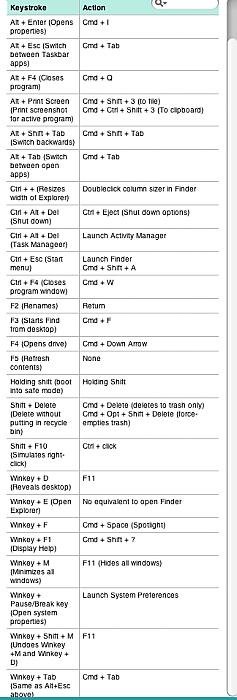
Also using the "x" button doesn't seem to terminate a program - which is well different, but OK - I guess. It's not the first time that I was *using* a mac, so I knew that behavior. But now .. if I *need* to kill a running program, is there a way to get a list of them (aka task manager)?
And - is there a way to auto-tidy files/folders? After moving some files they are all unsorted and you need to tidy/sort them by hand again.
And last but not least I felt kinda stupid because I was unable to create some shortcuts on the desktop. I am pretty sure there is a feature like that .. right? Didn't find anything in the menus, and shift+ctrl+alt dragging etc all didn't seem to work.
So far .. not really impressed ..
will do that - it is definitely OS X though.Are you using system 9? None of this looks familiar. Can you provide some details about the hardware and OS? Go to the apple in the top left corner and click on *about this Mac*
no, it's a new machine. It LOOKS exactly like the new iMacs they have in store:Sounds like some weird stuff going on. If this is an old machine going to a new user, I'd do a clean system install.
Dunno about the crashing, but I thought it must be joking with the short filenamesThe scanner software sounds really old - those kind of issues were common in the very early days of OS X, but virtually unheard of these days.

By Dock you mean the starter bar? If so, I have not noticed the triangle.Yes, the X closes the relevant window, but not the application. Close applications with Cmd-Q, or File/Quit. Or right click it's icon in the Dock and choose Quit. Any application running has a small triangle pointing to it's icon in the Dock.
Ah .. damned should have known that .. it's the "windows list" in many Linux interfaces.Cmd-alt-esc brings up a Task-Manager-style list of all running apps with an option to Force-Quit.
So much I figured .. by I want to AUTO-tidy EVERY stupid window. It's really annoying to do that everytime after moving some files .. (although that doesn't bother the senior owner of the machine at all. He says it's logical, after you moved something you have to tidy up ..Tidy up any Finder window or the desktop by choosing View/Clean Up Selection.
)Hm I wonder why I have not stumbled over that. I saw "smart folders" and stuff like that, but can't remember aliases. I will look into it the next time, thanks!Shortcuts in Mac parlance are called Aliases. Right click on the item of choice and choose Make Alias, (or select it and press Cmd-L) then drag the resulting Alias to the desktop or wherever you want it. (I agree this is a slightly clunky process compared to Windows' paste-like functionality.)


Yeah, will do that, thanks!You might want to have a look at network utility which is in Utilities folder in Applications folder.
If you haven't repaired permissions run disk utility. A good one to install is
That's what I was looking for when quicktime preferences kept crashing. New Quickltime version solved this problem. however - no matter what setting I take it's still stuttering. Bandwidth shouldn't be the problem and my http download tests all had great speed, that's why I need stuff like ping/tracert etcThere is a setting in QuickTime Preferences. Normally streaming speed is set to automatic and you can enable instant on. Move the slider to Play movie after short delay. You can play with that setting to stop the stutters. Sounds like a bandwidth limitation.
Already did thatAnother thing, even if the computer is brand new, go to system preferences under the apple menu and check for system updates.
 But since we are at this topic .. it HAD to reboot after it hehe
Try a fresh install of QuickTime from the Apple site.That's what I was looking for when quicktime preferences kept crashing. New Quickltime version solved this problem. however - no matter what setting I take it's still stuttering. Bandwidth shouldn't be the problem and my http download tests all had great speed, that's why I need stuff like ping/tracert etc
Already did that