

The Original Gay Porn Community - Free Gay Movies and Photos, Gay Porn Site Reviews and Adult Gay Forums

  • Welcome To Just Us Boys - The World's Largest Gay Message Board Community

    In order to comply with recent US Supreme Court rulings regarding adult content, we will be making changes in the future to require that you log into your account to view adult content on the site.
    If you do not have an account, please register.
    REGISTER HERE - 100% FREE / We Will Never Sell Your Info

    PLEASE READ: To register, turn off your VPN (iPhone users- disable iCloud); you can re-enable the VPN after registration. You must maintain an active email address on your account: disposable email addresses cannot be used to register.

Possible causes of sound problems?

trawler69

Extreme Muppet
Joined
Aug 26, 2006
Posts
4,554
Reaction score
1
Points
0
Location
Cornwall U.K.
I believe the usual advice is to un-install and re-install your soundcard drivers. Control panel / system / hardware / sound card If I recall correctly from those miserable windows days!

Oh I almost forgot I am supposed to say OS? make and model of computer? and all that stuff but I don't think it really matters in this case.
 
a laptop usually has an integrated soundcard. does your laptop has some kind of volume control and/or mute buttons on the keyboard? often you need to press a FN key or something like that to use them. also did you check the mixer settings? (little speaker symbol next to the clock)
 
Actually techies love microsoft, without it they would be out of a job. Your laptop will have an integrated sound card but it will still require drivers. I would suggest you go down the line recomended earlier and uninstall and reinstall the drivers. Noelie will probably be back soon to lead you through the process in a much better linked way than I can.
 
Sounds like if the speaker icon is gone, your sound either got turned off or the drivers got corrupted. First lets see if we can get the sound icon back.

1. click start, select "control panel."
2. click "sounds, speech, and audio devices."
3. click "change the speaker settings."
4. make sure there is a check mark in the "place volume icon on the taskbar." if there isn't put one there and click "apply." make sure there is NOT a check mark in the "mute" box. if there is unchecked and click "apply" again.
5. then you can close out of all that. look to see if the speaker icon is back and if it had a red strike out circle on it.


If that doesn't work, let's try reinstalling the drivers. If you have a CD that came with your computer (you should get that and have it handy, we might need it if your sound card is not plug/play (which sorta means windows knows what it is and can recognize it without you having to add it via the "add/remove hardware" options in the control panel). I know you said it's a HP, but it would really help if you could give us the make/model. Like my HP laptop is a Pavilion zt1135 (which it says right on the front of the laptop where the little button is to unlock the screen so i can open the laptop). Tell us this before you try to remove the sound card drivers so that we can locate the drivers for you online in case you don't have the CD that came with your laptop.

To be clear, I'll repeat that. Tell us this info and wait for our reply BEFORE you try the steps below.

1. Right click on 'My Computer' and from the menu that appears, select properties.
2. Then in the window that appears click the device manager tab. You will now see a list of all the devices that are installed in your computer.
3. Click on the plus sign beside "Sound, video, and game controllers." For every item that appears under "Sound Video and game controllers" (and has a speaker icon next to it) select it and click on remove.
4. Then you'll get a dialog box asking you if you are sure if you want to remove that device, just click ok.
5. After you are done with that, reboot your computer. If your sound card is plug and play your computer will automatically detect the sound card and hopefully install the sound card drivers.
 
Sounds simple enough for me. How do I do that?

Start -> Programs -> Utilities -> System Programs (or Tools?) -> System Restore

Written atop of my head, I am not sure if it is wordwise like that :) (Utilities is where you also find paint :) )
 
ok .. check

control panel -> system -> hardware -> hardware manager (or so, first option on the panel)

you should get a list of A LOT of hardware in your machine.

list what there is under "audio video and game controller"

also list anything from the whole window (expand the tree using the + buttons) that either shows a yellow or red exclamation mark, or a red cross/forbidden sign
 
So help me here. Are you, Bareback1988, the same as Diederik? You post as if you were the OP. Do you have an alter ego?
 
umm... this is embarassing.... I don't understand. it may be because I obviously have everything in Dutch but where do I start? is control panel under "start"? What is it in your native German?
Uh .. I have no clue what it would be in dutch :)
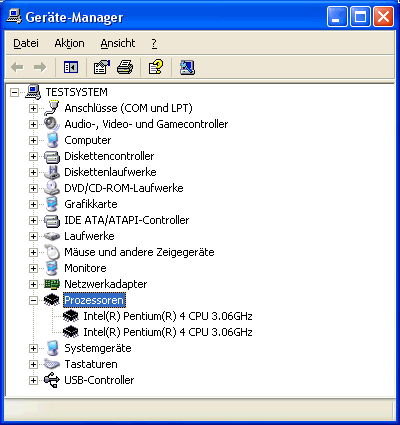
I am asking you to go to this screen:
geraetemanager.gif


Looks familiar?

From the control panel go to "system" then, click on the hardware tab, and press the first button "geräte manager" in german, "hardware manager" or so in english.

I'm beginning to fear I am wasting your time. maybe my computer is just getting too old and beginning to break down?

possible, but if the soundcard component in your laptop just broke, it usually would still show up.
 
Back
Top