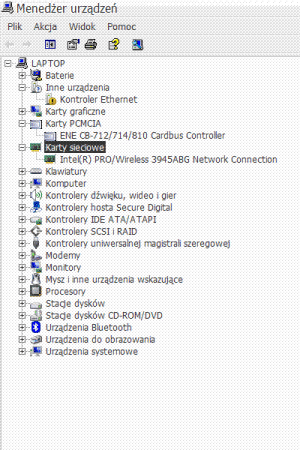
I've reinstalled system at my computer, and then installed there stuff for my laptop its company offers at its site (I've downloaded it on another computer).
Then I've came "home" and found out that, while the installed wireless internet connection works sort of fine, the wire connection does not. It simply doesn't recognise its existance. If I enter the control panel and, then, web connections, it only shows wireless connection 2 (I have two programs for that, it shows only one here), and no wire connection.
I'd have re-installed the system again to see if I didn't screw something there, but I can't.
I'd ask Acer about it, but I can't. They demand my computer number and day of purchase to ask them about anything. And I live 350 kms from my home, and even if I were there, I wouldn't really know where I've put it. So I'm asking You.
I think it may have to do with the fact that there were LAN drivers at the Acer's site, but, unlike wireless ones, they do not have setup or anything, and I don't really know what to do with them.
there are 3 LAN folders from Acers, I'll attach one of them, perhaps someone could see and tell me what to do with it and if the lack of proper installation of it is responsible for my problem.
I have Windows XP
And sorry for being a dummy. Thanks very much to anyone who can help me
P.S.
I can't attach the LAN files, but I can link to them:
http://support.acer-euro.com/drivers/notebook/as_5610.html
Then I've came "home" and found out that, while the installed wireless internet connection works sort of fine, the wire connection does not. It simply doesn't recognise its existance. If I enter the control panel and, then, web connections, it only shows wireless connection 2 (I have two programs for that, it shows only one here), and no wire connection.
I'd have re-installed the system again to see if I didn't screw something there, but I can't.
I'd ask Acer about it, but I can't. They demand my computer number and day of purchase to ask them about anything. And I live 350 kms from my home, and even if I were there, I wouldn't really know where I've put it. So I'm asking You.
I think it may have to do with the fact that there were LAN drivers at the Acer's site, but, unlike wireless ones, they do not have setup or anything, and I don't really know what to do with them.
there are 3 LAN folders from Acers, I'll attach one of them, perhaps someone could see and tell me what to do with it and if the lack of proper installation of it is responsible for my problem.
I have Windows XP
And sorry for being a dummy. Thanks very much to anyone who can help me
P.S.
I can't attach the LAN files, but I can link to them:
http://support.acer-euro.com/drivers/notebook/as_5610.html