The Original Gay Porn Community - Free Gay Movies and Photos, Gay Porn Site Reviews and Adult Gay Forums

  • Welcome To Just Us Boys - The World's Largest Gay Message Board Community

    In order to comply with recent US Supreme Court rulings regarding adult content, we will be making changes in the future to require that you log into your account to view adult content on the site.
    If you do not have an account, please register.
    REGISTER HERE - 100% FREE / We Will Never Sell Your Info

    PLEASE READ: To register, turn off your VPN (iPhone users- disable iCloud); you can re-enable the VPN after registration. You must maintain an active email address on your account: disposable email addresses cannot be used to register.

Reading DVDs on Windows 7 Starter

Atzesp

Slut
Joined
Mar 25, 2011
Posts
155
Reaction score
0
Points
0
Location
São Paulo, Brazil
Hey, guys. Can anybody help me?

My sister bought my nephew a notebook - which came with Windows 7 Starter installed, and asked ME to install all the needed softwares. I'm not an expert, but since I've been using computers for a long time it has become quite easy for me to do these kind of stuff. Tried to do my best, but faced a problem due to the OS installed: the Windows 7 Starter crap doesn't allow movie DVDs to run. In fact, they do are read by the notebook, but they don't run, it's impossible to watch the movie.

I haven't installed anything yet - and also I'm not into installing a hacked version of another Windows 7 edition. I have read through the net that Windows 7 Starter doesn't allow DVDs to be read only using Windows Media Player, they say that if you install any other software for it (and the right codecs) it will work. I'm still doubtful about that, and I'm unsure to install anything without that being able to properly work.

Does anybody know how this work? If I install some other software, it will be able to read movie DVDs anyway?
 
I stopped using Windows Media Player two years ago, I only use VLC player for all my DVD movies. Too many problems with Windows Media Player.

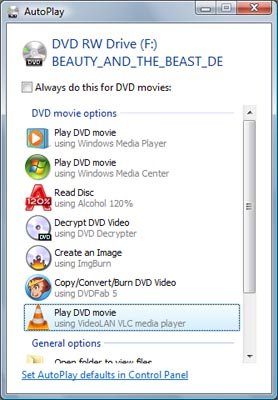
Usually when I pop in a DVD movie the little Autorun screen pops up and I can choose what program will open the DVD.
 
^^^^
I agree... VLC rocks... windows media player blows... (and not in the good way).

Does the NoteBook have enough RAM/video card to play DVD's ?
 
Thanks guys. We just bought a netbook a few days ago and I had the same question.
I was not aware of VLC player but I am now and I love it.(!)
 
Does the NoteBook have enough RAM/video card to play DVD's ?

Yeah, it has - and in fact the VLC had come installed with it, but for some reason it didn't run DVD's. I guess it should have been some coded problem.

I installed a codeck pack and ended up installing the Cyberlink PowerDVD, which worked for 3 days and then started showing up "internal error". ](*,)
I uninstalled it, there was some error on the process, and then I was able to uninstall it only using an uninstall program, which forced it to do so... I was thinking about TotalMedia Theatre, but tried installing it on another notebook of mine and, surprise!, everytime it was started it brought me the blue screen informing there was some error...

I was doubtful about VLC or MediaPlayer Home Cinema.
I think I'm gonna re-install the VLC.
 
Yeah, VLC might be outdated. But if you install it, it should open DVD movies. Some of those DVD movies particularly the Disney ones are a bitch to get working, due to it having so many damn previews and crap.

I can't seem to find it to where it just plays the movie.

But when I pop a DVD in autoplay always seems to open up unless I check it off.
attachment.php


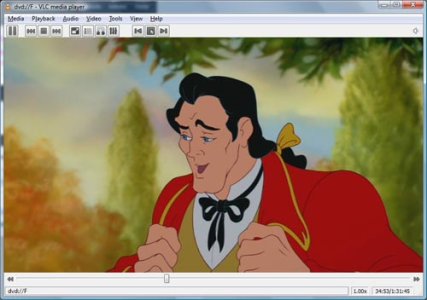
But it plays at least, my Windows Media Player the movie would skip and it would just have constant issues I use VLC for all my videos.
attachment.php
 

Attachments

  • autoplay.jpg
    autoplay.jpg
    48.5 KB · Views: 65
  • vlc.jpg
    vlc.jpg
    49.9 KB · Views: 60
In fact, looking for some more options, I came across with the KLMPlayer. Tried it, and damn, it's pretty good! Lots of options, choices, and highly evaluated all over the internet (by info people and users). It's also very fast and makes opening DVDs easier, by just clicking a button (a thing I thought was kind of hard to do using VLC).

In fact, it seemed to me as a somewhat better version of VLC. But man, the software is able to read most any file!, besides being easier to deal with. And is also very fast while loading stuff.

Decided to put it here in order to help other guys which might be facing the same problem, if they need an option. As for me, I guess we have a winner... ;)
 
Back
Top