The Original Gay Porn Community - Free Gay Movies and Photos, Gay Porn Site Reviews and Adult Gay Forums

  • Welcome To Just Us Boys - The World's Largest Gay Message Board Community

    In order to comply with recent US Supreme Court rulings regarding adult content, we will be making changes in the future to require that you log into your account to view adult content on the site.
    If you do not have an account, please register.
    REGISTER HERE - 100% FREE / We Will Never Sell Your Info

    PLEASE READ: To register, turn off your VPN (iPhone users- disable iCloud); you can re-enable the VPN after registration. You must maintain an active email address on your account: disposable email addresses cannot be used to register.

Tech hell!

TaigaStar

More! Deeper!
Joined
Dec 31, 2005
Posts
8,080
Reaction score
2
Points
0
Location
Flushing, NY
Hey guys! You've helped me out in the past, so hopefully you can help me out now...

My wireless router recently died and I replaced it. Set up the same network name, plugged the PC and printer to the Ethernet, told all the wi-fi devices to find it (two PS3s, one Wii, and a MacBook), everything was great. Recently, though, I'm totally unable to connect with the MacBook. I've reset the router and modem about ten to fifteen times, the MacBook can detect the wireless network (password is correct), but will absolutely not connect. When I log into the router, it says it's aware of the MacBook's wireless card, but I can't get much else past that (tried adding it to a list of permitted devices, etc, but it doesn't save when I tell it to). I had this problem two weeks ago, fixed it, but the same fix is not working this time. I'd really appreciate any and all help you guys can give.
 
Are you sure you don't have your wireless router set to only allow a limited number of clients. I saw this problem popup on two other peoples' WAPs that I know. They had unexpired licenses/IPs assigned to previously connected devices, but their router had a software limit of something like 5 leases allowed. So they had to go through an annoying process to get another device [back] on, until they adjusted the number of leased IPs. That's just my first thought.
 
Does the MacBook work when connected to the router via an ethernet cable? Can you take the MacBook to a friend's and confirm it connects to other routers? Can you borrow another router and substitute it with your own to test?
 
I went into the router setup before and it added the MacBook to the list of devices, then the MacBook worked. Thanks for the help, but don't be surprised if I come back here fore more help. :)
 
Does the MacBook work when connected to the router via an ethernet cable? Can you take the MacBook to a friend's and confirm it connects to other routers? Can you borrow another router and substitute it with your own to test?

Well, the problem came back the week after I posted initially. This time, we tried hooking it up to the router via ethernet cable and the macbook says there's nothing there. I tried wirelessly joining a neighbor's network with no success at all.

Any ideas of where to go from here?
 
Since the problem occurs with another router also, it sounds like the problem is within your computer rather than your router. Did your machine see the neighbours wireless network at all? Do you seem to have strong wireless reception with no connectivity, or is the signal weak?
 
It detects the networks all around me, and says mine (which it can detect and default try to connect to) has a very strong connection. We're considering just resetting the macbook to factory settings in the hope it was something we downloaded blocking the connection. Is that a viable possibility?
 
It's a viable way to troubleshoot, if you don't mind cleaning out your machine. Doing a clean install certainly can't hurt. However, if you have an Apple store nearby, I'd spin it past them first to see if they have any suggestions.

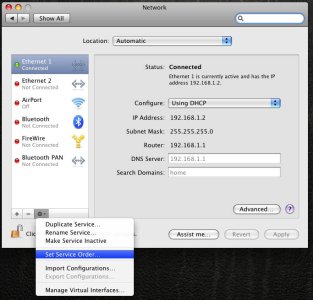
Also, check under System Preferences/Network, to ensure Airport is active and has top priority in the Network Services list. You can choose "Set Service Order" to re-prioritize Network Services. In my picture below I have Ethernet at the top, but you'll want Airport first.

attachment.php


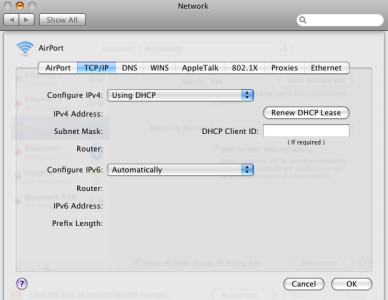
In Airport, click Advanced, TCP/IP tab, and make sure you are using DHCP.

attachment.php
 

Attachments

  • Picture 3.jpg
    Picture 3.jpg
    79.6 KB · Views: 67
  • Picture 4.png
    Picture 4.png
    81.7 KB · Views: 75
I am... and it's assigning me a 169.254 IP address, which i'm told means it can't connect to the internet. Can I just type in a new IP address that works?

Update: My router had a default DMZ server address, and I put it in manually to the macbook to detect and it connected the instant I said "save." I hope I didn't screw anything up (I'm guessing I didn't because it was a server assigned by my router). I'd still appreciate feedback. Thanks so much for helping me out.
 
Back
Top