The Original Gay Porn Community - Free Gay Movies and Photos, Gay Porn Site Reviews and Adult Gay Forums

  • Welcome To Just Us Boys - The World's Largest Gay Message Board Community

    In order to comply with recent US Supreme Court rulings regarding adult content, we will be making changes in the future to require that you log into your account to view adult content on the site.
    If you do not have an account, please register.
    REGISTER HERE - 100% FREE / We Will Never Sell Your Info

    PLEASE READ: To register, turn off your VPN (iPhone users- disable iCloud); you can re-enable the VPN after registration. You must maintain an active email address on your account: disposable email addresses cannot be used to register.

Using JUB on a public computer (with own FF)

treanir

Acolyte of the flux
JUB Supporter
Joined
Apr 1, 2003
Posts
9,414
Reaction score
1
Points
0
Location
Netherlands
I'm going abroad for a while and I would like to access the JUB forums while I'm away... but JUB's a naughty site. I don't think many internet cafes would approve. So I've been thinking about ways to browse the site without some of the more naughty things coming up. As a bonus, I am taking Firefox Portable with me on a flash drive. This allows me to make permanent changes to a browser, as well as install add-ons.

Right now the only thing I can think of is simply blocking all images on JUB with FFs built-in blocker. That seems to work and I don't think I'll encounter any naughty pics while in a busy internet cafe. My question to you is: is there anything else I should consider? Do many internet cafes filter sites based on words, for example?

Any tips or hints are greatly appreciated. :)
 
ok i was going to suggest FF portable, but i see you already got it ..|

blocking the pics should be fine, but will not protect you from images in tags coming from other servers. you can disable those in "my settings" "edit options".

as for the webfilters .. you probably should ask some of the aussie guys. here most do have webfilters like netnanny .. at least if minors are allowed to surf there. most proxy servers are also blocked by those filters ;) the other question is whether you will be allowed to insert a thumbdrive into their machines and run programs from there.
 
ok i was going to suggest FF portable, but i see you already got it ..|

Of course! I wouldn't know what to do without it! Go back to IE? *shudder*
:D


Thanks for the tips guys. I hadn't thought of the JUB options. #-o Disabling images, avatars and signatures might actually be better than a broad-sweep block of all images. The best thing would be that it still gives a link for attached images, instead of just blocking them completely. As far as I can see, disabling images/avatars/signatures is as good as letting Firefox block all images. Am I right? (note: I don't see adverts anyway)

I definitely have to take a closer look at Stealther. :D
 
Be sure to get a Big Mac on top of that rock-thingy while you're in Oz.


attachment.php
 

Attachments

  • maccas2.jpg
    maccas2.jpg
    35.8 KB · Views: 237
:rotflmao:

If it were a Hungry Jack's*, I'd be tempted...


*Burger King to the rest of us.
 
On a *somewhat* related matter: what is the best way to secure the flash drive? I'm not talking about anything like TrueCrypt (needs admin rights) or any file encryption program. I would like something that asks for a password either when I insert the drive or when I try to open it, so that the entire drive is secure as opposed to just the files I encrypt. What would be a good program for that?
 
Don't forget to set a Master Password on Firefox:
Tools > Options > Privacy > Passwords > Set Master Password

I didn't even know you could do that! (though I should've guessed)
Great! ..|

The drive I'm using was a promotional gift from an interpreting agency... but it's small and the price is right.
 
Maybe you could carry a small computer with you on your trip, treanir. Like the Asus Eee PC or the Everex Cloudbook. You could log your experiences on the sub-notebook, and upload it to your blog here on JUB when you get access. I think the Eee PC's batteries are supposed to last 5 hrs or something incredibly long like that, since it doesn't have a hard drive and the screen is small.

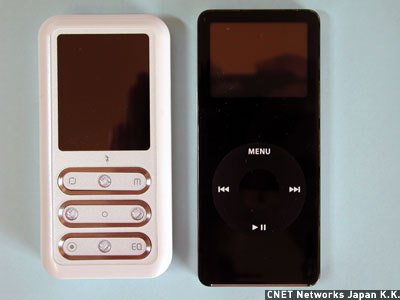
There's also an mp3 player made by Turbolinux that's interesting. It's called the Wizpy, and it's interesting because if you plug in into the usb port of any computer (which is BIOS-configured to boot first from the usb), that computer will boot Turbolinux from the Wizpy, and it will run "live" on the host. Nothing whatsoever gets saved to the hard drive of the host computer, so there is no evidence on that computer that you were ever there. You use the browser in Turbolinux (probably FF) from the Wizpy, and all your cookies and internet settings and anything you download gets saved to the Wizpy's flash drive. You can even keep all your emails and stuff in it as you travel. You could also use it to listen to mp3s or watch videos during those times when you're without internet access. It also has an FM radio built into, so you can tune in to whatever it is those Aussies have to say for themselves while you're traveling about. And everything - the whole OS and everything you've stored on it - can be protected with just a single password.


attachment.php


Wizpy (left) vs. iPod nano.


The wizpy is pretty small (8.4 x 4.2 x 1.2 cm) and weighs just 60 gm. I have thought the Wizpy overpriced, but it might be very useful on a trip such as you're about to take. So far as I know, the Wizpy is the only media player that lets you boot a computer operating system from it. The only problem I can foresee would be whether most internet cafe or hotel computers would let you boot from the usb.

Oh yeah, it's even got an e-book reader and a sound recorder built into it!


http://www.reghardware.co.uk/2006/11/23/wizpy_linux_media_player/

http://www.linux.com/feature/114370
 

Attachments

  • 070501_wizpy_01.jpg
    070501_wizpy_01.jpg
    18.3 KB · Views: 138
Now that I think of it, it seems to me that ANY mp3 player which is recognized as a flash drive at bootup could be configured this way. I'll bet you could partition the flash drive with a Linux partition, and you could install any version of Linux onto it as bootable! Most Linux distros will install into less than 1 GB total, and lots of mp3 players these days are bigger than that.

I'm not geeky enough to know how to do this, but I bet it can be done. And I bet there are lots of people in this forum who could talk you through it!
 
Now that I think some more, you could probably do this with any flash drive (1 GB and up) as well. Of course, you wouldn't have the media player or radio functions, but for a few dollars, you could install any Linux OS on a flash drive as bootable and then just carry your whole OS and all your downloads and email and everything around with you everywhere in your pocket during your trip! Forget just FF on the flash drive - just bring your whole damn OS with you in your pocket everywhere you go!

I can buy 4 GB flash drives here in the US for just $20 and 8 GB drives for just $30. And they would take up almost no space whatsoever during your trip!

I think maybe I'm thinking about this a little too much.
 
Very few Internet Cafe machines allow you to run external applications - any executable file is blocked from running, for obvious reasons. I may be wrong, but I'd be surprised if you can run FF portable on such machines.

I think the earlier suggestion - using JUBs own settings to disable Avatars and images - is a safer way to go.
 
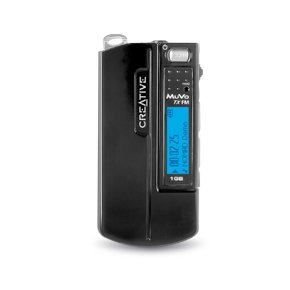
My boss used to boot Knoppix on both his desktop and laptop computers from a 1 GB Creative Muvo mp3 player like this one:

attachment.php


The Muvo looks like any other usb flash drive to the BIOS on boot-up, so you can configure its flash drive as a bootable drive. The weird thing is, the boss had only one partition on it for the Knoppix, but the mp3 player part still worked fine! I was sure all those Linux files would confuse the mp3 player part of the device, but the Muvo seemed to be able to find all the mp3 files on the drive, and ignore everything else! In fact, I think he kept the mp3s in a /mp3 subdirectory, and yet still the Muvo was able to scan the directories and subdirectories on the drive, and find all the playable mp3 stuff. When you used the mp3 player, only the mp3 files displayed on the LCD screen - you couldn't tell from the display that there was anything else on the drive.

I'm sure justgofaster is correct, though. I don't think you're stuck with Knoppix - just about any Linux distro could be installed and booted this way. You'd probably want a player that had more than a 1 GB drive, though, since Linux would use up probably 700 to 800 MB. Also, it's always possible you could come across some computer here or there which had some piece of hardware that might trip up the Linux boot-up, but I don't think that's very common anymore. And you need to be sure your mp3 player is one which looks like nothing other than a flash drive to the BIOS (or just use a flash drive, of course!).

I don't know anything about internet cafe computers preventing booting from the usb bus, but it seems likely that might be a problem.
 

Attachments

  • muvo_1.jpg
    muvo_1.jpg
    16.1 KB · Views: 127
Very few Internet Cafe machines allow you to run external applications - any executable file is blocked from running, for obvious reasons. I may be wrong, but I'd be surprised if you can run FF portable on such machines.

Let's just hope for lightly restricted computers then. And if I have to, I'll use IE. Won't be happy about it though. ;)

Loading an OS on the flash drive... it's a 128mb drive and that's good enough for me. As long as I have a browser, I have my Gmail, my weblog (click here! click here! - here endeth the plug :D), my Google Docs, so I'm not really without. I initially just wanted a flash drive that held important copies of files. Having my trusted FF with me is just a huge bonus for me.

The only thing I do need now is a way to secure files. Like putting a password on a Word-file with MS Word, only, well, secure.
 
Prior to me getting wireless broadband at home I always used an internet cafe and never had an issue with accessing 'inappropriate site'...well, that is what I found in Sydney.

So, you may be lucky depending on where you are travelling.

You will find that 99% of internet cafes will not allow any executable files from being run without admin rights.

If you do manage to find that you can accessing JUB on your travels make sure that you sign out of JUB every time...and make sure the computer DOES NOT save your username/password.
 
Back
Top