



- Joined
- Sep 12, 2004
- Posts
- 21,650
- Reaction score
- 3,279
- Points
- 113
Hello All,
I have a laptop whose harddrive is dying so I'm looking at new ones. I have a network of computers that I use that are currently all XP.
Most of the new laptops are vista.
When using the new Word and Excel documents in Vista, is it an issue to be able to change documents between xp and vista versions? I often times need to make changes to documents on the various computers.
For example, I heard that word files on vista are saved as .docx files and the xp office word files are .doc. But that .docx files can be converted into .doc files. Can the default for the new vista office documents be changed so that they automatically are saved to autoamically work with files created on xp, such as .doc files? I don't really want to create more work and hassel looking at files between computers. But I'm also thinking that it might be a good idea to have a vista computer so that when people send me files in it I can open them without asking them to change them.
Thank you in advance for the advice.
I have a laptop whose harddrive is dying so I'm looking at new ones. I have a network of computers that I use that are currently all XP.
Most of the new laptops are vista.
When using the new Word and Excel documents in Vista, is it an issue to be able to change documents between xp and vista versions? I often times need to make changes to documents on the various computers.
For example, I heard that word files on vista are saved as .docx files and the xp office word files are .doc. But that .docx files can be converted into .doc files. Can the default for the new vista office documents be changed so that they automatically are saved to autoamically work with files created on xp, such as .doc files? I don't really want to create more work and hassel looking at files between computers. But I'm also thinking that it might be a good idea to have a vista computer so that when people send me files in it I can open them without asking them to change them.
Thank you in advance for the advice.


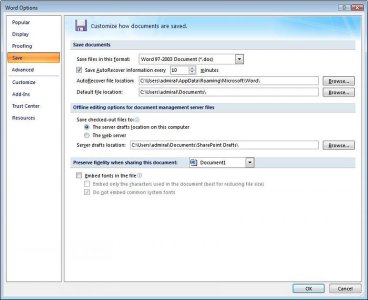

 That will save me from updating my software on all of my computers.


