The Original Gay Porn Community - Free Gay Movies and Photos, Gay Porn Site Reviews and Adult Gay Forums

  • Welcome To Just Us Boys - The World's Largest Gay Message Board Community

    In order to comply with recent US Supreme Court rulings regarding adult content, we will be making changes in the future to require that you log into your account to view adult content on the site.
    If you do not have an account, please register.
    REGISTER HERE - 100% FREE / We Will Never Sell Your Info

    PLEASE READ: To register, turn off your VPN (iPhone users- disable iCloud); you can re-enable the VPN after registration. You must maintain an active email address on your account: disposable email addresses cannot be used to register.

Weird Inbox disappearances

EJMichaels

Queer enough
JUB Supporter
Joined
Apr 23, 2010
Posts
4,611
Reaction score
258
Points
83
A very weird thing is happening in my email. I use several different email clients and get the same mail on more than one computer, so I've dealt with all sorts of email configurations. Recently, I tried Sylpheed. It's similar to Thunderbird and Seamonkey, which I've been using much longer. I set up Sylpheed with two of my accounts. The first one works fine. The second one is the problem.

When the messages come in, I can watch the inbox filling up with bold text messages, indicating they are unread. Immediately after certain ones appear, they disappear from the list. I have to be watching carefully to see it. They just appear briefly on the screen. The numbers in parantheses next to the word "Inbox" shows the correct number of unread messages. Once I view the ones in the inbox, the count does not go to zero. That tells me there are unread messages somewhere.

I finally tried searching for unread messages with the "search messages" function. They were all there, on the list of unread messages, but only in the search. They were not in any folder, and I have no filters or special folders. It's mostly personal messages, not subscriptions and junk that does this. I tried sending messages from other accounts, with other email clients. Only the one from my work account (in Outlook Express) goes into the inbox and stays there. Mail from Frontier, Yahoo, Hotmail, and others disappears.

Once I read the messages in search, they are no longer visible in a search for Unread, but I can find them again by searching for messages another way. That's incredibly tedious, and I'm still left with being able to see them only when I do a search. I can get the mail in my Thunderbird copy of the account on the other computer but I wanted a second copy. The only Sylpheed help forum I found is in Japanese, so I can't ask there. I tried Sylpheed because it comes with Linux Puppy and I'm planning to start using Linux more. I wanted to get used to Sylpheed before I switched OS. I'm on Windows XP now.

Any ideas? Thanks.
 
I had to re-read your note a few times, heh - different computers, different accounts, and E-mail software being referenced, it's like a bit of a puzzle...

But sometimes the kind of weirdness you describe is with slightly different IMAP implementation in the clients (I assume you're using IMAP - can you confirm? - rather than POP3 since you're using different computers and experimenting with different clients, although people have made do with POP3 by selecting not to delete from servers). Sometimes stored IMAP messages might have problems/lose sync between clients, but you mentioned this behavior is happening consistently everytime you fetch new mail, so that shouldn't be the case here...


I set up Sylpheed with two of my accounts. The first one works fine. The second one is the problem.

Are both of these accounts from the same ISP/mail provider? It's possible one is not supporting IMAP in the same way or in compatibility with Sylpheed's implementation. Sometimes through the Webmail or account configuration you need to allow it.

If these two accounts are from the same ISP/mail provider, I would do a close A/B compare side-by-side between Sylpheed's settings on your side (I've never run that program, but I assume it's like the model of Thunderbird, et al where you have separate profiles/"personalities" with their own configuration) - it's possible you have something configured for one of the accounts and not the other. Whether you have to do this through registry comparisons, local configuration files or even just screenshots side-by-side you want to check all the settings are the same.

Maybe you should try Thunderbird on your problem PC since you mentioned it's known to work for you and leave Sylpheed out of the equation. Thunderbird does offer a Linux version so it might be a suitable choice.
 
Thanks - answers below.

...But sometimes the kind of weirdness you describe is with slightly different IMAP implementation in the clients (I assume you're using IMAP - can you confirm? - rather than POP3 since you're using different computers and experimenting with different clients, although people have made do with POP3 by selecting not to delete from servers).
That^ (POP3)

Sometimes stored IMAP messages might have problems/lose sync between clients, but you mentioned this behavior is happening consistently every time you fetch new mail, so that shouldn't be the case here...

It's only about a third of the mail overall, but it's each time I "get messages" - some appear briefly and disappear, and some stay in the inbox. I don't see a pattern in which messages except that it's most of the personal ones that disappear rather than subscriptions and junk.

Are both of these accounts from the same ISP/mail provider? Yes

If these two accounts are from the same ISP/mail provider, I would do a close A/B compare side-by-side between Sylpheed's settings on your side (I've never run that program, but I assume it's like the model of Thunderbird, et al where you have separate profiles/"personalities" with their own configuration) YES, very similar - it's possible you have something configured for one of the accounts and not the other. Whether you have to do this through registry comparisons, local configuration files or even just screenshots side-by-side you want to check all the settings are the same.

The settings seem the same, but I could look again. There's another quirk in the performance I didn't mention - sent mail from the problem account appears in the other account's "Sent" folder. The settings for that look correct.

Maybe you should try Thunderbird on your problem PC since you mentioned it's known to work for you and leave Sylpheed out of the equation. Thunderbird does offer a Linux version so it might be a suitable choice.

It's already there (and working) for another subset of my accounts, but that might be the best option. (I have several accounts with my DSL provider, plus 1 Yahoo, 3 Gmail, 1 GMX, and 1 AOL, all viewed with Seamonkey or Thunderbird now.) Good to know about the Linux version.

Thank you!
 
Actually with your "power user" needs (getting the same E-mail from multiple computers, experimenting with different E-mail clients, and moving to Linux), IMAP might be a better choice for you over POP3 protocol. Some of the advantages (and disadvantages) are outlined here. If that's an option with your accounts (even some of them - there's a guide for GMail IMAP support here for instance), you could look into that and see if this funky behavior disappears.

With POP3 as you know you can fiddle with its settings like "Leave Mail On Server" or "Delete Mail From Server", and as a subsetting often the number of days/weeks mail should be kept on the server before being deleted (get some of the settings ideas here). I'm wondering if this setting is out of sync between your clients (or just handled differently in Sylpheed). I'm assuming your other E-mail client on the other computer isn't running automatically every X minutes and grabbing mail unattended - the only thing I'm thinking is Sylpheed thinks those messages are marked for deletion, so it downloads them, then immediately goes "Oh, they should be deleted" and removes them before you can read them. If you have different "Leave for X days" or deletion settings set on the clients they might be getting confused. It's possible even without this setting they're getting confused by message-ID's somehow.

Again, normally if you're wanting to manage the same mailbox with different clients on different computers, IMAP would be the better choice than POP3 which is fairly simplistic at handling this situation.

Strange that you say it seems to be personal E-mail rather than bulk/mailing list that sees most deletes. Maybe you just notice it more because you "recognize" it as it's happening. You're not reading or previewing that same mail with the other client or a Web interface that's marking them as read, are you?

As for mail appearing in the outbox of the problem account, double check your SMTP or client settings - so with inbound POP3, there'd be the corresponding outbound SMTP server. Some E-mail clients (and this varies) have you create an outbound server profile and you can reuse that outbound server profile for each mail account - let's say, "Comcast SMTP Server Info". For instance, the first time you create it. But it may be stashing the mail against that first (or "main") account because you have no outbound SMTP profile for each unique account, just the one, so the client assumes all outbound E-mail should be in the folder. Secondly maybe there's an option in your client to store all outbound mail under one "master" account instead of the profile that sent it - I remember reading something about this a few years ago for a different client.

Good luck! :D
 
Thanks for all the ideas and links. It could be related to my other computer checking for the same mail at the same time, but that wouldn't explain why it's only certain messages. The weirdest thing is that the messages aren't gone - I can find them by searching. The search results show them as being located in the inbox, but they're definitely not there.

Sounds like it's time to move to IMAP in addition to giving up on Sylpheed.

Thanks again.
 
The weirdest thing is that the messages aren't gone - I can find them by searching. The search results show them as being located in the inbox, but they're definitely not there.
You probably know all this, since you're using Linux, but. . . .

Email apps (some, anyway) don't move the emails when you transfer them to other boxes. They duplicate, and the original remains where it is, invisible.

Over time, if these things aren't killed off, they clog up the app's guts and the app behaves as you describe. A search shows they're still there but you can't see them, though god knows what happens to the duplicates.

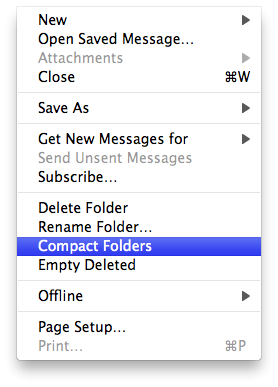
Thunderbird has a Compact Folders command that's alive when one of the mailboxes is clicked on once to define it. It kills these left-behind dupes.

Does Sylpheed have a Compact Folders command or equivalent?

I've also read that an email app's inbox should be kept as empty as possible because of snowballing problems with scores or hundreds/thousands of emails. Thunderbird glues each separate email in a box to one single document that can reach a zillion miles long. You may have a single document consisting of hundreds of emails, screwing up the map or the catalogue or whatever it uses to "separate" them for viewing.

attachment.php
 

Attachments

  • T-Bird.png
    T-Bird.png
    44.5 KB · Views: 69
Thanks! I use the compact function on Thunderbird - but not recently - oops. I thought that was a problem only with deleted or moved messages. I haven't done either here. There's no compact option, just "rebuild folder tree", which doesn't seem to do anything (maybe because I haven't moved or deleted much). The huge file Thunderbird creates for the inbox is one reason I'm setting up other clients. I want to save a lot of the mail. I use XP now, just planning ahead for Linux.

I could use ideas for saving Tbird emails (as a group) in a format I can read later. I don't have to have them as emails. Something like the spreadsheet JUB PMs export to would be good.

Thanks again.
 
I could use ideas for saving Tbird emails (as a group) in a format I can read later. I don't have to have them as emails. Something like the spreadsheet JUB PMs export to would be good.

Thanks again.

You could try the nice ImportExportTools addon for Thunderbird (for Thunderbird "1.0 - 3.0" the page says; you'll have to try it out to see if it'll work fine for the current 3.1 series). It adds its menu under "Tools" and or right clicking an individual mail folder and you can choose from different output formats (MBOX, EML, HTML, plain text, CSV for the indexes).
 
You could try the nice ImportExportTools addon for Thunderbird (for Thunderbird "1.0 - 3.0" the page says; you'll have to try it out to see if it'll work fine for the current 3.1 series). It adds its menu under "Tools" and or right clicking an individual mail folder and you can choose from different output formats (MBOX, EML, HTML, plain text, CSV for the indexes).

Perfect! (!) Thank you! (!)
 
Back
Top