The Original Gay Porn Community - Free Gay Movies and Photos, Gay Porn Site Reviews and Adult Gay Forums

  • Welcome To Just Us Boys - The World's Largest Gay Message Board Community

    In order to comply with recent US Supreme Court rulings regarding adult content, we will be making changes in the future to require that you log into your account to view adult content on the site.
    If you do not have an account, please register.
    REGISTER HERE - 100% FREE / We Will Never Sell Your Info

    PLEASE READ: To register, turn off your VPN (iPhone users- disable iCloud); you can re-enable the VPN after registration. You must maintain an active email address on your account: disposable email addresses cannot be used to register.

What is our iPad doing while we sleep?

EJMichaels

Queer enough
JUB Supporter
Joined
Apr 23, 2010
Posts
4,611
Reaction score
258
Points
83
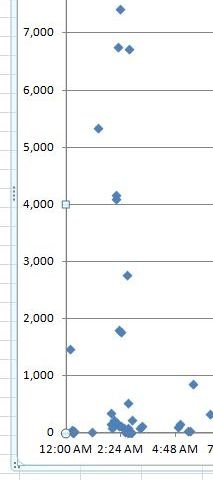
After repeatedly getting messages that we were reaching our iPad data usage for the month, I checked the past 3 months for times and days of highest use. There is quite a lot of usage overnight, when we are definitely not using it.

Is there a way to find out what's going on and how to stop it? There's a pattern, but not a precise one. There is a lot of usage at lunchtime, which makes sense, but there are large amounts of data used at around 2 - 3 a.m., plus some at times that correspond to the ride home, another time we don't use it.

We use AT&T, a 2 GB plan shared with two phones. Neither are smartphones -- almost all the data is from the iPad.
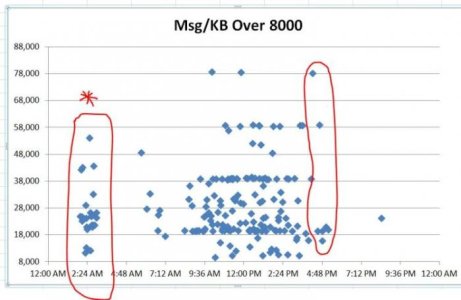
ipaduse.jpg
Also smaller amounts while we sleep:

ipaduse under 8k.JPG
 
It’s probably caused by one or more apps constantly checking for updates.

Go to Settings/Battery to see the percentage of battery use for each app. It may show something unexpected, such as some obscure app using an inordinate amount of power.

Turn on airplane mode when you go to bed:
http://www.iphonefaq.org/archives/97903

Touch Settings -> Airplane Mode ON
This turns off all radio activity including cellular antennas and Wi-Fi. Now while staying in airplane mode you can turn on Wi-Fi only.
Touch Settings -> Wi-Fi -> Wi-Fi ON
Your iPhone will now use the Wi-Fi connection while keeping the EDGE and 3G radio off.
Turning Airplane Mode on and off:
http://www.takecontrolbooks.com/resources/0182/site/chap05.html

Go to Settings/Privacy and tap Location Services, at the top.

Tap each app to see whether it’s accepting requests and sending back data. If you don’t need the Location Service on for that app, turn it off.

Why does the camera need Location Services on? Who cares? My list of apps that I turned off includes the camera, the ABC News app, the Associated Press app, the App Store, a frigging dictionary for gawd’s sake, the iCab Mobile browser, Safari Websites and a ton of others that have no business knowing my location anyway.

This seven-minute video may help. It’s about iOS 7 on the iPhone, but the settings are nearly identical to iOS 9.


Since battery usage correlates with data usage, go to Background app refresh in the General settings. Turn it off. Who cares if a dictionary refreshes itself or not, especially when it sends data back and forth to do it.

Search on YouTube for iOS 9 battery for more. My iPad can use only wi-fi, so I don’t know anything about cell data.
 
Thanks! I'll check the app settings tonight. I knew there was some sort of airplane setting, but he doesn't keep it on often enough. Most of the buildings at work don't have wifi, so he has to use our personal wireless plan. They gave him the iPad for work, but we have to pay for the service.
 
. . . plus some at times that correspond to the ride home, another time we don't use it.

I forgot about this. The iPad's keeping track of where it is by connecting to GPS.

Since I don't have a cell connection, I don't know if it can be shut off (the control may be missing in my wi-fi only iPad) other than with the scatter-shot Airplane Mode.

If a GPS control existis, it might be in Privacy/Location Services (at the top)/System Services (at the bottom). There's a bunch of stuff there that can and is turned off with my wif-fi only iPad: Compass Calibration, Location-Based Alerts, Location-Based iAds, Setting Time Zone, Frequent Locations and the rest.

The only ones I have turned on there is Find My iPad, in case it's stolen (but it never leaves the house) and Share My Location because it's greyed out. I can't turn it off, presumably to ensure Find My iPad will work and to placate advertisers, but all the other location stuff's turned off under Share My Location.
 
It may need to be on for some other reason. In the car going home to hear music or downloaded podcasts, a wi-fi connection at night for emails or browsing that's also chewing up unneeded cell-data connections — lotsa reasons.

Even plugging it into the charger when it's turned off turns it back on again, necessitating turning it off again, for which Tim Cook should be fired and forced to sell pencils from a tin cup.

Though how he'd fit in a tin cup I'll never know.
 
Thanks again, Keeland. I found a few things to turn off, but Location Services were already off, and there are only two active apps -- mail and the browser. Of course those are both big.

Nothing seemed to be an obvious cause for all the activity around 2-3 in the morning, but it could be mail, which would vary a lot in data usage. Since the iPad has access to our wifi at that time inside the house, I'm guessing the extra activity happens when it's left in the car overnight, which happens frequently.
 
Back
Top