The Original Gay Porn Community - Free Gay Movies and Photos, Gay Porn Site Reviews and Adult Gay Forums

  • Welcome To Just Us Boys - The World's Largest Gay Message Board Community

    In order to comply with recent US Supreme Court rulings regarding adult content, we will be making changes in the future to require that you log into your account to view adult content on the site.
    If you do not have an account, please register.
    REGISTER HERE - 100% FREE / We Will Never Sell Your Info

    PLEASE READ: To register, turn off your VPN (iPhone users- disable iCloud); you can re-enable the VPN after registration. You must maintain an active email address on your account: disposable email addresses cannot be used to register.

Why is my computer so slow?

KrisHawkXXX

JUB Addict
Banned
Joined
Jul 13, 2008
Posts
3,550
Reaction score
12
Points
0
Location
La Grange
Its a new desktop and here is the info..(its got 4 gigs of ram.
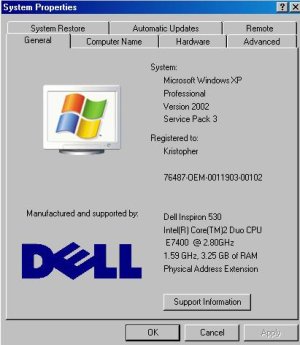
Intel(R) Core(TM)2 Duo CPU E7400 @ 2.80GHz 1.59 GHz, 3.25 Gbs Of Ram


WHy does it say 2.80 and then 1.59? What is the true GHz?
 
it could be the motherboard not displaying 2.8 hence displaying 1.59 and the same thing with 3.25 G Ram (not sure).


Motherboard is the most important.
2nd is CPU
3rd is ... ?
 
it could be the motherboard not displaying 2.8 hence displaying 1.59 and the same thing with 3.25 G Ram (not sure).

why would it display both at the same time? Its XP by the way.. i right click MY COMPUTER and thats what comes up
 
attachment.php
 

Attachments

  • comp info.JPG
    comp info.JPG
    32.4 KB · Views: 276
umm not sure, i'm not good at computer hardware. :)
i'm sure others will jump in soon.
 
The 3.25gigs is because you have a 32bit OS, if you had a 64bit OS it would read all 4gigs. A good reason why the processor shows 1.59GHz instead of 2.8GHz is most likely do that it's in power save mode. It will jump to 2.8GHz when you start up a program that will utilize it.
 
The 3.25gigs is because you have a 32bit OS, if you had a 64bit OS it would read all 4gigs. A good reason why the processor shows 1.59GHz instead of 2.8GHz is most likely do that it's in power save mode. It will jump to 2.8GHz when you start up a program that will utilize it.


what program should i start that will utilize it the 2.8


and i take it vista is a 64bit OS?
 
what program should i start that will utilize it the 2.8


and i take it vista is a 64bit OS?

normally games or graphic intense programs will utilize the 2.8GHz. Most of the time you don't need it running at full load.

Vista comes in both 32bit and 64bit, same with Windows7. XP also comes in both flavors of 32bit and 64bit, but from what I've heard is that the 64bit version has problems.
 
Vista comes in both 32bit and 64bit, same with Windows7. XP also comes in both flavors of 32bit and 64bit, but from what I've heard is that the 64bit version has problems.

You do not need XP 64bit in your life!

Don't do it!

It's buggy as fuck and half the programs most people use either don't install to 64 bit or do and run with issues, like iTunes constanlty thinking you've screwed the library and giving you warning messages every time you open it.

The only reason I'm still putting up with it is because Vista is an expensive and similarly bugged OS.
 
Is there a way to get the full 2.8 working for just surfing and opening lots of programs? When I'm running more then 3 applications such iTunes (playing music while i work), Firefox, Bittorrent, WinAVI Video Converter, and working on my external hard drive it goes really slow and EXPLORER.EXE has to close. Its annoying because on my Vista this doesn't happen.
 
Have you scanned for Spyware and Viruses?
 
^^ It's a new dell, so my guess is, on top of norton, there are 100 other installed proggies running.
 
Back
Top