The Original Gay Porn Community - Free Gay Movies and Photos, Gay Porn Site Reviews and Adult Gay Forums

  • Welcome To Just Us Boys - The World's Largest Gay Message Board Community

    In order to comply with recent US Supreme Court rulings regarding adult content, we will be making changes in the future to require that you log into your account to view adult content on the site.
    If you do not have an account, please register.
    REGISTER HERE - 100% FREE / We Will Never Sell Your Info

    PLEASE READ: To register, turn off your VPN (iPhone users- disable iCloud); you can re-enable the VPN after registration. You must maintain an active email address on your account: disposable email addresses cannot be used to register.

Windows Updates failure

300148

Slut
Joined
Jan 17, 2005
Posts
294
Reaction score
2
Points
0
Location
Vancouver
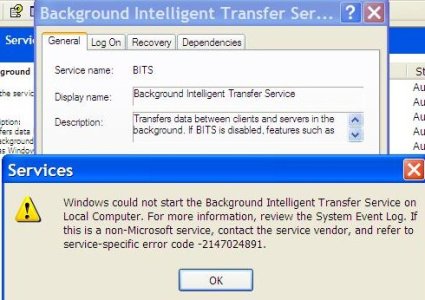
I have been unable to get updates for months now...have tried automatic updates and updating from Microsoft. Microsoft Support has been useless and complicated. Online I have discovered that the problem may be with Background Intelligent Transfer Service which I am unable to start manually or automatically.
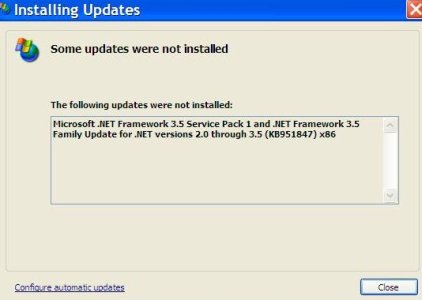
.NETFRamework 3.5 SP1 + Family updates for .NET versions 2.0 through 3.5 (KB951847). It won't install...just the blinking cursor. This is what updates says is priority and must be installed first and separately. It appears to download but WILL NOT install.
I have used the .NETFramework Cleanup Tool and tried reinstalling...no change.
Presently I have the following installed:
.NETFramework 2.0 SP2; CRT; Pre XP; 1; CA; CLR; WinForms; ASP.NET; 2; 3.0 SP2.
Any suggestions appreciated.
:-)Thank you,
LARRY
 
This thread on KB951847 has a few ideas - not sure if you've already tried it. One person mentioned disabling their antivirus during the install caused it to be able to install immediately instead of always hanging like it did in a past. One guy was saying it does eventually install after waiting about an hour with no visual indication that it's working, just the cursor - so you could try starting it off and going to bed or doing something else and checking back on it later? It's apparently 248 MB so may take a while to download and uncompress/install.

Maybe this will help in terms of the update agent reinstall. Not sure, though. Let us know if you get any success!
 
Thanks.
Have tried all of the above with no change.
Anyone know how to get the BITS started?
 
Couldn't find anything there...or didn't understand!
Used the Cleanup Tool again today and removed AllVersions of .NETFramework. Began reinstalling and was successful with 1.0; 1.1; 1.1SP1; 1.1 Redistributable and 2.0 Redistributable.
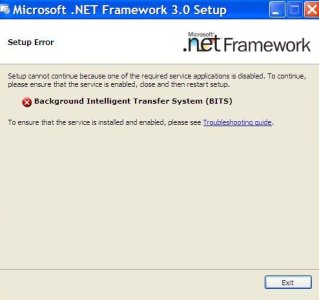
When I tried to do 3.0, it would not install and AGAIN said something about BITS (Background Intelligent Transfer Service) not working. It is set to automatic in Services. I cannot start it manually. Can BITS be removed and reinstalled? Or how can I start it? In Services it says that Windows Update and other prograams will not work properly if BITS is stopped.
Do I NEED the >NETFramework....what versions?
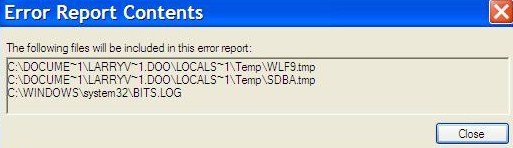
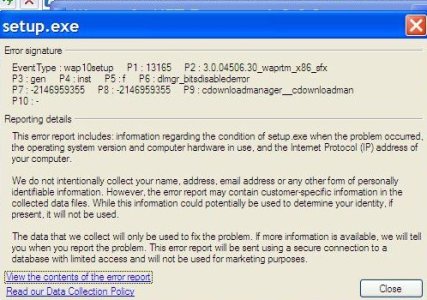
The attached screen shots may help someone kind enough to help me. I am 40+ updates behind!!!
Thanks again....
LARRY
 

Attachments

  • .NET3.0 (2).JPG
    .NET3.0 (2).JPG
    29 KB · Views: 40
  • .NET 3.0 (3).JPG
    .NET 3.0 (3).JPG
    76.4 KB · Views: 38
  • .NETFramework failure.JPG
    .NETFramework failure.JPG
    39.9 KB · Views: 39
Two more screen shots that may help.
The Troubleshooting guide referenced in pic 1 (BITS) in not functioning.
 

Attachments

  • BITS.JPG
    BITS.JPG
    41.4 KB · Views: 42
  • BITS 2.JPG
    BITS 2.JPG
    63.9 KB · Views: 41
I tried to uninstalled Microsoft Works I no longer use it but it seems like programs like that always have some sort of update issue.
 
Back
Top