The Original Gay Porn Community - Free Gay Movies and Photos, Gay Porn Site Reviews and Adult Gay Forums

  • Welcome To Just Us Boys - The World's Largest Gay Message Board Community

    In order to comply with recent US Supreme Court rulings regarding adult content, we will be making changes in the future to require that you log into your account to view adult content on the site.
    If you do not have an account, please register.
    REGISTER HERE - 100% FREE / We Will Never Sell Your Info

    PLEASE READ: To register, turn off your VPN (iPhone users- disable iCloud); you can re-enable the VPN after registration. You must maintain an active email address on your account: disposable email addresses cannot be used to register.

You will no longer be able to sign in to YouTube without a Google account

But you lose the opt-out cookies when you clear the cookies. The Beef Taco extension allegedly replaces the opt-outs (and who trusts the tracking companies anyway) every time the cookies are cleared.

 
aw poor paws. yeah add-ons. it's quite funny how you complain about something but don't want a solution except one where you don't need to do anything.

yes it is not perfect, no it should work without anything.
on the other hand they don't need to offer ANYTHING like that .. but they do offer it. either you completely block their services and don't use them, or you pay the price .. the price here is analytics and ads. if that price is too high - don't use them. and also don't use your weird websites which require google analytics.

you can't have it all.
 
I just added BeefTaco and BetterPrivacy.

Weird -- BetterPrivacy wiped the same number of those long-term cookie things as I removed cookies last night.....

I put those two on.

Now I can't manually get rid of cookies in Firefox, like I used to. It turned on "accept third-party cookies", and I now have more cookies than I ever seen in my life -- I counted past eight hundred and wasn't even halfway.

All I've been doing is JUB, news, and some image searches!
 
BetterPrivacy affects only Adobe's supercookies, not the ordinary cookies found in Firefox's Profile folder. Firefox, or any other browser, doesn't know those Adobe supercookies exist, which is why Adobe plants them elsewhere in computers. Firefox is merely a handy connection point for BetterPrivacy to kill the buggers.

Beef Taco plants opt-out cookies in Firefox; it has no control over Firefox's cookie settings.

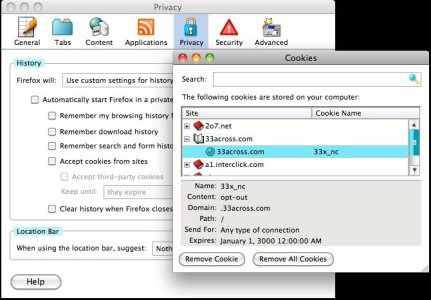
I've included a pic (the Mac window dressing appears different than that of your Windows machine's) to show one of the cookies I chose at random that Beef Taco plants.

I had just clicked on the Remove All Cookies button twice, clearing even those that Beef Taco plants. Then I closed the window and reopened it, and Beef Taco had replaced only the opt-out cookes again. You can see the cookie says "opt-out" next to Content.

Perhaps your problem is caused by a conflict with some other add-on you may be running.
 

Attachments

  • Cookies.jpg
    Cookies.jpg
    65.5 KB · Views: 37
BetterPrivacy affects only Adobe's supercookies, not the ordinary cookies found in Firefox's Profile folder. Firefox, or any other browser, doesn't know those Adobe supercookies exist, which is why Adobe plants them elsewhere in computers. Firefox is merely a handy connection point for BetterPrivacy to kill the buggers.

Beef Taco plants opt-out cookies in Firefox; it has no control over Firefox's cookie settings.

I've included a pic (the Mac window dressing appears different than that of your Windows machine's) to show one of the cookies I chose at random that Beef Taco plants.

I had just clicked on the Remove All Cookies button twice, clearing even those that Beef Taco plants. Then I closed the window and reopened it, and Beef Taco had replaced only the opt-out cookes again. You can see the cookie says "opt-out" next to Content.

Perhaps your problem is caused by a conflict with some other add-on you may be running.

So if I click the Remove All Cookies button once, all the stuff left behind are opt-out cookies? I can't delete them normally, individually, like I used to.
Some of them say "opt out" for content, others say "1".
 
On my Mac, when I click it twice they all disappear. Then I close that window and open it again. With my machine, they're back. I assume it would work the same way with Windows. The extension is built to do this so you don't lose the opt-out protection when clearing cookies.

I went to the Beef Taco site and poked around. There's a list of its cookies here. Some show "opt out" and others show "1."

Firefox often uses numbers for settings. Go into about:config, and in the blank strip next to Filter, type a 1. All the settings that use it will appear. You can do the same for 0, 2 or any number through 9. I was searching Beef Taco's site to find out what 1 does but can't find anything.

I have to assume it means opt out and must be used because of the way the tracking cookie is written and because any new extension on Mozilla's download site is sandboxed when new. For sandboxing to end it's extensively examined. In effect, it's peer-reviewed, and this process has killed other extensions. Beef Taco, like all the others, went through that process.

If I recall correctly, the original version was abandoned by its developer and picked up by another, forcing it to go through the process again, which also checks for conflicts with other extensions, as well as whether its a Trojan or any other type of malware. If "1" doesn't mean opt out, it would have been discovered. Most extensions, not all, are written for Windows, Mac and Linux machines, so the process isn't micky mouse. This version by the new developer has been there for a year or more, so any problem would have been exposed long ago.

Somewhere on the Beef Taco site there's a comment by a user who wants all Beef Taco's cookies grouped together so the cookies planted by sites on the web can easily be found. IMO the user is correct. The way it works now makes it too difficult to find any other particular cookie. But I usually kill them all on my machine from one site to another with a right click on Clear All Data.

Incidentally, I also have the extension Menu Editor. With that, I can eliminate the right-click menu commands I never use, and move the others around on the list. I keep Clear All Data at the bottom of the list so I don't even have to look for it.
 
I had to enable cookies to look at something on the NYT web site. When I went back to disable, the "accept third party cookies" box was clicked!

I've never turned that on! Why would one of these programs be doing it?
 
I downloaded a new copy of Firefox and after quitting Firefox and backing it up removed every vestige of it from my computer's system, including the application, all the extensions, my preferences file on how it runs, two caches, the Profiles folder, everything. (I have a script to do this in a second or two.)

I loaded the new one and ran it as a virgin — no modifications whatsoever — except for making sure cookies were on and turning off third-party cookies. I went to the New York Times and opened a story then went back to the cookies setting. The third-party-cookies setting was still off. I closed the cookies window.

I clicked on Home, which took me to Google. I opened the cookies window again, and third-party cookies was still off. I deleted all the cookes, and third parties was still off.

I killed all vestiges of that new Firefox and reinstalled my old one, along with all its ancilliary files, which includes the extension PrefBar, with its cookie-setting check-mark box.

PrefBar turns third-party cookies on, so if you're running PrefBar, that's the culprit. That never affected me because I have PrefBar's Clear Cookies button that I position next to PrefBar's cookies on-off setting. I always used PrefBar's Clear Cookies until Clear Private Data under the right mouse button came along, and by reflex I click the cookies check mark off and clear all cookies before going to the new site. Clear Private Data makes doing that even easier and faster.

But if you didn't load PrefBar, I'm sorry to say I don't know what could cause your third-party-cookies problem, other than the possibility it's caused by a conflict from another extension. You could disable all the extensions except Beef Taco, quit Firefox, restart it and see what happens.

Complicating the issue are our different platforms. I understand the Mac's workings, as far as an intermediate user might, but I know almost nothing about Windows (and "almost nothing" is a stretch).
 
Back
Top
