(unless you built it yourself, of course)
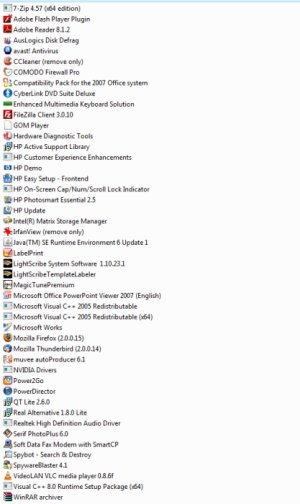
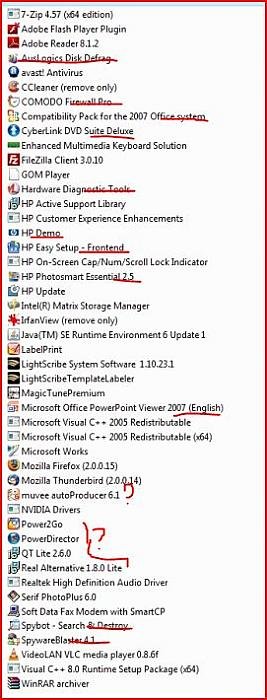
Do I really need any of it? Like my "Cyberlink DVD Suite Deluxe ." Whatever that is. Doesn't Windows (Vista) already include whatever you would need to burn/view/etc. DVDs? My computer also has this PC Doctor Hardware Diagnostic thing, which I suppose is kind of nice. Microsoft Works, too (watered-down version of Office). And some other stuff as illustrated in the attached image.
I am asking because I am considering doing a clean installation of 64-bit Vista Ultimate on my HP computer (I currently have 64-bit Home Premium), and I would lose all that. I think I could probably do it as an upgrade and keep all the currently installed stuff, but I'd rather not. I'm a little scared to pull the trigger. I'm such a wimp.
Some of the items on this list I obviously wouldn't absolutely need, like all the HP stuff and the stuff I mentioned above.
Some of the items, I don't know what they are, but I guess (?) that I need them...like the three Visual C++ entries. I don't know what that is, but it sounds important. Where do I even go to download that? What happens if I don't have it?
The Intel Matrix Storage manager? I think that has something to do with RAID (my HDs are not set up in RAID, nor do I want them to be). So do I need it? The Java SE runtime environment thing?
Is there anything else I need to consider?
To summarize: Can't I just put the damn Vista disc in and have it install and be done with it? Will Windows Update find whatever I need? It's probably been five years since I installed an operating system, so I don't remember what it was like or what I had to do to get it to work that time. Thanks for your patience!
arrrrrrrrrrrrrgh

PS: This is my computer, if that makes any difference:
http://h10025.www1.hp.com/ewfrf/wc/prodinfoCategory?lc=en&cc=us&dlc=en&product=3688702&os=2100&lang=en
PPS: I have a follow up question about drivers, but I'll save that for another time because I am so freaking tired. I hope that I have managed to express myself clearly above. Thanks again
Do I really need any of it? Like my "Cyberlink DVD Suite Deluxe ." Whatever that is. Doesn't Windows (Vista) already include whatever you would need to burn/view/etc. DVDs? My computer also has this PC Doctor Hardware Diagnostic thing, which I suppose is kind of nice. Microsoft Works, too (watered-down version of Office). And some other stuff as illustrated in the attached image.
I am asking because I am considering doing a clean installation of 64-bit Vista Ultimate on my HP computer (I currently have 64-bit Home Premium), and I would lose all that. I think I could probably do it as an upgrade and keep all the currently installed stuff, but I'd rather not. I'm a little scared to pull the trigger. I'm such a wimp.
Some of the items on this list I obviously wouldn't absolutely need, like all the HP stuff and the stuff I mentioned above.
Some of the items, I don't know what they are, but I guess (?) that I need them...like the three Visual C++ entries. I don't know what that is, but it sounds important. Where do I even go to download that? What happens if I don't have it?
The Intel Matrix Storage manager? I think that has something to do with RAID (my HDs are not set up in RAID, nor do I want them to be). So do I need it? The Java SE runtime environment thing?
Is there anything else I need to consider?
To summarize: Can't I just put the damn Vista disc in and have it install and be done with it? Will Windows Update find whatever I need? It's probably been five years since I installed an operating system, so I don't remember what it was like or what I had to do to get it to work that time. Thanks for your patience!
arrrrrrrrrrrrrgh
PS: This is my computer, if that makes any difference:
http://h10025.www1.hp.com/ewfrf/wc/prodinfoCategory?lc=en&cc=us&dlc=en&product=3688702&os=2100&lang=en
PPS: I have a follow up question about drivers, but I'll save that for another time because I am so freaking tired. I hope that I have managed to express myself clearly above. Thanks again