The Original Gay Porn Community - Free Gay Movies and Photos, Gay Porn Site Reviews and Adult Gay Forums

  • Welcome To Just Us Boys - The World's Largest Gay Message Board Community

    In order to comply with recent US Supreme Court rulings regarding adult content, we will be making changes in the future to require that you log into your account to view adult content on the site.
    If you do not have an account, please register.
    REGISTER HERE - 100% FREE / We Will Never Sell Your Info

    PLEASE READ: To register, turn off your VPN (iPhone users- disable iCloud); you can re-enable the VPN after registration. You must maintain an active email address on your account: disposable email addresses cannot be used to register.

Annoying sound through speakers

RoyP33

Virgin
Joined
Jun 9, 2013
Posts
32
Reaction score
0
Points
0
Hey all!

(First: I apologise in advance for my grammar or bad spellings; English is not my native language.)

Since I have bought myself some new speakers (brand Trust), there is an annoying sound coming out of them, which has something to do with my mouse I guess.
When I don't move the mouse, I hear a constant 'PEEP'-tune in the background of my left speaker, and a constant noise on the right one. (Like a crispy sound; as if a radio is out of tune.)
When I lift up the mouse, the 'PEEP'-tune goes down (sort of 'PEEEEEEW' - same sort sound there is in funny cartoons when something or someone has been thrown away (only in my case there is no 'POOF' nor mushroom cloud at the end)).

Hopefully one of you all do recognize this problem, and is able to help me out. Not only the sound is extremely annoying, after turn of the computer the 'PEEP' will stay in my ears for about 30 minutes (as if I went to a rock concert).

Thank you very much in advance for your help!

Yours truly - Roy

Some extra information:
Speakers are from Trust;
PC and mouse are from HP (mouse has a USB-tail);
PC runs with Windows 8
 
It would help if you provided the model number of the PC as well as the sound card, if you know it. However, the first thing I would check are the sound card drivers to make sure they are not generic Microsoft drivers and are, indeed, the correct drivers for the sound card you have installed. You may want to also check the mouse drivers, although a lot of mice don't have their own drivers.

Go to > Charms Bar > Settings > Change PC Settings > Devices

That's where all of the drivers are listed.
 
Is this the sound that you hear?


have you tried using a different USB port for your mouse?

different power outlet for the speakers? turn the speaker plug a 180°?
 
The fact that mouse movements affect the quality of the sound suggests that the speakers are picking up electrical/radio interference.

The speaker wires are acting as an antenna. You want to position the speakers as far away from the mouse as is reasonable. Also, you want to limit the length of the speaker wire to the minimum necessary for your run. You don't need to cut the wire. Just loop it around and around your hand to create a coil, and tie the coil off with a twist tie (like from a loaf of bread).
 
^ usually PC speakers should be shielded against this.

My suspicion is that there is a creep current on his chassis, maybe from a faulty USB port. If so, this could be potentially dangerous. I can show you pics from a server where the USB port was shooting fiery sparkles 0,5m high ...
 
^^^
These guys are much more qualified to help than I am, but I can relate to your frustration. My speakers used to pick up signals from cab drivers and police if they used their CB' s (???) close to the apartment I used to live in. Hearing their voices in my bedroom would scare the graphics outta me.

I can now hear a tone on my speakers seconds before my cell phone receives a call or text.
 
To all (so far): Thank you very very much for your willing to help me. Really much more appreciated then I can write down here.

@ Gewhite3:
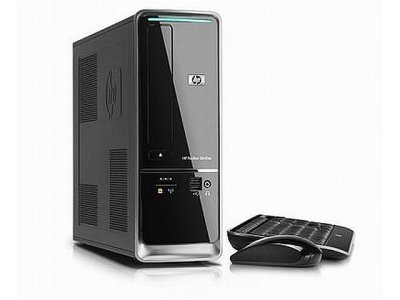
model nr. s5560nl (Pavilion Slimline).jpg (model nr.: s5560nl)

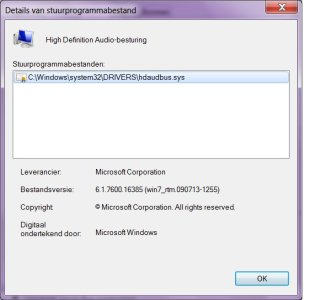
Drivers info.jpg (6.1.7600... is the file version; it's all in Dutch, the rest speaks for itself)

This is all the info I could find for you. If you need more, please don't hesitate to ask.

@Corny:
Unfortunately I don't have the possibility to record my sound, but according to the keyboard of my piano, your sound is like humming and is (believe it or not) exactly 4 and a half octaves lower than the sound coming out of my speakers. You probably don't have the slidest idea what I'm talking about, but it's not a "hum"-sound (like people use to say when they are practicing yoga (Zen)) but a more falcetto-sound. Not up front, but more from a distance. (I'm sorry, my English isn't that well to explain it to you much better than this.)
Lucky for me that it doesn't shoot any fiery sparkles (yet!). Please, don't bring that up to my speakers! LOL No, in all seriousness, I don't get any electricity nor shock (or what so ever) when I touch my PC while the speakers are on.

@T-Rex:
The speakers are on my desk, behind the screen. I have a complete computer table. My mouse is on its path on a slide board (if this is correct English, but I'm sure you know what I mean), together with my keyboard. I have tried to place them further away from the screen (more backwards), but the problem is still "going strong", so to speak.

@Borg69...:
Thanks for your input! I'm not hearing voices from "outerspace", nor the signals from any emergency car like your experience. But since you hear a tone on your speakers secs. before your cell phone receives a call or text, makes you a so called fortune teller. You can steal the show with it, when you have company. ;)

Further info:
The plug of my mouse has its own input on the back of my PC. Above the input there is an icon of the mouse; if I plug it in somewhere else, the mouse doesn't move. It's the same with my keyboard.

I have a few unused ports on my PC. The plug of my speakers is an ordinary USB. Plugging it in into the other ports, doesn't solve the problem. Bummer!

Just a general question: Is it possible that my speakers aren't compatible with Windows 7? Or do I now sound extremely blonde? You see, my former printer, a Lexmark, refuses to print since I had this HP computer. The helpdesk of Lexmark told me that the printer wasn't compatible with W-7, so I had to buy myself a new printer.
In my humble opinion, speakers are like a mouse or keyboard: plug and play without a set up disc. Though?

Anyway... Once again I wanna thank you all so far for your help.

Best wishes - Roy
 
Back
Top