The Original Gay Porn Community - Free Gay Movies and Photos, Gay Porn Site Reviews and Adult Gay Forums

  • Welcome To Just Us Boys - The World's Largest Gay Message Board Community

    In order to comply with recent US Supreme Court rulings regarding adult content, we will be making changes in the future to require that you log into your account to view adult content on the site.
    If you do not have an account, please register.
    REGISTER HERE - 100% FREE / We Will Never Sell Your Info

    PLEASE READ: To register, turn off your VPN (iPhone users- disable iCloud); you can re-enable the VPN after registration. You must maintain an active email address on your account: disposable email addresses cannot be used to register.

Computer Problems (No Beeping Sound, Blank Screen)

  • Thread starter Thread starter BrandonSBCA
  • Start date Start date
B

BrandonSBCA

Guest
Alright, my computer died. I think it died, not really sure. I'm using a laptop with a dial up on it. This is what happened.

I was using the computer, and totally froze on me, so I turned it off, then turned it back on. I heard it come on, (Fan from power supply and motherboard) I didn't hear a beep sound from the mother board though. The screen on the monitor was completely blank too.

I opened up the computer and turned it on, from the front where the hard drive is, I see a green light then I could hear the hard drive making a small amount of sound, but not turning, so I thought it might of been the hard drive that got fried. I tried a different hard drive and I heard that hard drive but no beeping sound and the monitor was still blank on the screen. So I went around and looked for information, couldn't find a bit of useful help, so I tried to take out my video card thinking it might be the video card that might of fried and it not working. It wasn't the video card still no beeping sound and still a blank screen.

So what might be the problem? It's not the hard drive, the motherboard seems to be working perfectly unless there is something wrong with it, it wasn't the video card, and I thought if it was the RAM the computer wouldn't even start at all.

I'm running Windows XP Pro Service Pack 2
RAM: 1GB
Hard Drive Space: 40GB (12GB remaining on the C drive)
1.5ghz Processor AMD Athalon XP
Motherboard: FOXCONN
Video Card: RADEON 9550 256MB
Power Supply Wattage: 250w

Thanks to whoever can help me with this problem.
 
Oh no :( I really have no idea, Brandon. I'd say the best bet is to take it somewhere to get it checked out. Or do you know anyone who's good with computers? Universities also usually have cheaper computer tech help than companies like Best Buy.

Good luck, I'll miss you if you take too long :(
 
It's never happend to me Bran, but what T-Rexx says seems to fit. Normally, you'd expect the BIOS to get loaded first. The power going in is making the fans work, and beyond that nothing happens, which seems to indicate the instructions in the BIOS chip is not working. Glad you have access via some other computer though. Was it dusty inside? Could be the static from dust which may have caused it.
 
Sorry to say it, Brandon, but I think the motherboard is fried. The lack of the beep implies that the boot-up sequence doesn't even get as far as executing the instructions in the BIOS.

i had the same phenonem once, and thought the same - but in the end it was the graphics card that somehow jammed the bios whatever (usually if the graphic card is missing you get the beep, but this time it made the whole machine just stop)
 
It's never happend to me Bran, but what T-Rexx says seems to fit. Normally, you'd expect the BIOS to get loaded first. The power going in is making the fans work, and beyond that nothing happens, which seems to indicate the instructions in the BIOS chip is not working. Glad you have access via some other computer though. Was it dusty inside? Could be the static from dust which may have caused it.

Yeah I think T-Rexx is right, the fans and the hard drive seems to be moving but it sounds like it can't at all get passed the BIOS on the motherboard. So thats why both my hard drives still work.

Yeah I'm glad I still have this laptop my tutor gave me back in early 2000, and a CompuServe account that still has my brother's account and password saved on the computer.

Yeah there was tons of dust inside, I think I should of cleaned it a while back. But now that I know my motherboard is fried I was thinking of either 1. Buy a totally new computer or 2. Buy a whole new motherboard and processor.

Also if anybody is looking at this second post. If I bought a new computer is there a chance I can still use my old hard drive? I kind of have personal stuff on that and I want to burn it to a DVD before trashing it or deleting the files off of it.

I saw some computers that are like $618 dollars after rebate and all that junk. I think it was a Pentium D 850, anybody know what those are?
 
Sorry for the trouble cuddly bran. I have no idea what might be causing that. It can be so many things. Hope u get it sorted soon (*8*)
 
An external harddisk enclosure does the job. I got one off the internet for less than 10 bucks, p&P (It was £5.90+p&p via ebay) and worked first time. It's a 2.5" harddrive, you just clip the hard drip onto the interface pins of the enclosure, put the drive into the casing, secure with a couple of screws, then use the Y shaped lead to power and send info to the new computer via two free USB ports. Simple and effective. In WinXP, it doesn't require any drivers, just plug in and play, so all your files are safe.
 
Also if anybody is looking at this second post. If I bought a new computer is there a chance I can still use my old hard drive? I kind of have personal stuff on that and I want to burn it to a DVD before trashing it or deleting the files off of it.

I saw some computers that are like $618 dollars after rebate and all that junk. I think it was a Pentium D 850, anybody know what those are?

you can certainly use your old hard drive the way T-rex described above. you will likely also be able to add it as a second internal drive (slave) to a new computer. the problematic part is if you attempt to BOOT a new computer from teh old hard drive. because all the hardware is different windows XP will freak out and likely refuse to start. so the external enclosure is probably a good bet.

if you were lucky enough to find the same motherboard that you already have (cheaply) you could just swap out the motherboards (which means taking out the processor, fan, memory, video card, sound card, and disconnecting the DVD/CD drive and hard drive and then reconnecting all that stuff with the same "new" motherboard). that way windows wont know you have a new motherboard and it will run as before. you can download and run Belarc advisor and i think it will tell you what sorta of motherboard you have if you dont know. if you have a name brand computer the changes of getting another of the same motherboards working (and cheaply) might be less than if it were a custom built computer (at least that's been my experience).

Belarc advisor: http://www.belarc.com/free_download.html
 
Hey guys, thanks for the advice, I can't even find the battery on the motherboard, I just think that maybe the motherboard got fried, that was my best guess. I did remove the video card and all that thinking it might of been the problem but it wasn't. Also I just got a private message from someone saying that the memory sticks might need to be reseated, it didn't work at all so obviously the computer is lost.

My friend just faxed me over a print out of a computer at Circuit City. HP Pavillion 1700n Desktop PC

Specs:
1GB of DDR2 memory
AMD Athlon 64 X2 3600+
250GB hard drive
Windows Vista Home Premium
NVIDIA GeForce graphics card 319MB of video memory 128MB dedicated.

It's only the tower no monitor, no speakers for as low as $600 bucks, $550 if you do the mail in rebate.

I just hope my Dad goes on with this plan, my old PC lasted since 2001, and updated the motherboard in 2004. I can't believe that the motherboard didn't even last as long as the hard drive which is 7 years old.

Again thanks for all the help guys on my computer problem. Also I'll have to try out that hard drive method, but from what Mike told me about it freaking out if I had the old hard drive booting up to Windows XP. I'm not sure how I can do it, also I don't even know how to set the hard drive to SLAVE. Also parents told me that if I get a new computer I can't upgrade it or open it up because then if I do that then they will not buy me a new one if it fucks up.

#-o Oh by the way I hate dial up!:grrr:
 
Brannie, I am so sorry to hear that. I miss you on here. If I hit the lottery tonite, I will buy you a new iMac (just kidding) I know you prefer a pc. If I sell the house at a profit this weekend, maybe there will be enough to get you a PC.

Hang in there
 
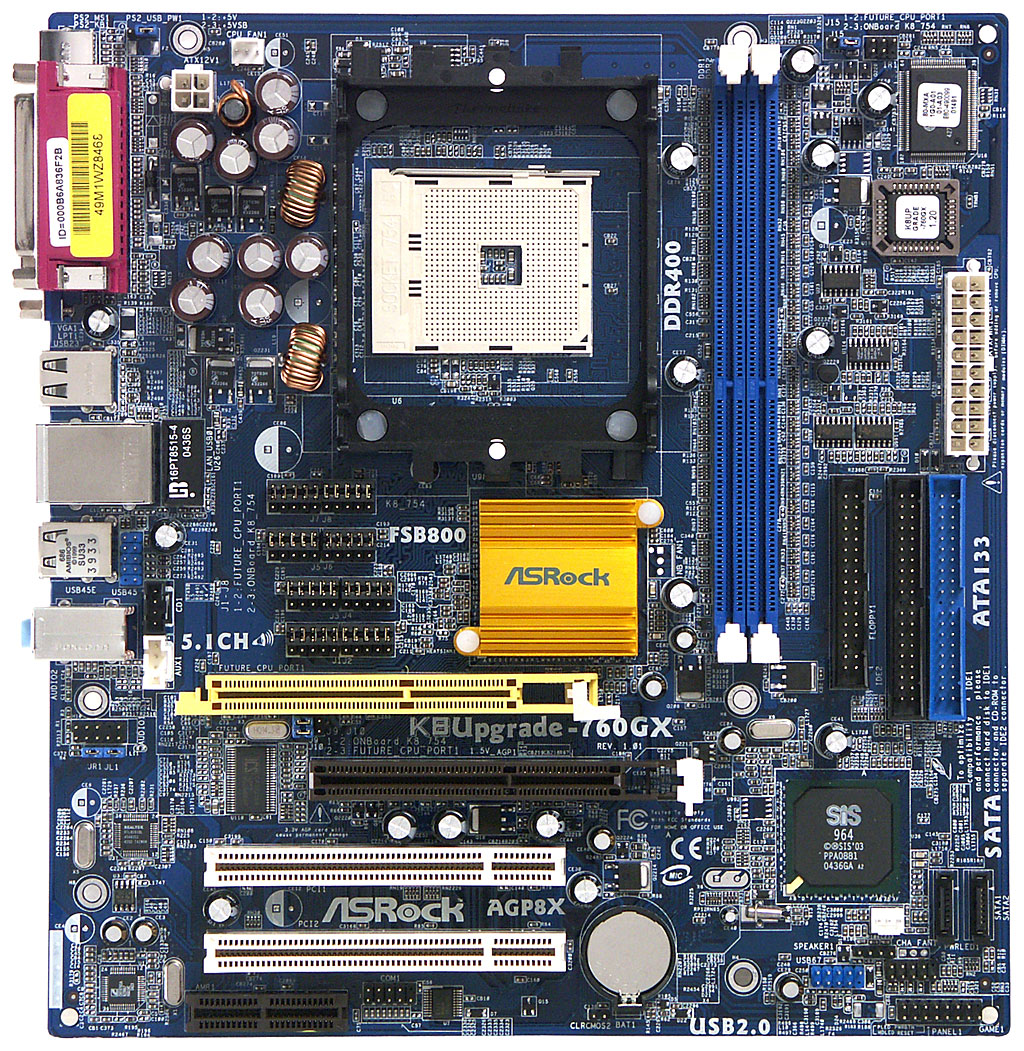
here is a picture of a motherboard. the battery on this is the small gray round thing near the bottom center just below the two white PCI slots (there is also a yellow slot and an off set brown slot). just under it in small print is the letters "CLRCMOS2" and "BAT1"

mb-big.jpg
 
Back
Top