The Original Gay Porn Community - Free Gay Movies and Photos, Gay Porn Site Reviews and Adult Gay Forums



-
Welcome To Just Us Boys - The World's Largest Gay Message Board Community
In order to comply with recent US Supreme Court rulings regarding adult content, we will be making changes in the future to require that you log into your account to view adult content on the site.
If you do not have an account, please register.
REGISTER HERE - 100% FREE / We Will Never Sell Your InfoPLEASE READ: To register, turn off your VPN (iPhone users- disable iCloud); you can re-enable the VPN after registration. You must maintain an active email address on your account: disposable email addresses cannot be used to register.
You are using an out of date browser. It may not display this or other websites correctly.
You should upgrade or use an alternative browser.
You should upgrade or use an alternative browser.
Converting MP4 format to flash video
- Thread starter Flaguy
- Start date


Paws
( ´・ _ ・)
- Joined
- Nov 19, 2004
- Posts
- 11,069
- Reaction score
- 20
- Points
- 38
Real Player Premium

Anyway: you could try an online converter (search for it) or the software called "Super".

m1thousand
JUB Addict
Flaguy
I use Quick Media Converter. Its free. It converts from any video format to any other format.
Here is a tutorial I have about how it works. Quick explanation
This second tutorial shows how you would convert to flv files
BUT there is a downside to the program. When the files are converted, the program has added '_converted' to each file. This is there way of getting you to buy the license so _converted is not added in the licensed version.
There is a program (Ron's Renamer) that gets rid of that for you, but this program is also a paid program (but maybe Ill share it with you ;-)
link: http://www.cocoonsoftware.com/
I use Quick Media Converter. Its free. It converts from any video format to any other format.
Here is a tutorial I have about how it works. Quick explanation
This second tutorial shows how you would convert to flv files
BUT there is a downside to the program. When the files are converted, the program has added '_converted' to each file. This is there way of getting you to buy the license so _converted is not added in the licensed version.
There is a program (Ron's Renamer) that gets rid of that for you, but this program is also a paid program (but maybe Ill share it with you ;-)
link: http://www.cocoonsoftware.com/

andysayshi
JUB Addict
Paws was diplomatic. I'll be a little more direct.
WHY, for the love of dogs, would you convert anything to FLV? It is an outdated, bad quality format that is fast approaching obsolescence. Every format conversion reduces the quality of your content. Rather than convert for your playback software, why not get better playback software? Which leads me to...
WHY, for the love of cocks, would you use RealPlayer Premium? It costs you money, it bloats your computer, it takes over things it shouldn't, and it doesn't play all formats. There are plenty of good free media players out there. VLC, mentioned above, is a great one. It's free, and you can play MP4 and FLV and Quicktime and AVI and WMV and Mpeg2 and blah blah blah - no conversion required.
Anyways, please don't take my passion as an attack. I, as others here, am here to help. Let us know if what's been posted needs more explanation.
WHY, for the love of dogs, would you convert anything to FLV? It is an outdated, bad quality format that is fast approaching obsolescence. Every format conversion reduces the quality of your content. Rather than convert for your playback software, why not get better playback software? Which leads me to...
WHY, for the love of cocks, would you use RealPlayer Premium? It costs you money, it bloats your computer, it takes over things it shouldn't, and it doesn't play all formats. There are plenty of good free media players out there. VLC, mentioned above, is a great one. It's free, and you can play MP4 and FLV and Quicktime and AVI and WMV and Mpeg2 and blah blah blah - no conversion required.
Anyways, please don't take my passion as an attack. I, as others here, am here to help. Let us know if what's been posted needs more explanation.
m1thousand
JUB Addict
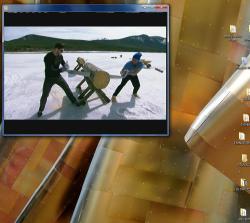
I reclaimed lots of hard drive space by changing avi video files to mp4. Yes, there is a difference in the screen size . . .
This file went from 1.4 gb to 123 mb
Avi . .
Mp4 . .
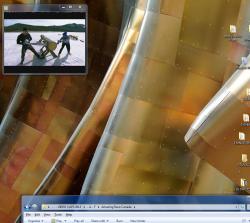
But all you do is stretch out the screen. The video quality looks the same (especially if its porn ;-)
Stretched mp4 . . .
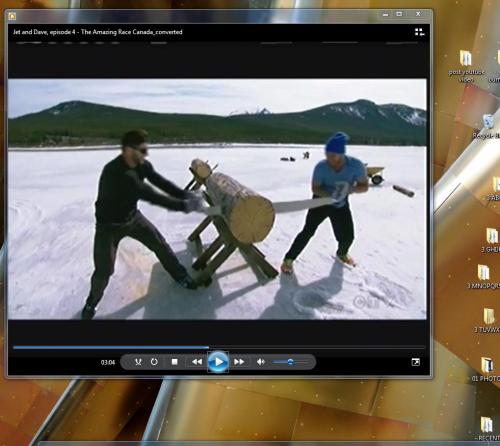
This file went from 1.4 gb to 123 mb
Avi . .
Mp4 . .
But all you do is stretch out the screen. The video quality looks the same (especially if its porn ;-)
Stretched mp4 . . .

GamerBear
( ̄(エ) ̄)
I reclaimed lots of hard drive space by changing avi video files to mp4. Yes, there is a difference in the screen size . . .
Out of all my ripping experience when I ripped DVDs I started out doing them in AVI, most of the time it shrunk the video to fit the specific file size which was 700MB. When I switched to mp4 about 99% of the time it would match the file size of the original DVD source which was like 720 x 480, usually cropping videos with 16:9 ratio. I don't understand why someone would want to convert any format into FLV its like killing the quality. Sometimes I wish more people encode porn into mp4 because it just looks way better then encoding it into FLV and reducing video resolution but have a huge file size.
m1thousand
JUB Addict
The file above went from 1.4 gb to 123 mb

Im not watching Shakespeare. I dont need great screen quality. I know its hard to see on screen but the quality looks the same to me, and after converting all my avi files, I reclaimed about 25% of my hard drive
https://vimeo.com/user19497448/videos
- all these videos are mp4 (reduced from avi)
example:
https://vimeo.com/71865705

Also, if you have a current Roku media player with a USB port, Roku can read mp4 video and not other formats. So..I convert my videos (YouTube, Vimeo, other downloads, etc.) into mp4 on a flash stick, and then plug the flash stick into the Roku's USB port and watch the videos on my big screen tv. The color and definition are sometimes brilliant, though YouTube videos as low as 360p can look really good.
For example ...
480p is even better:
720p and 1080p are high definition and really great in mp4 format.
720p ..
1080p ..
I use the free version of RealPlayer to download the videos, and then use the free HandBrake format converter program to convert to mp4. The results, played on my big screen HD TV thru Roku are stunning.
For example ...
480p is even better:
720p and 1080p are high definition and really great in mp4 format.
720p ..
1080p ..
I use the free version of RealPlayer to download the videos, and then use the free HandBrake format converter program to convert to mp4. The results, played on my big screen HD TV thru Roku are stunning.