The Original Gay Porn Community - Free Gay Movies and Photos, Gay Porn Site Reviews and Adult Gay Forums

  • Welcome To Just Us Boys - The World's Largest Gay Message Board Community

    In order to comply with recent US Supreme Court rulings regarding adult content, we will be making changes in the future to require that you log into your account to view adult content on the site.
    If you do not have an account, please register.
    REGISTER HERE - 100% FREE / We Will Never Sell Your Info

    PLEASE READ: To register, turn off your VPN (iPhone users- disable iCloud); you can re-enable the VPN after registration. You must maintain an active email address on your account: disposable email addresses cannot be used to register.

disk wipe software

Kulindahr

Knox's Papa
JUB Supporter
50K Posts
Joined
Jan 15, 2006
Posts
123,002
Reaction score
4,576
Points
113
Location
on the foggy, damp, redneck Oregon coast
I used to have a copy of PGP Wipe; I think it died with a former hard drive. I went looking for another, but the $@#&%!! people who plague computer users with Norton own it now, and it didn't seem to be available free.

What's a good disc wipe utility out there that doesn't have to do the entire drive? That can be set to wipe just certain areas (like eighty chapters of a story after merging into a new massive document, or the crap a 'friend' left behind when borrowing the computer one day, etc.), all previously-used space containing now 'deleted' files, or just all empty space.


What would be a real gem would be one that did three passes and then fill the 'empty' space on the hard drive with material of my choice -- like Road Runner cartoons, maybe, over and over -- just for grins if anyone ever decides to see what I "used to have" on the drive.
 
basically anything will do. one overwrite is enough with modern harddrives.
 
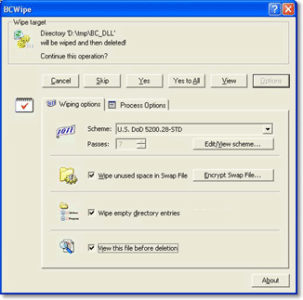
I've always liked BCWipe, when I've been ready to give away or toss out an older hard drive:

http://www.jetico.com/wiping-bcwipe/

You can pick to delete files with wiping, wipe just "free space" on your drive right now, wipe the whole thing, wipe the recycle bin, etc. and choose a variety of wipe passes/methods. The trial lasts for 21 days and isn't crippled. The other recommendations in this thread are good, too - often these programs are pretty similar.
 

Attachments

  • 35179-bcwipe.gif
    35179-bcwipe.gif
    31.8 KB · Views: 45

CCleaner is free and has a wipe free space operation. It is very effective at cleaning a lot of other crap as well, thus the name CCleaner.

http://www.piriform.com/ccleaner

From the info on the sites, I see that Eraser has a wipe free space function, but I'm not seeing it on CCleaner. Cityboy, any comments on Eraser?

I'll admit here that I'm in an incredibly stressful situation at the moment and having a really hard time making clear decisions; I could sit all day and not be able to decide between them or if I should trust them.
 
Okay, what does "elevate the process" mean, and why does it say "Administrator privileges required"? It's my computer and no one else has higher access!

BTW, I was hoping for an option that searched for previously deleted files and wiped them instead of just wiping everything whether the space has been used or not. I really don't want to spend 81 hours wiping the drive.
 
Okay, what does "elevate the process" mean

Windows manages all running programs/services/processes. This gives you the option to increase the resource allocation (CPU, memory) to, in theory, speed up the program's operation. On a modern computer if you're not running much at the same time anyway it might not make that much difference "real world".


and why does it say "Administrator privileges required"? It's my computer and no one else has higher access!

Typically (for power users, anyway), one is an Administrator on their own computer. It just means whatever login name you're using has the proper permissions. This is a common message for programs that might interact heavily with a device, the OS, write registry keys, etc.
 
Windows manages all running programs/services/processes. This gives you the option to increase the resource allocation (CPU, memory) to, in theory, speed up the program's operation. On a modern computer if you're not running much at the same time anyway it might not make that much difference "real world".

Okay, that's fairly close to what I guessed. Though since I was only running Firefox, WordPerfect, and FreeCell, how much difference could it have made?

(I alternate writing, webbing, and puzzling through FreeCell.)

Typically (for power users, anyway), one is an Administrator on their own computer. It just means whatever login name you're using has the proper permissions. This is a common message for programs that might interact heavily with a device, the OS, write registry keys, etc.

Okay, but my account is THE administrator account. How much higher can I go -- summon an angel? :badgrin:


BTW, I'm four hours into a free space wipe, estimated 10... no, 6... no, 9... no, 11.... hours left, using CCleaner.
 
if you are on vista or win7, right click the app and choose "run as adminstrator". i'd guess that's what they mean with "elevating the process"

if they really mean the CPU time, start the task manager, find the executable in the list, richtlick it and change the priority (using "realtime" is not recommended .. )
 
if you are on vista or win7, right click the app and choose "run as adminstrator". i'd guess that's what they mean with "elevating the process"

if they really mean the CPU time, start the task manager, find the executable in the list, richtlick it and change the priority (using "realtime" is not recommended .. )

I'm becoming convinced that operating under a severe anxiety level simulates functioning with a low IQ. Not so much your post, but others and instructions with the programs -- well, I can look at them and believe they make sense, but I can't draw it out. Of course this phenomenon only elevates (there's that word!) the anxiety level.

The nice thing is that the ongoing wiping of my hard drive is trailed by a resultant reduction in stress: I know that the traces of the absolutely disgusting porn a friend who borrowed my laptop downloaded, watched, and deleted are vanishing like a sandcastle into the surf.

I already, of course, delete&wiped all his files, killed his account, and made my password *******************, something only a handful of people in the world could even guess because it originates in -----------------------------------------------, something only a few more are aware even exists.
 
if you are on vista or win7, right click the app and choose "run as adminstrator". i'd guess that's what they mean with "elevating the process"

if they really mean the CPU time, start the task manager, find the executable in the list, richtlick it and change the priority (using "realtime" is not recommended .. )

And I missed the one thing I really meant to respond to: define "realtime". I'm looking at that and my mind is saying, "We know that", and I'm asking my mind, yeah? And? And if it really is in my head, it isn't coming out to play.
 
From the info on the sites, I see that Eraser has a wipe free space function, but I'm not seeing it on CCleaner.

When you run the program, CCleaner has a 'wipe free space' check-box after you run the 'cleaner' option itself.
 
When you run the program, CCleaner has a 'wipe free space' check-box after you run the 'cleaner' option itself.

Found it.

And now that I've wiped everything I felt the urge to....

I can't post on JUB without logging in before posting a message. Logging in twenty times a day is getting aggravating.
 
And I missed the one thing I really meant to respond to: define "realtime". I'm looking at that and my mind is saying, "We know that", and I'm asking my mind, yeah? And? And if it really is in my head, it isn't coming out to play.

Realtime means "use all available resources to run this program as fast as we fucking can" in Windows language. This is okay if you have multiple processor cores and lots of RAM, unless you set more than one program to realtime. It's bad if you're doing two intensive things at once.
 
I can't post on JUB without logging in before posting a message. Logging in twenty times a day is getting aggravating.

I take it your browser isn't remembering site preferences/active logins/cookies, etc.
 
Regarding login cookies - you can go to the "cookie manager" or whatever your browser calls it and set the JUB site cookies to be kept even if it's set to delete cookies normally. If it's failing to do this, you can also open the cookies folder and manually delete (or not delete) the ones you select if it works to let it save all the cookies.
 
Regarding login cookies - you can go to the "cookie manager" or whatever your browser calls it and set the JUB site cookies to be kept even if it's set to delete cookies normally. If it's failing to do this, you can also open the cookies folder and manually delete (or not delete) the ones you select if it works to let it save all the cookies.

I do the manual delete thing regularly. I looked and couldn't find any place to list JUB as "approved".

So I got medieval on it and uninstalled and reinstalled Firefox, and the JUB connection is now behaving. I'm having to dig out all my passwords that had been saved, but that's a process with an end.
 
Back
Top