The Original Gay Porn Community - Free Gay Movies and Photos, Gay Porn Site Reviews and Adult Gay Forums

  • Welcome To Just Us Boys - The World's Largest Gay Message Board Community

    In order to comply with recent US Supreme Court rulings regarding adult content, we will be making changes in the future to require that you log into your account to view adult content on the site.
    If you do not have an account, please register.
    REGISTER HERE - 100% FREE / We Will Never Sell Your Info

    PLEASE READ: To register, turn off your VPN (iPhone users- disable iCloud); you can re-enable the VPN after registration. You must maintain an active email address on your account: disposable email addresses cannot be used to register.

External hard drive not recognized: Format error

m1thousand

JUB Addict
Joined
Jun 28, 2013
Posts
6,651
Reaction score
148
Points
63
Location
Vancouver area
HI
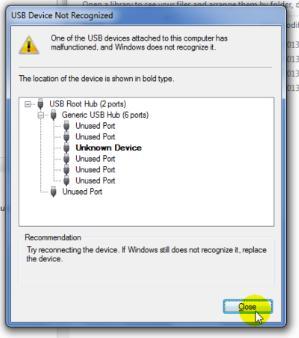
My Seaagate 1 TB external hard drive worked for about 7 months and now I get this message when I click on the drive

tumblr_mq0nu3wDmn1saa1x7o1_400.jpg


This happened once before to my Western Digital drive. It eventually went back to normal.

Does anyone know how I fix this?

Thanks,
Mark

===========================================

Also,
My 1 TB Western Digital ext. hard drive shows this message when plugged in
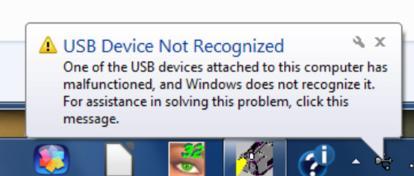
tumblr_mq0ptnQtQI1saa1x7o1_500.jpg


then this . . .

tumblr_mq0ptnQtQI1saa1x7o2_400.jpg


==============================================

Lastly,
My Iomega ext. hard drive (I forget what size it is, it is several years old) ....nothing happens when I plug it in


Should I uninstall my usb drives or do something else?

I went into device manager and clicked on each usb drive. I did 'update driver software' for each drive.
 
Do the drives mount on another computer? So many drives fouling up in a short time is unusual, and the fault might be with the USB controller on your PC.

If not, do the drives get moved around much? Do they get very hot in a confined space? Is there a lot of dust around them?
 
The drives are connected to one computer

If it is the usb controller (what is that? where is that?, what should I do?

The drive sits on a shelf ion computer desk. Yeah, it sits next to the Iomega drive so there isnt much circulating air

Thanks
 
I called Seagate and they had me do chkdsk and it worked. 1.3TB of files recovered

There needs to be a better way to back up. Burning 1.3Tb of data onto blank 4 GB disks is a slow process.
 
There needs to be a better way to back up. Burning 1.3Tb of data onto blank 4 GB disks is a slow process.

Well, if you still want to go the optical disc route, you might move to Blu-Ray where capacity discs are 25 GB or 50 GB per. That's still a number of discs but it'll cut it down substantially at least. :)
 
I would say optical discs aren't the easiest, fastest or most efficient backup for lots of data, but I can understand that if you've had a recent bad drive experience, you might not want to embrace disk-based backup and if you're already using optical discs, the comfort and familiarity level is there. Backup software that can "span" discs can help you with automatically requesting the next disc. If you want to stick with optical, it might make sense for you to move to Blu-Ray and get more capacity. If your internal drive won't support Blu-Ray writing, you could replace that internal one with a new one or look at an external model (assuming you have USB3 or Fireware or e-SATA interfaces).

Anyway, in terms of the discs, the 50 GB capacity ones will be labelled "dual layer" or "DL" and most often state "50 GB" specifically, like the first disc in this image, so look for that if you want to go that route in the future. The standard single layer ones meanwhile will list a 25 GB capacity.

 
Trinket,
You're the man :-) thanks for the help
I really don't want to switch to blu ray just because I three hard drives that were suppose to be for back up and two have failed. but if they are unreliable, I guess I don't have a choice. Good thing I have a birthday coming up because I couldn't afford to buy a blu ray otherwise.

When I called Seagate and mentioned that it took several days to back up my files, she had heard of that happening before with their back up program. I used it as a hard drive and moved the files manually.
 
Back
Top