The Original Gay Porn Community - Free Gay Movies and Photos, Gay Porn Site Reviews and Adult Gay Forums

  • Welcome To Just Us Boys - The World's Largest Gay Message Board Community

    In order to comply with recent US Supreme Court rulings regarding adult content, we will be making changes in the future to require that you log into your account to view adult content on the site.
    If you do not have an account, please register.
    REGISTER HERE - 100% FREE / We Will Never Sell Your Info

    PLEASE READ: To register, turn off your VPN (iPhone users- disable iCloud); you can re-enable the VPN after registration. You must maintain an active email address on your account: disposable email addresses cannot be used to register.

FireFox Navigation Toolbar

Kyanimal

Keep Smilin'!! ;-)
JUB Supporter
50K Posts
Joined
Oct 9, 2004
Posts
65,807
Reaction score
141,810
Points
113
For some strange reason, my FireFox Nav Toolbar seems to have been turned off. It's still there, but it isn't automatically responding to anything.

When I open Fox, it goes to a blank page, and I have to hit my "Home" button to open my Home Page. Also, the "Back" and "Forward" buttons don't work.

I can still navigate, with the buttons on my mouse. I can also still type in addresses, and go there, but when I change pages, or sites, the address in the bar doesn't update/change. Also, the Nav pane is blank unless I click on the "Page" icon next to it to get the address of where I currently am.

I even updated to 4, hoping that would change things, but NO! #-o](*,)

The Nav bar in I.E. still works, so it's definitely something with Fox.

I've checked everything I can think of/find. Any ideas?????

THANKS!! (group)

Keep smilin'!! :kiss:(*8*)
Chaz ;)
 
The problem may be caused by an add-on, whether an extension or theme. To find out, exit the program completely; it must not be running. Then use Firefox's safe start, not to be confused with the computer's safe start.

Safe start bypasses all Firefox's add-ons/extensions, so if the problem is gone, it's safe to assume it was caused by an extension.

Safe-start instructions for Firefox running on Windows machines are here. Unfortunately, the extent of my knowledge of Windows machines starts and stops with the article in the Firefox knowledge base.
 
THANK YOU!! (group)

I'll definitely give that a "Go!" when I've got some time. I'm using I.E. for browsing right now, and can't wait to get back to "The Fox"! ..|

Keep smilin'!! :kiss:(*8*)
Chaz ;)
 
Ky, I thought I should mention the following, in case an errant extension isn't the problem and you happen to lose your bookmarks with any further working with Firefox's files (in particular the Profiles folder). Then I lost control of my fingers.

It might be best to back up your Firefox bookmarks, unless IE's are up to date and they can be imported from that.

If you're not sure how, and because these are Mac screen shots, the fonts and windows will look different, but those aside, the rest, according to Mozilla, allegedly is the same.

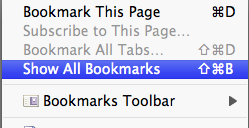
Go to Bookmarks in the menu bar and choose Show All Bookmarks:


attachment.php


Click the right-hand icon at the top:

attachment.php


Some add-on themes change the icon to a label with words to the effect of "Import and back up your bookmarks." (But one Firefox 4 add-on theme killed the Mac version's vertical scroll bars. Another killed the website-loading progress info at the bottom left of every page I went to, so if you're running a theme add-on, don't be surprised if the icon and/or label doesn't even show up. You might have to return to the default theme then restart Firefox — which may cure the problem anyway.)

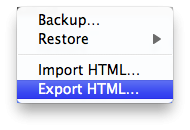
Choose Export HTML:

attachment.php

From there you can save the bookmarks file anywhere you easily can find it again.

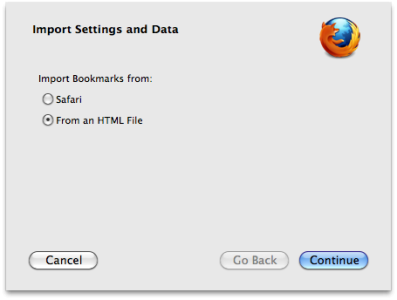
If and when you need to reload the bookmarks, go the same icon/label you used to export them, but this time choose Import HTML. Click on the "From an HTML file" radio button, navigate to the bookmarks backup file and click on it:

attachment.php


With the bookmarks backup safe and sound — and with Firefox not running — you can kill the possibly corrupt Profiles folder, with the only loss being the initial application setup and any site cookies that may have been handy to keep. (However, I'm not sure how to do this in Windows. Just trash it?)

With the old one gone, Firefox creates a new Profiles folder when it's restarted (likely in Windows, too), and you can import your bookmarks from the backup file if you need to.

By the way, killing the Profiles folder fixes nearly everything anyway — with the exception (in the Mac, anyway) of a screwed up cache — so every time I quit the app I use a script that quits Firefox and backs up the folder to another location. If anything goes wrong, the backup, including the properly working add-ons, the bookmarks and the cookies if I have saved any, is only as old as the previous session.

I leave the cache turned off anyway, thereby eliminating any potential problem it can create. Besides, it isn't slow-processor 1989 any more. I found the web to be no faster when it's turned on.
 

Attachments

  • 1.png
    1.png
    23.1 KB · Views: 108
  • 2.png
    2.png
    21.1 KB · Views: 108
  • 3.png
    3.png
    19.8 KB · Views: 111
  • 4.png
    4.png
    35.2 KB · Views: 102
Hey, Keelandson :wave:

It took me longer than I expected to carve out some time to deal with this puppy! My schedule suddenly became crowded, and I wanted about an hour I could set aside to go after this. I have not been purposefully ignoring this. I've been using Explorer and have been antsy to get "My Fox" back to normal! ](*,)

First thing I did was take your advice about backing up my bookmarks. Thank You! for that reminder, and your tutorial on how to do that. They're now residing on my desktop. :cool:

Before I got into trying a repair, I thought I'd take another look at my add-ons. Version 4 looks a lot different! However, it did tell me I needed to update Shockwave Flash. So, decided to do that before possibly getting into anything deeper. Downloaded the update to "My Documents", closed everything, and ran the install. It took about 5sec.! Then I relaunched "Fox" to get started on "the project". :help:

Guess what! "Fox" relaunched and ALL was O.K.! My "Nav Toolbar" is working again, and everything seems Fine! (!) ..|

I have NO idea if that update actually had anything to do with the "Fix", but I'm not looking any "Gift Horses" in the mouth! :badgrin:

I truly do appreciate your offering assistance with this! THANK YOU!, Buddy! (group)

Keep smilin'!! :kiss:(*8*)
Chaz :luv:
 
God only knows why Flash would be the culprit, but I'm glad it's working again.
 
Actually, it seems I spoke a bit too soon. #-o

When I launched "Fox" today, it was back to it's old tricks! ](*,)

Did some more troubleshooting, and found it was my "No Script" Add-on that was not playing nice anymore. Removed that sucker, and all seems good again! (!)

(I hope! :lol: )

Thanks again for all your help, Buddy! (group)

Keep smilin'!! :kiss:(*8*)
Chaz :luv:
 
Glad to hear you fixed the problem Chaz, it's always good to disable add-ons to see if that might be the issue cause half the time the add-on stuff gets screwy with other add-on plug-ins.
 
Back
Top