The Original Gay Porn Community - Free Gay Movies and Photos, Gay Porn Site Reviews and Adult Gay Forums

  • Welcome To Just Us Boys - The World's Largest Gay Message Board Community

    In order to comply with recent US Supreme Court rulings regarding adult content, we will be making changes in the future to require that you log into your account to view adult content on the site.
    If you do not have an account, please register.
    REGISTER HERE - 100% FREE / We Will Never Sell Your Info

    PLEASE READ: To register, turn off your VPN (iPhone users- disable iCloud); you can re-enable the VPN after registration. You must maintain an active email address on your account: disposable email addresses cannot be used to register.

Hard Drive Enclosure

GamerBear

( ̄(エ) ̄)
Joined
Apr 26, 2009
Posts
11,961
Reaction score
10
Points
38
Location
Portland
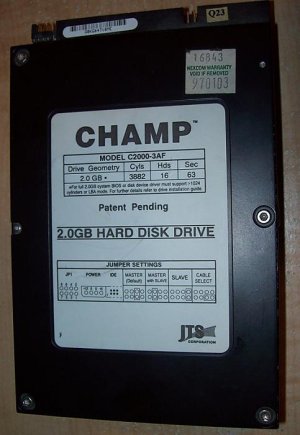
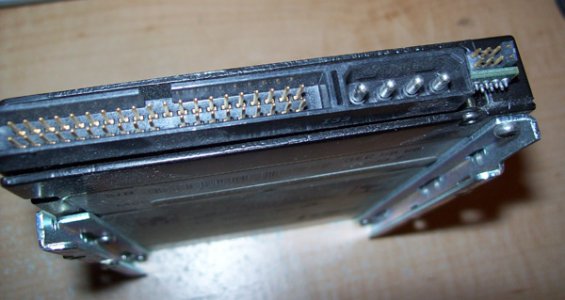
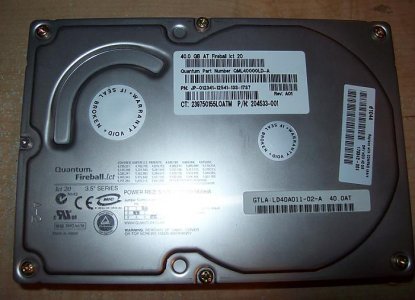
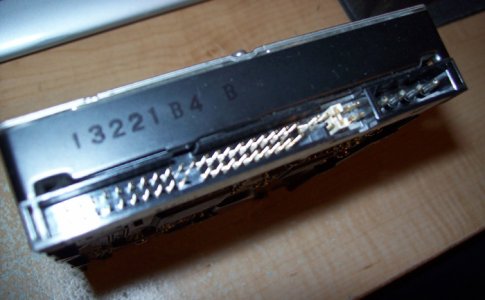
I've been meaning to ask this since my two first computers died, I figured that I would see if the old hard drives still work, but I need a Hard Drive Enclosure. I'm uncertain with what I need, I'm guessing I need a IDE Enclosure but here are some pictures. Also I'm not sure if I need a 2 inch or a 3.5 inch Enclosure they are pretty big but maybe you guys can determine it. Thanks in advance if anyone can help out.

1st one is from my first computer which only had 2GB hard drive in total but I'm hoping that there is some good data that I can recover or since it's almost 10 years old the drive might be dead.

attachment.php


attachment.php


2nd drive is 40GB and it was from my previous computer and I'm definitely sure I had a great deal of content on there that I'm still hoping is working cause I would hate to have lost these two hard drives.

attachment.php


attachment.php
 

Attachments

  • 103_4408.jpg
    103_4408.jpg
    44.2 KB · Views: 220
  • 103_4409.jpg
    103_4409.jpg
    96.8 KB · Views: 219
  • 103_4412.jpg
    103_4412.jpg
    52.2 KB · Views: 226
  • 103_4413.jpg
    103_4413.jpg
    119.5 KB · Views: 224
First thing OMG OMG OMG you have a 2gig HDD ...

Anyways, desktop computers usually require a 3.5 inch enclosure where as laptops would need a 2 inc enclosure.

As the 2gig HDD is over 10 years old I would just buy the one 3.5 inch enclosure and see what is on the 2gig first and importantly if it is usable.
 
As the 2gig HDD is over 10 years old I would just buy the one 3.5 inch enclosure and see what is on the 2gig first and importantly if it is usable.

Good advice. You can buy a 4GB USB stick cheaper than a case for your 2GB drive.

You should be able to buy a cheap 3.5" IDE enclosure online for 20-30 dollars.
Put the 2GB drive in it, copy the data off, then swap it for the 40GB drive and put the 2GB drive in the bin.
 
Good advice. You can buy a 4GB USB stick cheaper than a case for your 2GB drive.

You should be able to buy a cheap 3.5" IDE enclosure online for 20-30 dollars.
Put the 2GB drive in it, copy the data off, then swap it for the 40GB drive and put the 2GB drive in the bin.

I was looking for something similar (only for a larger hard drive) and found this link:

http://www.unityelectronics.com/product-product_id/5356/m/Coworld/p/ENCL-1P-CWSD

I also already have this devise which may be easier if you don't want a permanent enclosure for these drives:

http://www.apricorn.com/product_detail.php?type=family&id=39

I got one on eBay cheap and it allows me to read a hard drive without installing it in a case.
 
If you just want to transfer the data (you do not really want to use a 2gb drive, do you?) you don't need an enclosure ..
 
Heck......you can buy a 16 gig flash drive for under $30 right now....... :D
 
If your motherboard still has an IDE connector and power cable, you don't even need that adapter.
 
If your motherboard still has an IDE connector and power cable, you don't even need that adapter.

Well my new computer only has a SATA connector with the new hard drive so I need an IDE adapter that will work as a USB drive.
 
Well my new computer only has a SATA connector with the new hard drive so I need an IDE adapter that will work as a USB drive.

are you sure it only has a SATA connector? i've not seen many motherboards that do not have at least one IDE port on it (actually I don't think I've seen any that didn't have one). There might night be a ribbon cable to it, but surely you have one. if you do, then all you need is a ribbon cable and just plug it in.

if your know the make and model of your computer we might be able to look it up. or if you know the motherboard make and model that would help too.
 
are you sure it only has a SATA connector? i've not seen many motherboards that do not have at least one IDE port on it (actually I don't think I've seen any that didn't have one). There might night be a ribbon cable to it, but surely you have one. if you do, then all you need is a ribbon cable and just plug it in.

if your know the make and model of your computer we might be able to look it up. or if you know the motherboard make and model that would help too.

I'm positive because there were no other connectors, if there were IDE connectors I would of hooked up the hard drives to the computer I'm using now.
 
/\ i don't mean is there a lose IDE cable, i mean is there an IDE connection on your motherboard. there should be and may be it just doesn't have a ribbon cable plugged into it. if it does have an IDE connector you can just plug in an IDE ribbon cable and then boom you could connect your IDE drives. What is your CD/DVD drive connected to? is it SATA also?
 
/ i don't mean is there a lose IDE cable, i mean is there an IDE connection on your motherboard. there should be and may be it just doesn't have a ribbon cable plugged into it. if it does have an IDE connector you can just plug in an IDE ribbon cable and then boom you could connect your IDE drives. What is your CD/DVD drive connected to? is it SATA also?

No, there are no IDE connection on the motherboard, even if it did I don't have the cables for it.
 
Ok thats pretty old technology you have there and you say
since my two first computers died
. Now do you know why your computers died ? Is it at all possible they died because the HD's died ? Since you state you dont like opening up your computer, how did you get the HD's out ? Do you think you'll handle using the enclosures easier ? Your cheapest option is as Mike has suggested and as asked earlier by him what is your computer? IDE cables are laying in junkyards all over the planet and you may not have to buy one. It is also possible that you'll have to study HD forensics to finally retrieve the data
 
So it pretty much won't hurt to use that adapter which was my first choice.
 
Back
Top