The Original Gay Porn Community - Free Gay Movies and Photos, Gay Porn Site Reviews and Adult Gay Forums

  • Welcome To Just Us Boys - The World's Largest Gay Message Board Community

    In order to comply with recent US Supreme Court rulings regarding adult content, we will be making changes in the future to require that you log into your account to view adult content on the site.
    If you do not have an account, please register.
    REGISTER HERE - 100% FREE / We Will Never Sell Your Info

    PLEASE READ: To register, turn off your VPN (iPhone users- disable iCloud); you can re-enable the VPN after registration. You must maintain an active email address on your account: disposable email addresses cannot be used to register.

Help Hooking DVD Player To Dish?

  • Thread starter Thread starter moonrabbit
  • Start date Start date
M

moonrabbit

Guest
Hello everyone. I was wondering if you guys can help me. How can I hook my DVD player to my Dish box? I'm not sure which holes the red, white, and yellow cords belong in since the Dish box has two of each color. Also, I don't know which station to have it on if I want to watch a DVD. I've tried everything and nothing seems to work.
 
I'm unable to hook the DVD player to my TV since it doesn't have a spot to put the cords in. I've had to hook my DVD player to the VCR. It's now a problem because I have copy protected DVDs that won't work while the player is hooked to the VCR. The only thing left for me to do is to hook it up to the Dish box somehow.
 
What your're describing is a very atypical setup. In 99% of cases you want your DVD player to hook directly to your TV. The ONLY way you could even hook it to a Dish Box is if your box has Composite (red/white/yellow) INPUTS, and can convert that signal and display it on your TV. To do that you'd have to change the Input on your Box, and most Dish boxes aren't really designed for that at all.

You don't have any free Composite Inputs on your TV? Most TVs come with at least 2-3 Composite inputs, and most bigger TV/HDTVs have 4-5 Composite Inputs, as well as a whole host of other inputs. Is this a particularly old TV?

Short of buying a new TV with the neccessary inputs (which i'd actually recommend if your TV is ancient) then you really need some kind of switch box so you can connect your DVD player / VCR / whatever all to the same input on your TV and use them one at a time.
 
We have our Dish connected with cables to the DVD/VCR recorder. Then from the DVD/VCR to the TV. I think the antenna is plugged into the DVD too. You can watch each separately using Ch. 3, however if you want a sharp picture using the S-Video cable. We have to put it on input 1 and then turn on the DVD/VCR no matter which device we want to use. Hope that helps.
 
We have our Dish connected with cables to the DVD/VCR recorder. Then from the DVD/VCR to the TV. I think the antenna is plugged into the DVD too. You can watch each separately using Ch. 3, however if you want a sharp picture using the S-Video cable. We have to put it on input 1 and then turn on the DVD/VCR no matter which device we want to use. Hope that helps.

Yours is not an uncommon setup, but what he wants to do is different, he says he wants to go from the DVD/VCR to the Dish Box, and THEN to the TV. Which is uncommon and not a good solution unfortunately.
 
I got my TV a few years ago, so it's not that old. I'm saving up for a trip so I can't afford a new one right now. All I want is to be able to watch my DVDs without Macrovision distorting the screen. This is why I hate copy protected DVDs.
 
I got my TV a few years ago, so it's not that old. I'm saving up for a trip so I can't afford a new one right now. All I want is to be able to watch my DVDs without Macrovision distorting the screen. This is why I hate copy protected DVDs.

Is your TV a widescreen format TV? It shouldn't matter if the DVD is copy protected or not, as long as your output goes directly to the TV, the TV itself controls what aspect the video is presented in. If you just got the TV recently, there's no way it has just one set of Composite inputs.

Why don't you tell us exactly what inputs are on the back of your TV (used or not) and what devices you want to hook up, and let us see if we can't devise a setup that will accomodate all of them.
 
Why don't you tell us exactly what inputs are on the back of your TV (used or not) and what devices you want to hook up, and let us see if we can't devise a setup that will accomodate all of them.[/QUOTE]

There's nothing on the back of my TV. Only a spot for the cable cord to be hooked up.
 
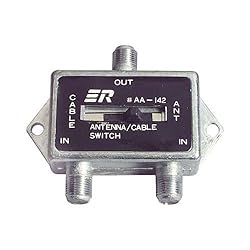
You could always use an A-B switch
B0002ZPIQ4.01-A385A0XNQBW8HY._AA250_SCLZZZZZZZ_.jpg
 
There's nothing on the back of my TV. Only a spot for the cable cord to be hooked up.

Then it really isn't a new TV is it? I can't think of any TV in the last 10 years that wouldn't have come with a single set of composite inputs. And if it's true, and you don't have any, then it's not a TV worth watching your Dish or DVD player on anyways :(, sorry.
 
Sounds like you will need a switcher box then. Radio shack has an a b switcher for like 20 bucks that has a remote control.

Yes but that won't solve his problem. DVD players don't have coaxial outputs, only Composite, Component, or HDMI. So if he wants to go from the composite output on his DVD player to the Coaxial input on his TV, he can't just use a switcher. His only choice would be:

DVD Player Composite Output > RF (Radio Frequency) Modulator > Coaxial > Switcher > TV Coaxial Input.

Obviously Composite cables won't fit into a Coaxial input, and you can't just buy an adapter to fit them together, they're incompatible unless you use an RF modulator to change the Composite signal into something the TV tuner can read via the Coaxial input.

So not only would you need a $20 switcher, but you'd need a $40 RF modulator for EVERY device you want to hook up to that TV that doesn't have a coaxial output. Not to mention $20-$30 worth of coaxial cables to go from the switchers and modulators to the TV.

Now i don't know how big of a TV we're talking here, but if you're going to spend $100 on all that why not pay $130 for a new 20" Flat Tube TV with all the composite and component inputs you'd need?
 
Then it really isn't a new TV is it? I can't think of any TV in the last 10 years that wouldn't have come with a single set of composite inputs. And if it's true, and you don't have any, then it's not a TV worth watching your Dish or DVD player on anyways :(, sorry.

I haven't been online, so that's why my reply is so late. I never said my TV was new. I said it wasn't old. Big difference. Also, the problem isn't with watching my Dish. It's being able to watch DVDs without copy protection. I know you're trying to be helpful, but I'm not throwing out a perfectly good TV.
 
How old is wasn't old is the main point? Regaurdless, without the proper connections, there just isn't anything you can do. At the very least there's no solution i can offer you, sorry. You need a TV with better connections, that's the bottom line.
 
Back
Top