

The Original Gay Porn Community - Free Gay Movies and Photos, Gay Porn Site Reviews and Adult Gay Forums

  • Welcome To Just Us Boys - The World's Largest Gay Message Board Community

    In order to comply with recent US Supreme Court rulings regarding adult content, we will be making changes in the future to require that you log into your account to view adult content on the site.
    If you do not have an account, please register.
    REGISTER HERE - 100% FREE / We Will Never Sell Your Info

    PLEASE READ: To register, turn off your VPN (iPhone users- disable iCloud); you can re-enable the VPN after registration. You must maintain an active email address on your account: disposable email addresses cannot be used to register.

Help: iMac question

skips

Sex God
Joined
Dec 29, 2010
Posts
980
Reaction score
1
Points
16
So I recently found an iMac at a thrift store for $20 (pic below)
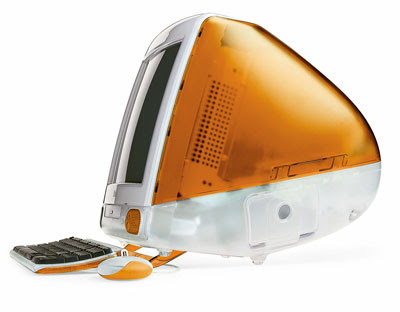
tangerine.jpg


It's the tray-loading model, with a 333 MHz PowerPC 750 (G3) processor, 512k backside level 2 cache, 32 MB of RAM, a 6.0 GB EIDE hard drive, and ATI Rage Pro Turbo graphics with 6 MB of VRAM. The installed OS is MacOS 9.2.2 and the browser is IE for Mac 5.2, I believe. I'm not too knowledgeable in tech in general, and especially ignorant in all things Apple (save the iPod ;))

What I'm wondering is which is the latest OS that I can safely run on this? Not that it's terribly important as it'll mostly be used for web-browsing. This brings me to my next question: Which browser should I go with? I'm not going to be using IE, so any other ideas?

Any other advice, opinions or general knowledge info would be greatly appreciated. ..|

Thanks!
 
Windex,

Neat little rigs they are...

The G3 iMac can run OSX up to 10.4.

The limiting factor on the unit you've got is the 32MB of ram; OSX would be happiest with 512MB.

As to browsers... being as it's a PowerPC running OS9 your options are very limited...

hxxp://guides.macrumors.com/Web_Browsers_for_the_Mac#Mac_OS_9_browser

Best of luck,

B

P.S. If you do pursue an OSX 10.4 upgrade; the G3 has only a CD-ROM drive, ensure the install media is CD.
 
The absolute minimum amount of RAM required to run OS X 10.0 or 10.1 is 64MB, with 128MB being the recommended minimum.

If you can upgrade the RAM to 128 or 256MB, you can run up to os 10.4 on that machine.
 
I guess I'll do some browsing around on eBay for memory, and possibly some OS X 10.x shopping as well. Thanks for your help, fellas! :wave:
 
IMO any upgrades are a waste of money. Mac OS X will slow that machine to a crawl. It should be fine with what it has now. IE is the best browser you're going to find for OS 9.

The only issue will be pages rendering strangely in such an old browser, but it is about a 12 year old computer.

Have fun with it!

We got some newer ones than that my mom's school sold for $10 each, and we ended up donating them to good will. My fear was that they would do a crazy mark up on them.
 
I guess I'll do some browsing around on eBay for memory, and possibly some OS X 10.x shopping as well. Thanks for your help, fellas! :wave:

The problem with upgrading the OS on a computer like this is the cost. You will pay 4x to 6x as much for a (legal) copy of OS X 10.4 as you paid for the computer - and that's for an OS that dates to early 2005! That hardly seems worth it.


If you like to experiment, there are some Linux distros that still support the PPC. That is the only way you can get a recent/updated OS for a machine like this. You would get a full suite of updated application software including the latest browsers, games, photo editors, office software, and media players. And Linux is FREE, of course! You may need to upgrade the RAM on your machine for some of these, however (check the requirements of each distro).


Gentoo is a great distro which just released a new build for the PPC last month:

http://mirrors.kernel.org/gentoo/releases/ppc/autobuilds/current-iso/


Yellow Dog Linux is based on Red Hat Enterprise Linux (that's a good thing) and has long specialized in PPC architectures:

http://www.yellowdoglinux.com/


Also, Debian is still supporting the PPC platform:

http://www.debian.org/ports/powerpc/

http://www.debian.org/ports/powerpc/inst/install


If you want to try this route for an updated OS for this computer, but you don't understand what you need to do, let us know in this forum. We will try to help you.

BTW, cool find! ..| I love putting old computers like this back to useful work!
 
Be careful if you load it with OS X! I recall something about it needing a firmware update first, because without it, you can fry some of the circuitry.
 
That machine will be happiest with Mac OS 9.2.2. Any version of Mac OS X will be rather slow; the oldest machine I'd recommend for OS X would be the blue and white Power Macintosh G3.

Running OS X on that would require a memory expansion (PC66 SO-DIMM modules, 2 x 256 MB for a maximum of 512 MB) and a hard disk upgrade. OS X's graphics will always be slow as that model only supports software rendering (on a slow processor). Same goes for all non-AGP Macs.

So, not worth it. You'd be better off with a G4 or so. You could probably find an OS X-ready one for the same it would cost you to upgrade this one.
 
. . . the oldest machine I'd recommend for OS X would be the blue and white Power Macintosh G3.
Watching paint dry is less boring than running OS X on a G3.

I still have one, gathering dust, a 350 mhz machine that ran Windows 95 through Soft PC or SoftWindows (I can't remember which) faster than it ran OS 10.2.

It's worth noting, too, that OS 9 needs a lot of hand-holding. I wouldn't run it now without Norton's Disk Doctor of the same vintage (manufactured before Norton slid into the sludge).
 
Ok, fellas. I looked at some of the Linux OS flavors online today and I'm kinda thinking either Slackware or Yellow Dog. Anybody know which would be a better fit? Like I mentioned earlier, the majority of the work would be cruising the interwebz, some word processing, and I guess having GIMP and Open Office wouldn't suck.

Thanks everybody for all of your helpful advice, opinions, insights and shared experiences. I really appreciate it all. ..|
 
^ It's not like you need to pick only one - they're free! (You could install both, alongside Mac OS 0.2.2).

But, I would recommend starting with Yellow Dog, just because it's based on Red Hat Enterprise Linux. I think you'll need to upgrade your RAM for that, though.

Here's a guy booting Yellow Dog 6.1 on an iMac G3 (192 MB RAM). Boot seems incredibly slow on this old machine:
[ame]http://www.youtube.com/watch?v=FdPgsmXxT84[/ame]

Here is Yellow Dog on an iBook G3:
[ame]http://www.youtube.com/watch?v=2427l7b6F54[/ame]

Whatever you choose to install, make sure NOT to download the iso for a DVD, since you don't have a DVD drive on your G3. I'm not sure, but I don't believe this computer is capable of booting from an external (usb) DVD drive. Looks like Yellow Dog is > 4 GB, so you're going to end up with about 6 installation CDs.

I happen to like GIMP. I do not think the controls for GIMP are organized particularly logically, but you learn how to do things after a little while, and it is quite powerful. Also, I think Open Office is a pretty decent office suite. I have never encountered a document need that Open Office could not handle.
 
Here's another thought.

I just discovered there is a beta of a PPC version of Puppy Linux! (!) It's an early beta, and it looks like it hasn't been updated for quite awhile. But, it's only 13.9 MB in total, and it will probably run (if you can get it to run) in your measly 32 MB of RAM, without any upgrade. Also, Puppy Linux will run entirely from the CD drive, so you can test to see if everything runs okay on the iMac before you install it to the hard drive.

If you can get Puppy to run, it probably really is your best option for this computer. Puppy is a great Linux distro - easy to use, nice GUI interface, reasonably fast even on ancient hardware like this, and up to date with the latest browsers and application software. Hardware requirements are very, very minimal. And it's FREE, of course!

http://powerpup.yi.org/

The goal of this project is to make a Lightweight Linux System that works like Puppy, runs completely in ram and can save changes to a hard drive or usb stick, all in a PPC environment. Because there are plenty of good G3 macs and such out there, but Mac OS 9 is too old, and sometimes Mac OS X is slow. Puppy is ideal for these kind of computers.
 
Just wanted to thank you all again for the continuous feedback and the wide variety of options! ..|

What I've decided to do is to upgrade the RAM and to keep my options open for now. I'm doing a lot of investigative research on operating systems at this point but I'll let you know how things end up. Thanks again. :-)
 
Quick update: I'm thinking of going with Linux MintPPC for now. I may end up trying one (or more) other Linux distros somewhere in the new feature, but for now this seems to fit most of the criteria that I was looking for in an OS. I appreciate all of the helpful info that you've shared with me, so thanks again!
 
Excellent choice! (!)

I didn't even know MintPPC existed!

Mint is a variation of Ubuntu. Ubuntu gave up on its PPC version about three years ago, so I'm surprised Mint continues to maintain this.
 
^ I was actually going to go with either YDL or Xubuntu but came across MintPPC while searching in an obscure Ubuntu forum. I couldn't believe it when I read that they'd just released an update a few months back. I'm going to try to install it sometime this week as it seems like it may take awhile to do so, judging by the info I was able to gather.

On a completely unrelated note, I also found Peppermint Linux OS and installed Peppermint Ice on my laptop, alongside Windows 7. I can't believe I was so hesitant to give Linux a try for all these years. What was I thinking?!?
 
mint is great and really fast :) not as much eyecandy as ubuntu or kubuntu, but when you are not going for this .. :)

linux IS a great os, and it is really not that difficult nowadays. if it weren't for so many compatibility issues i'd be using nothing else :)
 
Back
Top


