The Original Gay Porn Community - Free Gay Movies and Photos, Gay Porn Site Reviews and Adult Gay Forums

  • Welcome To Just Us Boys - The World's Largest Gay Message Board Community

    In order to comply with recent US Supreme Court rulings regarding adult content, we will be making changes in the future to require that you log into your account to view adult content on the site.
    If you do not have an account, please register.
    REGISTER HERE - 100% FREE / We Will Never Sell Your Info

    PLEASE READ: To register, turn off your VPN (iPhone users- disable iCloud); you can re-enable the VPN after registration. You must maintain an active email address on your account: disposable email addresses cannot be used to register.

How many tabs are "too many" in a browser

cgymike

JUB Addict
Banned
Joined
Jun 30, 2012
Posts
7,191
Reaction score
0
Points
0
Location
Seattle
Tabbing is a great thing but I find I leave a lot open. I understand the browser "hibernates" dormant tabs but you still have the executable instance for each tab so presumably it still uses resources. I use Chrome (OK I know what you are going to say but this isn't about choice of browser or platform).
I just want to know if 26 tabs is "definitely" too much and a strain on system resources.
I have noticed dormant tabs sometimes do not reload or take forever so I am forced to close them and re-open using the "recently closed" link in the lower right corner of a new tab (in Chrome).
Now, you may ask WHY anyone would need 26 tabs open ;) but I just want the technicals here.

Thanks.

Vista SP2 3GB Ram
 
I had a friend who had hundreds of tabs, and soon or later the browser crashed...
 
26 is not too many. at one job I had, which was a web based servicing company, we had over 60 tabs open at one time all day, everyday and it was just fine.
 
I usually open a few but not too many max 20. But I close them once I am finished with them. But thats with my Pc though. I sued to use the laptop a lot and it hangs if I open too much. My housemate is very crazy. She opens like 40+ lol.
 
I open a whole bunch of stuff I plan to skim with one click and that's probably 30 tabs right there. Safari does just fine with that.
 
It depends on how much memory your computer has. Try this - open up Chrome (or any web browser) and fire up a few tabs - say 15 or 20 or so. Then open up Task Manager - quickest way is to hold down simultaneously CTRL + SHIFT + ESC. It may take a few seconds to open. Then go to the Processes tab and you should see something like "chrome. e x e" (in the case of Chrome) or "iexplore. e x e" in the case of Internet Explorer. Look at how much memory it takes up, and then compare it to how much you have in capacity. 1 GB of RAM is 1,048,576 KB (or 1,024 MB), so multiply that by 3 and that's the most your computer can handle before it starts paging memory to your hard drive. Once that happens, things get enormously slow.

One tip to free up memory is to close running programs, especially ones that run in the background. These normally stay in your notification area - the area of your taskbar in the bottom-right near the clock. You can usually hover over each icon to see what it is, and then right-click and choose "Exit" or "Quit" to close them down. Just make sure you know what you're closing; everything should normally start up and reappear when you either log out or restart your computer.

EDIT: The ". e x e" got censored by the forum - these programs appear without the spaces between the ".", "e", "x", and "e".
 
It depends on how much memory your computer has. Try this - open up Chrome (or any web browser) and fire up a few tabs - say 15 or 20 or so. Then open up Task Manager - quickest way is to hold down simultaneously CTRL + SHIFT + ESC. It may take a few seconds to open. Then go to the Processes tab and you should see something like "chrome. e x e" (in the case of Chrome) or "iexplore. e x e" in the case of Internet Explorer. Look at how much memory it takes up, and then compare it to how much you have in capacity. 1 GB of RAM is 1,048,576 KB (or 1,024 MB), so multiply that by 3 and that's the most your computer can handle before it starts paging memory to your hard drive. Once that happens, things get enormously slow.

One tip to free up memory is to close running programs, especially ones that run in the background. These normally stay in your notification area - the area of your taskbar in the bottom-right near the clock. You can usually hover over each icon to see what it is, and then right-click and choose "Exit" or "Quit" to close them down. Just make sure you know what you're closing; everything should normally start up and reappear when you either log out or restart your computer.

EDIT: The ". e x e" got censored by the forum - these programs appear without the spaces between the ".", "e", "x", and "e".
Thanks ...your response is the best so far.

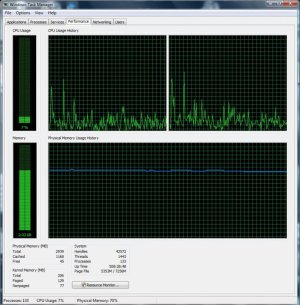
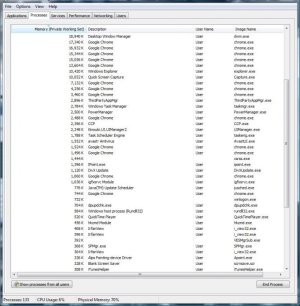
Here a few screen caps though couldn't get all the chrome execs to show...
Resource.jpgResource2.jpg
 
It depends on how much memory your computer has...

Exactly, and great answer!. Each tab will consume some resources. If you open the Google search page in 20 tabs, you still probably wouldn't have an issue (haven't tried it, but you know...). If you open 20 different instances of a site as complex as facebook, you might see problems unless you have sufficient RAM.

Each browser may treat tabs differently, so you might see different behaviour across Chrome, Safari, IE and Firefox. If browser choice is less important that having a heap of tabs open, maybe play with the different browsers.

As with anything though, if you're running iTunes and Outlook and a heap of other stuff alongside your browser, each of those is hogging some RAM that your tabs can no longer nom on. Keep that in mind if you want to improve performance.
 
Yes and additionally shockwave flash sites per tab are the real problem in Chrome as it is notorious for not handling Shockwave....
 
That's crazy with only 3 GB of RAM how you manage that feat. I have 6 measly tabs open, iTunes on, and that is consuming 4 GB of RAM.

I upgraded RAM from 4 to 8 a while back.
 
Yeah, I think I need to scrap this laptop soon. 8 GB of RAM sounds about right! Won't even accept 8GB of RAM...
 
I wonder if Chrome will ever get Shockwave right...it should be obsolete eventually anyway.
 
I think I discovered the problem and it was Ad Blocker (Plus) NOT the RAM because last night Chrome crashed finally and when I restarted the tabs "could not be recovered" and I noticed ad block was not loaded in chrome either. It's a bit like when you do a registry clean and your browser is wiped. But the history file is there so I was able to reconstruct my tabs. It still COULD be one of the tabs but I doubt it. RAM usage now a LITTLE less than before.

So my conclusion is that the number of tabs open is unimportant unless an extreme number (would have to be over 40)....and I can't see the need for that.

Matter sorted.

And no it's not Windows fault FOR ONCE.
 
Back
Top