The Original Gay Porn Community - Free Gay Movies and Photos, Gay Porn Site Reviews and Adult Gay Forums



-
Welcome To Just Us Boys - The World's Largest Gay Message Board Community
In order to comply with recent US Supreme Court rulings regarding adult content, we will be making changes in the future to require that you log into your account to view adult content on the site.
If you do not have an account, please register.
REGISTER HERE - 100% FREE / We Will Never Sell Your InfoPLEASE READ: To register, turn off your VPN (iPhone users- disable iCloud); you can re-enable the VPN after registration. You must maintain an active email address on your account: disposable email addresses cannot be used to register.
You are using an out of date browser. It may not display this or other websites correctly.
You should upgrade or use an alternative browser.
You should upgrade or use an alternative browser.
Issues with the new forum? Check in here for assistance.
- Thread starter KaraBulut
- Start date


Is it possible to display latest posts first in a thread? It was possible to choose the order before. Now when I click on a thread it takes me to the page 1 which contains the oldest posts.
I believe there is something to do this so it shows on each thread but I haven't added it yet.
Last edited:

After arriving on the first page of a thread, you can click the “Jump to new” button on the top right of the page. (I noticed the system currently assumes that no posts have been read since mid-August, but that will reset automatically as new posts are added.)Is it possible to display latest posts first in a thread? It was possible to choose the order before. Now when I click on a thread it takes me to the page 1 which contains the oldest posts.
If you are viewing the list of threads in a sub-forum, you can click the link on the far right side of the thread listing to go directly to the most recent post in a particular thread.
You will also receive Alerts (bell icon upper right of forum page). The alert will provide a link directly to the most recent activity for threads you are watching.
From your news feed; a link will take you directly to the described post.
Last edited:

- Joined
- Mar 24, 2020
- Posts
- 2,423
- Reaction score
- 1,107
- Points
- 113
Very nice - clean - easy to use - I like it - well done


It's a hell of a lot easier to attach a file! Thank YOU!
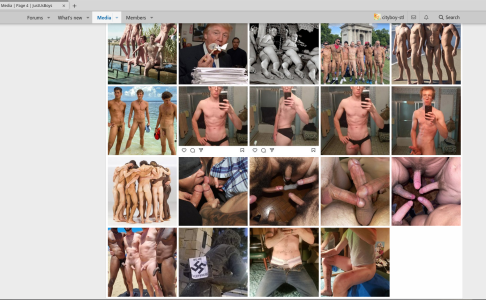
So just clicking around, I clicked on "Media" and get what appears to be a collection of everyone's photo albums. Among them (in this screenshot) is this photo of a swastika. Now, I'm not complaining about the photo. It is in my photo album (as is the photo of Trump eating documents, lol). I used the swastika photo in a couple of CE&P posts about the prevalence of far right groups etc. In the context of the CE&P posts, the photo works. However, this swastika photo just stand alone in the middle of a bunch of hot guys and dicks without context is likely to be viewed as offensive Nazi propaganda. So....when I put something in my photo album that I use for a specific post, is there a way I can tag it, so it won't show up in general photo album lists that might piss people off?
Maybe this happened with the old board too, and I didn't notice?
So just clicking around, I clicked on "Media" and get what appears to be a collection of everyone's photo albums. Among them (in this screenshot) is this photo of a swastika. Now, I'm not complaining about the photo. It is in my photo album (as is the photo of Trump eating documents, lol). I used the swastika photo in a couple of CE&P posts about the prevalence of far right groups etc. In the context of the CE&P posts, the photo works. However, this swastika photo just stand alone in the middle of a bunch of hot guys and dicks without context is likely to be viewed as offensive Nazi propaganda. So....when I put something in my photo album that I use for a specific post, is there a way I can tag it, so it won't show up in general photo album lists that might piss people off?
Maybe this happened with the old board too, and I didn't notice?
Attachments
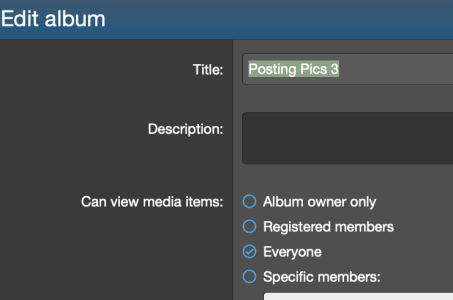
Yeah, if somebody had browsed your album on the old board, it would be visible. Try changing your CAN VIEW settings on the album to "Album owner only." I think a link to the image will continue to work for the post, but the album will not be visible.It's a hell of a lot easier to attach a file! Thank YOU!
So just clicking around, I clicked on "Media" and get what appears to be a collection of everyone's photo albums. Among them (in this screenshot) is this photo of a swastika. Now, I'm not complaining about the photo. It is in my photo album (as is the photo of Trump eating documents, lol). I used the swastika photo in a couple of CE&P posts about the prevalence of far right groups etc. In the context of the CE&P posts, the photo works. However, this swastika photo just stand alone in the middle of a bunch of hot guys and dicks without context is likely to be viewed as offensive Nazi propaganda. So....when I put something in my photo album that I use for a specific post, is there a way I can tag it, so it won't show up in general photo album lists that might piss people off?
Maybe this happened with the old board too, and I didn't notice?
Attachments

- Joined
- Dec 31, 2007
- Posts
- 63,339
- Reaction score
- 16,745
- Points
- 113
Check now.I can't see the Mod forums.










purina
Guest
- Joined
- Dec 5, 2006
- Posts
- 3,210
- Reaction score
- 670
- Points
- 113
So far, it sucks...and I don't mean that in a good way. Clicking on a thread title takes Mr to the first post instead of the first new post. Many of the pics in the kink forum are missing that were showing before. And my humanity is repeatedly questioned. XenForo can go fuck itself!


LeicsDom
JUB Addict
Got it

BTW there is now emoji reactions in each thread. These reactions will show up on each thread once someone actually does a reaction. It will show the top three reactions for each thread. I'm going to try to upload some more naughty reactions as well haha.

Clicking on a thread title takes Mr to the first post instead of the first new post.


How do I increase the number of posts per page, so I don't have to keep changing pages so often?
We have the default set at 25 which is quite a bit. We don't want to go as high as we did before. I don't think there is individual user adjustment for it.
Yeah, if somebody had browsed your album on the old board, it would be visible. Try changing your CAN VIEW settings on the album to "Album owner only." I think a link to the image will continue to work for the post, but the album will not be visible.
Ok, I made a "Test Album" and set it to Owner Only. Can everyone see this guy?

Oopse. Nope that didn't work.Ok, I made a "Test Album" and set it to Owner Only. Can everyone see this guy?
Bummer.Oopse. Nope that didn't work.
Yeah, I know if someone browsed the album, they could see the photos.
But it looks like, when you click the Media button, it shows you a collection of photos from everyone's albums. Which may include stuff like I described. I guess we have to live with it.
Additionally:
There are photos in posts that I linked with IMG tags. Those photos are not showing up in those posts, but they're in the albums. Don't know that is fixable?
Note: I like to upload to an album and use IMG tags because it shows the picture full size in the post rather than a smaller thumbnail.


