The Original Gay Porn Community - Free Gay Movies and Photos, Gay Porn Site Reviews and Adult Gay Forums

  • Welcome To Just Us Boys - The World's Largest Gay Message Board Community

    In order to comply with recent US Supreme Court rulings regarding adult content, we will be making changes in the future to require that you log into your account to view adult content on the site.
    If you do not have an account, please register.
    REGISTER HERE - 100% FREE / We Will Never Sell Your Info

    PLEASE READ: To register, turn off your VPN (iPhone users- disable iCloud); you can re-enable the VPN after registration. You must maintain an active email address on your account: disposable email addresses cannot be used to register.

Java update and 'Ask' toolbar

gsdx

Festina lente
JUB Supporter
50K Posts
Joined
Oct 10, 2003
Posts
57,249
Reaction score
1,622
Points
113
Location
Peterborough Ontario
Java did an update the other day and twice since then (on opening Firefox first thing in the morning), I've been asked if I want to install an 'Ask' toolbar. There is no 'No' option. There isn't even a 'Cancel' option. There is only a box to click in so the toolbar will install.

Unless there is another way to stop this, the only way I can see is to install the toolbar and then uninstall it again.

Shame on Java for doing this. No other program should be mandatory during an installation.
 
I hate all the added search tool bars companies try to shove down my throat.

There's usually an option to express install, or advanced install (not 100% on terminology). I always click the advanced so I can pick and choose what's being installed.

... and like you, I've had to uninstall numerous search bars. On the bright side, once uninstalled they send you to their website where they ask why it was removed. I tell them very rudely how much I hate the damn things, and them forcing them on me.
 
If possible, try to close the window by clicking the close button in the title bar. Sometimes the cancel button is disabled, or nonexistent, but you may still be able to close the window itself using the close button, thereby getting past it by not having to click "Yes" or "OK". This isn't guaranteed to work though, but it is something you could try.

I make it a point to keep my systems very clean. I don't use toolbars or too many third-party programs; the ones I do use, I make sure they don't install anything beyond what's necessary to run them. If I can't install a third-party program without it "requiring" it install something I'd rather not have, I just look for another alternative. Unfortunately a lot of things run on Java so finding an alternative to those things can be difficult, but it's worth a try to have a clean system.

Also, if you're running on Windows Vista or later (Windows 7 or Windows 8), make sure you have User Account Control enabled so that programs can't sneakily install things without your permission! I had to clean up a client's computer of nasty programs and discovered she didn't have UAC activated at all. Don't believe the Mac vs PC ads; UAC is there to protect you!
 
I had to update Java at work too and there was a box to untick the Ask toolbar.
 
Yes, I am confused. I am very pissed of at any program that includes some fucking toolbar, but at least with Java, you can disable it.
 
I had to update Java at work too and there was a box to untick the Ask toolbar.

I didn't get that option, or, at least, I didn't notice it. I'm usually very alert to these 'add-ons' and I rarely ever allow them to be installed.

Oh, and the request when I open Firefox is a webpage request and the only way out of it is to close the browser page. I'll install it tomorrow and delete it immediately.

They take great liberties in cyberspace. They wouldn't get away with it in real life. I mean, imagine going to buy groceries and, when you're checking out, the checkout clerk keeps piling stuff the belt on the chance that you might want to buy it.
 
I didn't get that option, or, at least, I didn't notice it. I'm usually very alert to these 'add-ons' and I rarely ever allow them to be installed.

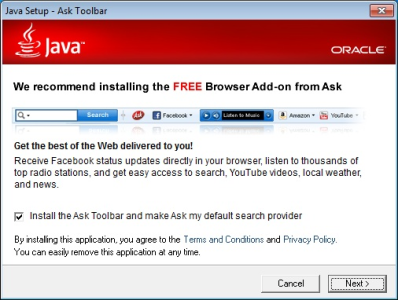
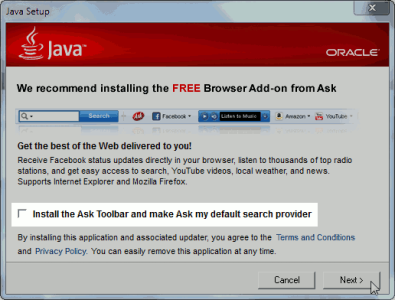
Hmm. All of my JAVA updates (on a couple different computers, running Vista and Windows 7) lately look like this. Are you seeing the prompt that looks like this? A few images grabbed from the web:

Highlighting the little checkbox that needs to be unchecked. It's very easy to move through this prompt quickly if you're in a hurry doing the update. Clicking right in the checked box toggles it on and off. Here it's in its unchecked state:

attachment.php


Same window without the highlighted area demonstrating the option, in its checked state:

attachment.php


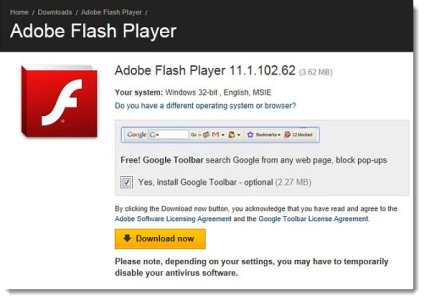
Meanwhile, on Flash updates, this type of prompt where you must also "uncheck":

attachment.php


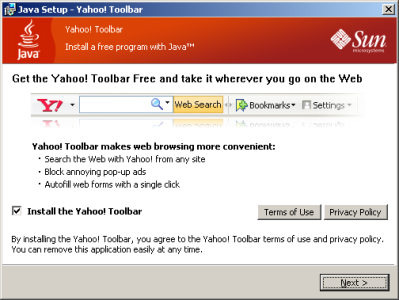
And one instance of JAVA asking about the Yahoo Toolbar, not Ask Toolbar:

attachment.php


Let us know what you're seeing and how they differ from these standard examples and we might be able to help you out further. The next time you get an update prompt (BTW, make sure you configure it to notify you but not auto-install via the Control Panel icon) if you're not seeing this, make a screenshot of what you are seeing and hopefully it might help us visualize your problem.
 

Attachments

  • toolbar-flashgoogletoolbar.jpg
    toolbar-flashgoogletoolbar.jpg
    60.1 KB · Views: 60
  • installation-ask-toolbar-java.png
    installation-ask-toolbar-java.png
    141.5 KB · Views: 63
  • 2011-08-17-10-42-04-2eb997.png
    2011-08-17-10-42-04-2eb997.png
    42.5 KB · Views: 61
  • java-ask-toolbar1.png
    java-ask-toolbar1.png
    14.6 KB · Views: 62
^ Nope. All I got was the usual Windows 'bubble' alert in the bottom-right of the screen telling me there was an update available and telling me to 'click here to install'. This time, I didn't even get the usual 'download' and 'install' progress windows. It did everything all by itself. Not even a window like you posted.

I don't ever remember it happening this way before.
 
Hmm maybe you have set it to automatic install? Check the java control panel in your control panel and set it to "notify me when there are upgrades" so that you can manually download and install them.
 
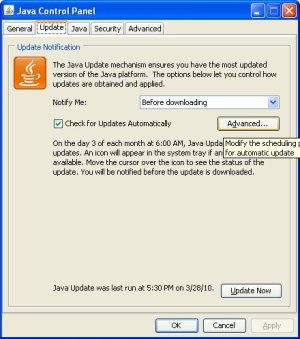
Interesting, never seen that behavior for Java before. In Java's icon in the control panel, double-check your toggle in the "Update" tab - you can make sure it's set for "Notify Me: Before Downloading" (the more cautious setting) and not "Notify Me: Before Installing".

attachment.php


You can also poke around in the "Advanced" tab to see if anything catches your eye that might be related to this. Good luck!
 

Attachments

  • Java-Update1.jpg
    Java-Update1.jpg
    44.2 KB · Views: 46
It's set up exactly like the one above. It doesn't really matter. All it did was to add 'Ask' to the search box at the top of the browser. I've never used that anyway.

Thanks for the tips, though.
 
Neil,
Somewhere along the line I got the Ask toolbar update, too.
Along with Google, etc.

With FF's new layout, I select Yahoo for my primary search engine in the search box, and let the others be in the drop down, should I want to use another service. The only toolbar that is showing is my Frontier/Yahoo toolbar, which about duplicates what I have on my FF direct.

IE had them stacked - I almost never use IE, so I didn't know how they looked/cluttered the space -I zap them.
But once installed, I think you get the ask UPDATE because Ask is already there, even if it's in the background.
 
Back
Top