The Original Gay Porn Community - Free Gay Movies and Photos, Gay Porn Site Reviews and Adult Gay Forums

  • Welcome To Just Us Boys - The World's Largest Gay Message Board Community

    In order to comply with recent US Supreme Court rulings regarding adult content, we will be making changes in the future to require that you log into your account to view adult content on the site.
    If you do not have an account, please register.
    REGISTER HERE - 100% FREE / We Will Never Sell Your Info

    PLEASE READ: To register, turn off your VPN (iPhone users- disable iCloud); you can re-enable the VPN after registration. You must maintain an active email address on your account: disposable email addresses cannot be used to register.

Microsoft Word Help

TickTockMan

"Repent, Harlequin!"
Joined
Dec 5, 2007
Posts
15,157
Reaction score
819
Points
113
Location
Salem
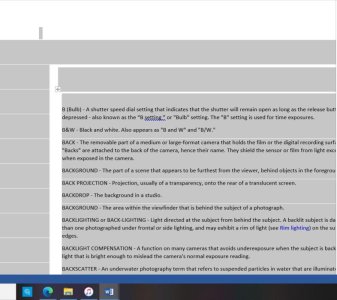
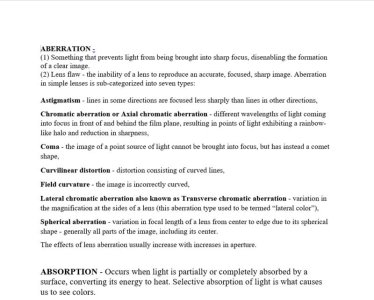
I copy and pasted a website to Word so I can make it easier for me to understand, but am having a hard time making features to be "normal". I am trying to make picture A's formatting/look look like picture B's.

Can anyone help? I have looked at Youtube, but since I don't know that the features/formatting is called I can't find how to do what I am wanting. I made pic B by changing everything little by little. There has to be a quick way to do it.


Thanks


Pic A (with everything selected to show the stuff I am wanting to remove)
attachment.php


Pic B (with a "normal" look)
attachment.php
 

Attachments

  • Screenshot (228).jpg
    Screenshot (228).jpg
    62.1 KB · Views: 46
  • Screenshot (229).jpg
    Screenshot (229).jpg
    69.7 KB · Views: 45
Last edited:
You're on the right track. It looks like you may have pasted in the text from the web page into Word as unformatted text, and in this case that's the best way to go (otherwise Word will recognize the web page text as HTML and try to replicate it in your doc).

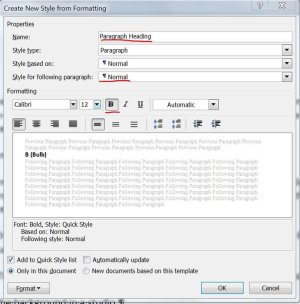
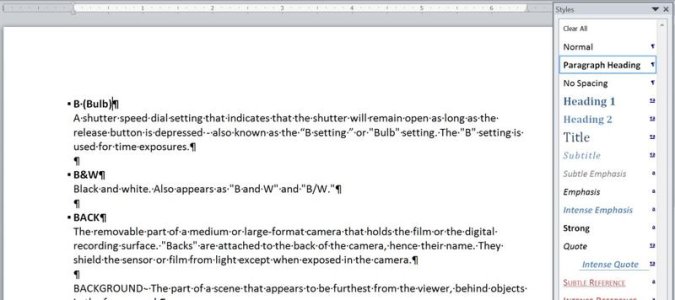
I don't believe there is an easier way to do this other than manually formatting by hand as you've done. You could create one or two new styles in Word via the Styles > New Style option. In the example below, I created a new style named Paragraph Heading containing the Bold Font option and the Keep with Next format option:

word-paragraphc-heading-style.jpg

word-paragraphc-heading-style-applied-cropped.jpg

Almost all the formatting in Word is controlled via styles, either the ones that ship w/the program or the ones you create yourself. Having said that, managing styles in a doc can be difficult, so it might be best to just continue formatting the items manually.
 
You're on the right track. It looks like you may have pasted in the text from the web page into Word as unformatted text, and in this case that's the best way to go (otherwise Word will recognize the web page text as HTML and try to replicate it in your doc).

I don't believe there is an easier way to do this other than manually formatting by hand as you've done. You could create one or two new styles in Word via the Styles > New Style option. In the example below, I created a new style named Paragraph Heading containing the Bold Font option and the Keep with Next format option:

View attachment 1628746

View attachment 1628747

Almost all the formatting in Word is controlled via styles, either the ones that ship w/the program or the ones you create yourself. Having said that, managing styles in a doc can be difficult, so it might be best to just continue formatting the items manually.


Thanks for the reply. I couldn't figure out Word, but your response made me think to try another writing program. Where it didn't work 100% all I have to do is fix some spacing, font and text size so you saved me hours of work. Thanks
 
Back
Top