The Original Gay Porn Community - Free Gay Movies and Photos, Gay Porn Site Reviews and Adult Gay Forums

  • Welcome To Just Us Boys - The World's Largest Gay Message Board Community

    In order to comply with recent US Supreme Court rulings regarding adult content, we will be making changes in the future to require that you log into your account to view adult content on the site.
    If you do not have an account, please register.
    REGISTER HERE - 100% FREE / We Will Never Sell Your Info

    PLEASE READ: To register, turn off your VPN (iPhone users- disable iCloud); you can re-enable the VPN after registration. You must maintain an active email address on your account: disposable email addresses cannot be used to register.

PC to TV converting help

Ares

Sex God
Joined
Jun 2, 2005
Posts
575
Reaction score
0
Points
0
I was just wondering if anyone has had any experience using a PC to TV converter. I am having trouble figuring out which one to buy. The ones that I have looked at all seem to not include an audio output slot. For example, I was looking at this one:
http://www.amazon.com/Grandtec-Ultimate-2000-PC-to-TV-Converter/dp/B00006B70W/ref=pd_bbs_sr_4/105-7633876-8196447?ie=UTF8&s=electronics&qid=1184454158&sr=8-4 but if you look closely at the outputs it only includes video out.

Without an audio output from the PC, I assume the sound will still come from the computer while the image comes from the TV. This wouldn't be good if I wanted to use my DVD recorder (which is connected through my TV) because it would record the video but not the sound.

Any ideas/experiences to share would be greatly appreciated. Thanks. :)
 
I know it's extremely the GHETTO method to do. But if buy that and use these two things.

This to hook it up to your computer Output on the back of your computer
http://www.amazon.com/Audio-Cable-3...4?ie=UTF8&s=electronics&qid=1184456051&sr=1-4

And this, you don't really need to buy these, just whatever you want to use for the two RCA hook ups.
http://www.amazon.com/Audio-Cable-P...?ie=UTF8&s=electronics&qid=1184456147&sr=1-19

I've only done TV to PC converting, I'm still trying to find ways of using the PC to TV method.
 
I am in the U.S., I'm not sure if there is scart here. I don't think I have a slot in the back of my TV that that device would fit into.

The make and model of my PC is a HP Pavillion a340n. It's kind of old. I bought it around January 2004.

The goal of all of this is to get my PC screen to show up on my TV, for various reasons. Watch movies from my PC on my TV or record things from my PC on my DVD recorder (my PC does not have a DVD burner). I have a TV to PC device that works great. The only problem is that when I capture the the TV program or movie and do editting and such, I can't get it onto a DVD.

I talked to a guy from Circuit City who told me not to do it unless I had a Plasma HDTV because a regular TV would give an awful picture. The only problem with that is, I have seen teachers and professors give presentations and show movies from their PCs onto a classroom TV (which I highly doubt were HD), and the picture was fine. I'm pretty sure it is possible to transfer a decent picture from your PC to your TV. It doesn't have to be crystal clear or anything.

And thanks for all the responses so far. I never knew there was a simple audio out cable that could go from your PC to TV.
 
This is just an example of the sort of thing you can use. there are many on the market at various prices. The resolution is never going to be brilliant, probably 640 by 480 at best unless you go for the hdtv option. To search for others use google with a search phrase of vga to composite adapter.
 
I know it's extremely the GHETTO method to do. But if buy that and use these two things.

This to hook it up to your computer Output on the back of your computer
http://www.amazon.com/Audio-Cable-3...4?ie=UTF8&s=electronics&qid=1184456051&sr=1-4

And this, you don't really need to buy these, just whatever you want to use for the two RCA hook ups.
http://www.amazon.com/Audio-Cable-P...?ie=UTF8&s=electronics&qid=1184456147&sr=1-19

I've only done TV to PC converting, I'm still trying to find ways of using the PC to TV method.
Okay, I tried to do it this way. I bought the product I linked to in the first post and also bought some audio cables.

Here's the thing, when I plug the audio cables into my PC audio-out (where my speakers are usually plugged in) and the red and white audio cables into the TV, no sound comes from the TV. I figured if I played a song or something on my computer, and I had my TV on the Input1 channel, the computer audio should come out of the TV speakers. Is that right? Right now there is nothing. I'm also not sure if I bought the right cables. Instead of ordering them online I went to the store and just bought some. I got "RCA 3.5 mm Plug "Y" Adapter to RCA Plugs" which seem to match everything from what you linked to on amazon. The product number is AH205 which when typed into amazon results in this http://www.amazon.com/RCA-Stereo-Adapter-Plug-AH205/dp/B00005T3GG/ref=sr_1_1/105-7633876-8196447?ie=UTF8&s=electronics&qid=1184627950&sr=1-1, only the one I bought are red and white, instead of red and black. Are these not the right cables to connect computer audio to an outside source?

Arg, this is kind of frustrating. Thanks for all the help though.
 
It should work, because those kind of connectors work both ways.... The one I have does. It works both ways.
 
Just to give you a little more example of what I use. I use this plug

http://www.amazon.com/3-5MM-Stereo-...?ie=UTF8&s=electronics&qid=1184633293&sr=8-12

And it works perfectly. I'm able to connect my PS2 audio to my computer through the Line In or using the Speaker Output to a TV.
I'm a little confused again. Why do I need an adapter to go into my PC? It already has an audio-out, right?

From what I understand, the cord I bought has a two RCA male side to go into the two RCA audio female slots into my TV (BTW how gross is this terminology? haha). The cord also had a male 3.5mm stereo plug to go into the (female?) slot in the back of my computer. Where would this adapter fit in? Does it go into the PC?

I understand how that device can bring audio into the computer, but not how it would send audio back out. I'm not really interested in capturing audio from the TV to the PC. I have a capture device (Pinnacle 500-USB) that does that.

Do you use the cord that was linked earlier with this or are they two completely different things?

Sorry to be so annoying. :)
 
I'm a little confused again. Why do I need an adapter to go into my PC? It already has an audio-out, right?

From what I understand, the cord I bought has a two RCA male side to go into the two RCA audio female slots into my TV (BTW how gross is this terminology? haha). The cord also had a male 3.5mm stereo plug to go into the (female?) slot in the back of my computer. Where would this adapter fit in? Does it go into the PC?

I understand how that device can bring audio into the computer, but not how it would send audio back out. I'm not really interested in capturing audio from the TV to the PC. I have a capture device (Pinnacle 500-USB) that does that.

Do you use the cord that was linked earlier with this or are they two completely different things?

Sorry to be so annoying. :)

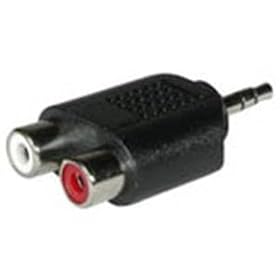
Well to make it simple it's just a smaller version of what you bought, and it works. I was telling you how to put PC audio to your TV.
 
214lLQt2CTL._AA280_.jpg

this
connects to the audio out on you pc so you can get the sound through you tv speakers using standard A/V cables

the cables you bought should all work

make sure you have it plugged into the right plug

and that the PC hasn't changed the output on you i know when i pull out my speaker plug it defaults to the digital audio out but i have to switch it back manually
 
Also check with your tv that you don't have to somehow select the audio source as being from the line in sockets.
 
Okay guys. Thank you for all the help. I have decided to just buy a DVD recorder for my PC instead of doing all of this to get my PC screen to show up on my TV. I am just not electronics savvy enough to do all of this.

I apologize for putting you all through this for nothing, but again, thank you so so much. You guys are great.
 
Yeah, that's basically the easy thing to do, it's more cheap to do it.
 
Back
Top