The Original Gay Porn Community - Free Gay Movies and Photos, Gay Porn Site Reviews and Adult Gay Forums

  • Welcome To Just Us Boys - The World's Largest Gay Message Board Community

    In order to comply with recent US Supreme Court rulings regarding adult content, we will be making changes in the future to require that you log into your account to view adult content on the site.
    If you do not have an account, please register.
    REGISTER HERE - 100% FREE / We Will Never Sell Your Info

    PLEASE READ: To register, turn off your VPN (iPhone users- disable iCloud); you can re-enable the VPN after registration. You must maintain an active email address on your account: disposable email addresses cannot be used to register.

.PDF question

bostonboy20

JUB Addict
Joined
Dec 7, 2004
Posts
4,655
Reaction score
11
Points
0
My new job just sent me a .pdf file of some paperwork I need to fill out and email back in order for me to get paid. How the hell do I fill it out? I only have Adobe Reader...am I going to have to print it out, fill it out by hand and like scan it and do it that way? or is there an easier way?
 
are you using the official and latest acrobat reader? if they did it right you can just click into the document in certain areas and enter whatever they want to know.
if that is not possible .. well i guess you need to print/scan then ..
 
If you have photoshop, you can open the PDF and add text layers for your responses ...
 
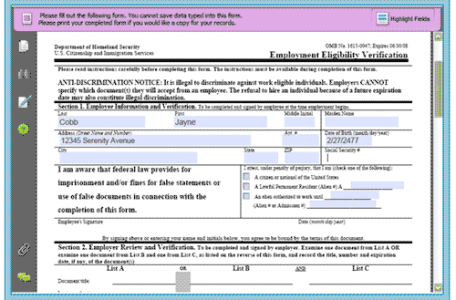
Yeah, I've seen different PDF form approaches depending on Acrobat versions (on your end) or the way they've designed the form to accept data. As advice in this thread noted, you can usually just click in the approximate place on the form to get a cursor and start typing (if they've enabled that true "form" functionality; maybe they just literally mean print and fill-out and didn't build any "form" features in!). Look for kind of "magenta" areas to guide you like the attached image - a big magenta warning along the top and lighter areas where you fill out; this has been standard on all the forms I've done this way. A bit more here.

But more importantly than all this, congrats on the new job, and does it look like a place/job you're gonna love? :D
 

Attachments

  • screen.pdf-form-support.png
    screen.pdf-form-support.png
    19.1 KB · Views: 52
of you can fill in the blanks with adobe reader, you can also download cutepdf (free) which will allow you to "print" and make a new pdf of the form with your answers filled in. instead of printing to a printer you'd be "printing" to a file.

Click here for instructions on how to use cutepdf:http://www.ehow.com/how_5089608_use-cutepdf-writer.html
 
That's a perversity. PDFs should only be for displaying static content.

With all the flaws of those extra functions like forms, Javascript and Quicktime videos integration, this format is a welcome target for hackers.

A company that wants you to fill out a PDF is irresponsible.
 
Back
Top