The Original Gay Porn Community - Free Gay Movies and Photos, Gay Porn Site Reviews and Adult Gay Forums

  • Welcome To Just Us Boys - The World's Largest Gay Message Board Community

    In order to comply with recent US Supreme Court rulings regarding adult content, we will be making changes in the future to require that you log into your account to view adult content on the site.
    If you do not have an account, please register.
    REGISTER HERE - 100% FREE / We Will Never Sell Your Info

    PLEASE READ: To register, turn off your VPN (iPhone users- disable iCloud); you can re-enable the VPN after registration. You must maintain an active email address on your account: disposable email addresses cannot be used to register.

question about video picture formatting on a mac

crakker_jakk

toy surprise inside!
Joined
Jul 18, 2006
Posts
1,163
Reaction score
0
Points
0
i download a lot of vids where the picture is either squished or streeeeeeeeetched (i'm assuming fullscreen picture distorted by widescreen formatting, or vice-versa) so i'm curious about what kinda programs i can install/use on a mac computer to correct a distorted video picture.. i've looked into the Imovie application that came on my computer, but haven't found any info on the subject, altho i might be using the wrong terminology to search - so any info will be a big help. i have a lot of videos in various different formats that need this kind of correction, so it's no problem if the video needs to be converted to .mov or .mp4, etc, in order to use a program that can fix distorted videos - i don't have a problem converting to whatever movie format is necessary.. thanxx in advance.

and i'm attaching a few screencaps here just to give an idea what i'm talking about in case my description didn't make sense..


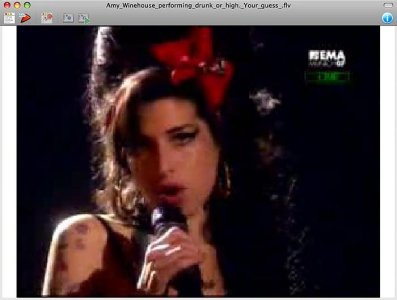
squished..

attachment.php


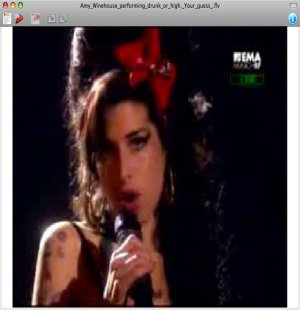
or streeeeetched...

attachment.php


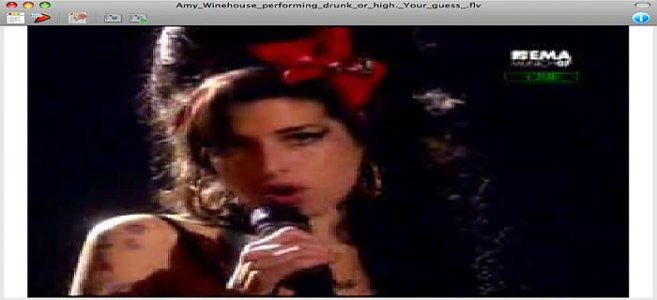
needs to look like this...

attachment.php
 

Attachments

  • screenshot_56.jpg
    screenshot_56.jpg
    35.6 KB · Views: 145
  • screenshot_56b.jpg
    screenshot_56b.jpg
    100.2 KB · Views: 143
  • screenshot_56c.jpg
    screenshot_56c.jpg
    24.7 KB · Views: 140
come on, i can't be the only person who gets annoyed by this problem.. i'm convinced it must be an easy thing to fix, but i just don't know how..
 
Well, I can't help you with Mac specifics unfortunately, but you'd think most player applications should detect the aspect ratio of the clip and size their display window appropriately based on that (at least, that's the way it works on PC apps)? As you say about "fullscreen picture distorted by widescreen formatting", I guess the question is why your player app is forcing widescreen on a fullsreen aspect ratio clip. A player like VLC (also available for the Mac) auto-sizes based on the aspect ratio of the clip, but you can also manually pick from aspect ratios as well in case it's a slightly non-standard aspect ratio that you want to tweak the output of. It looks like this:

aspect778.jpg


Maybe check your player's settings?

If you're talking about actually re-encoding the clip at another aspect ratio to correct for this, you'll encounter some quality loss and I'd only recommend this solution if the existing aspect ratio is really botched or non-standard, as you're not going to be wanting to do this with your clips.
 
check out the codez4mac forum and do a search for visualhub. If you are d/l these flv's off youtube choose the mp4 instead.I cant see anything in the free swf & flv player that fixes the problem maybe with pro version there is something
 
Well, I can't help you with Mac specifics unfortunately, but you'd think most player applications should detect the aspect ratio of the clip and size their display window appropriately based on that (at least, that's the way it works on PC apps)? As you say about "fullscreen picture distorted by widescreen formatting", I guess the question is why your player app is forcing widescreen on a fullsreen aspect ratio clip. A player like VLC (also available for the Mac) auto-sizes based on the aspect ratio of the clip, but you can also manually pick from aspect ratios as well in case it's a slightly non-standard aspect ratio that you want to tweak the output of. It looks like this:

aspect778.jpg


Maybe check your player's settings?

If you're talking about actually re-encoding the clip at another aspect ratio to correct for this, you'll encounter some quality loss and I'd only recommend this solution if the existing aspect ratio is really botched or non-standard, as you're not going to be wanting to do this with your clips.

thanks, but about 95% of both fullscreen and widescreen videos are automatically formatted correctly when i play them, so the problem is obviously not MY player settings..
 
Using Scroogle, I ran a search using the terms

mac video "aspect ratio" correct

(quotes included). At the top of the list was this, an iMovie plugin that costs $5.50.
check out the codez4mac forum and do a search for visualhub. If you are d/l these flv's off youtube choose the mp4 instead.I cant see anything in the free swf & flv player that fixes the problem maybe with pro version there is something
thanks keeland and wirega, i'll look into those as soon as i get some time and let you know what kinda luck i have.. :wave:
 
p.s. this problem isn't just with .flvs.. i was just using a screencap of the amy winehouse .flv as an example, but i see this problem all the time with all different types of formats..
 
thanks, but about 95% of both fullscreen and widescreen videos are automatically formatted correctly when i play them, so the problem is obviously not MY player settings..

That's news to me! You'd never have known by your original post that most were fine - you wrote "i download a lot of vids where the picture is either squished or streeeeeeeeetched" and "i have a lot of videos in various different formats that need this kind of correction". Didn't know most were correct, but seeing as they now are, your player seems fine for the majority of cases, yes. :)
 
What I use to fix that issue is a program called ffmpegX - it is a balls to the walls UNIX open source GREAT transcoder/encoder that has every codec that VLC does. Go to the site and download all the binaries and read the instructions! and follow them to the letter. You can change aspect ratios, sound, format the lot. I LUURVE this application - it fixed a whole bunch of files that had some freaky DivX 3 problem that made them unwatchable.

http://www.ffmpegx.com/

Have fun!

Deb.
 
Back
Top