The Original Gay Porn Community - Free Gay Movies and Photos, Gay Porn Site Reviews and Adult Gay Forums

  • Welcome To Just Us Boys - The World's Largest Gay Message Board Community

    In order to comply with recent US Supreme Court rulings regarding adult content, we will be making changes in the future to require that you log into your account to view adult content on the site.
    If you do not have an account, please register.
    REGISTER HERE - 100% FREE / We Will Never Sell Your Info

    PLEASE READ: To register, turn off your VPN (iPhone users- disable iCloud); you can re-enable the VPN after registration. You must maintain an active email address on your account: disposable email addresses cannot be used to register.

Sloooooooooow Ie :-(

WestCoastWilson

JUB Addict
Joined
Jun 9, 2010
Posts
2,478
Reaction score
920
Points
0
Location
Los Angeles
I have a Dell desktop computer with Windows XP. Since I discovered Firefox about 1 ½ years ago, I pretty much use FF 95% of the time. I only use Internet Explorer to get my MS updates, I use it for one SBC/Yahoo email account, and I use it in order to send a handful of emails (about ever 2 months) where I actually copy & paste photos into emails (since my copy & paste photos in FF do not work/those photos NEVER appear in the emails).

Yet my main focus for this posting is, whenever I do copy and paste photos in emails using IE, it seems that every thing I do in IE starts moving at a dial-up speed. :grrr: I just sent 2 photos to a friend (by copy and pasting the photos into the email), and it took almost 45 minutes just to do that. GRRRRR!!! :grrr: For some reason, my friend can not see and or open photo attachments in any of the emails that I send to him (using FF or IE). He has AOL . . . so I am not sure if that is the problem or not. :confused: However, whenever I see a photo online that I want to send to him, I have to open IE, go to the website with the photo, then copy the photo, then paste the photo into the email, in order for him to see it. So I have to have 2 windows open in IE in order to do this . . . with one window open to compose the email and the second window must be open in order for me to navigate to the various sites to find the photos I want to send to him, in order to copy & paste them into the email. Thus far, this is the only way I can send him photos where he can see them on his end.

If I do this in FF, the copy and pasted photos will not appear in the email. If I try to copy a photo found using FF and pasting it in an email account using IE, the photo will not appear there either, so I must do everything in IE. :grrr: Just now, while having 2 windows open in IE just to send those 2 photos to my friend, IE was using over 200,000K in memory . . . yet EVERYTHING seems to slowdown drastically to almost freezing up entirely whenever I have 2 windows open in IE whenever I am doing a copy and paste. :grrr: Whereas IE works at a reasonable speed if I am not doing a copy and paste, and if I have more than 1 window open . . . just as long as I am not doing a copy and paste, IE works okay and moves at a satisfactory speed.

What could be causing this HUGE slowdown with IE when I am copy and paste photos into an email? Is there a cure? :confused:

Wilson
 
First, what version of IE are you using? I believe 6 came with XP, then since then there's been newer versions (latest not necessarily compatible with XP, though).

I've sometimes found IE a bit of a pig for resources, slower than other browsers I've run and a couple machines/versions I've used have seen it have memory leaks like you describe, though this is often with interactions of stuff like Flash or heavy JavaScript. Also, try clearing your browser's cache/history (cookies if you want, though obviously you'll lose site personalization) - sometimes I've seen IE freak out when it's got an enormous cache that even its settings about when to clear it are not observing, and sometimes it needs a few minutes to do its clearing if you've got hundreds of megabytes or even gigabytes of cache.

Weird about your Firefox not supporting the paste, I wouldn't think the Yahoo webmail interface you're using would use IE-specific stuff (ActiveX?) for pasting. Make sure you're on the latest Firefox - also, give Google's Chrome browser a whirl (runs light and lean) and see if that works out for you. Maybe instead of pasting a photo directly into an E-mail you can add it as an "Attachment" (as a file) or use something like Dropbox and send a link to it.
 
Thank you Trinket, ..|

Since I rarely use IE, I never bothered with updating it. I have IE 7.0.

Yet at times, when I am doing a copy-and-past option in IE, it seems that all of those websites go so slow and download so slow, whenever I do this function. Whereas, that does not happen in FF. Yet only the copy-and-paste option does not work for me in FF. When I paste a photo in an email, it only leaves the outline of a box (where the photo would have been, had it been able to attach/paste in the body of the email) with info in the top lefthand corner (I think) basically letting you know that the photo did not paste into the email. So I am not sure why Yahoo does not support this paste function, regardless if I am using IE or FF, yet will only support it in IE.

I will try to empty the IE browser's cache/history/cookies the next time I try to do this function. I don’t care about saving any of that information in IE, since I never go to websites in IE anymore, where I would need to do any autofills. So I don’t care about losing any personalization in IE.

Just for fun, I will give Google Chrome a try.

Since I am not very computer literate, I do not know how to add it as an "Attachment" (as a file) or use something like Dropbox and send a link to it. As that step you have described, is a bit too complicated for me. :cry:

Thanks a MILLION Trinket, I will report back with my findings at a future date. Thanks so very, very much for your help. :kiss:

Wilson
 
Hi WestCoastWilson. Here's Yahoo's tips on how to add an attachment to an E-mail, and this version with screenshots too.

When you just "paste" an image into an E-mail, you're composing an HTML E-mail with picture "embedded" into it. For whatever reason, it's not working for you with Firefox. When you use the "attachment" method, a given file is included as an attachment with the message.
 
OOPS!!! #-o Thanks, Trinket. I think I misunderstood your original statement of when you said “Maybe instead of pasting a photo directly into an E-mail you can add it as an "Attachment" (as a file) or use something like Dropbox and send a link to it.LOL!!!

I can easily do an attachment to any email (jpeg, pdf, word, etc.). However in the case of my friend that I send photos to, he can not see them (attachments) on his computer for some reason, since I have personally went to his home to see how my emails view on his computer. Yet for some reason, the photo attached to the emails that I send to him, the option to view the attached photos or any attachments are not visible in his AOL email for some reason. You can see the email in his inbox, but it does not show that there is any attachment of any kind, but when you open the email, all you see is just the text of the email, and there is no sign or any indication that there is a photo attached to the email. MAJOR FROWN!!! Yet again, he uses AOL, and I am not familiar with AOL’s email system.

Per your suggestion, I downloaded and got Google Chrome. ..| Though I had similar troubles with everything running slow, when I opened up two windows to do the copy-and-paste and pasted a photo into the body of a test email, at least it went much quicker that doing the same thing in IE . . . it only took me about 10 minutes to send 2 separate test emails (with one pasted photo in each email). Now I just have to wait to hear from my friend to see if he can see the photos, in the 2 test emails that I sent to him a few hours ago.

Since I got an upgraded version of FF, I tried the copy-and-paste thing in an email this afternoon, and “now” the paste part does not work at all. :cry: It will show that a photo is being copied okay, but when I go to paste the photo into the email, nothing happens. MAJOR FROWN!!! :cry:

Thanks a MILLION for your suggestion of using Google Chrome. For now, I might just use GC as my alternative to IE, since I rarely use IE. ..| :kiss:

Wilson
 
...view the attached photos or any attachments are not visible in his AOL email for some reason.

Yikes - well, I'll restrain myself from bashing AOL E-mail (but it's such an attractive and easy target ;) ) because I'm going to assume your friend probably has his reasons for using that service (longtime subscriber not wanting to change, plenty of dial-up points across the country, fixed price plan, "easy", etc.) but AOL isn't exactly known for sticking to established and/or open standards, so they're probably running some variant that doesn't handle the attachments in the way you'd (and other stand-alone client or Webmail services might) although who knows, maybe they've gotten better in recent years going to Web and high-speed. It's admirable you're trying to work around his limitation, but changing your method just for him still has his end as the non-compliant point of failure, not what you would normally do with "attachments".

Ten minutes to send two E-mails; yikes. :( Not sure exactly what's happening on your system - from hardware, to software, to Internet access - could be a lot of things, and the things you've hinted at in your message don't completely help at diagnosing. How large are the pictures you're trying to send - both pixel size (like 640x512) or actual kilobyte or megabyte size? Sometimes, depending on software, I've noted when one "pastes" a photo it reverts to its uncompressed format (like a non-compressed bitmap). Here's what I mean: Let's say the JPG is large in size, 1200x900 or something, but compressed to JPG it comes out to 700 KB, which is reasonable. When you use "paste" to paste from the clipboard (the "clipboard" is the place that stores all your Control-C, Control-V, Control-X actions) it's just pasting pure binary graphic data that isn't the JPG anymore, but megabytes of the image uncompressed. Now, on an E-mail software client (like Outlook, Thunderbird, whatever), if you're writing an HTML E-mail you can generally use "Insert Image" rather than just pasting, and since you point to the JPG you're sure you're sending a JPG - however you're using Webmail, and the "insert" functionality will vary about whether the client even shows this option.

Try this test: Send a much smaller image than you might normally, a postal-sized image of a low amount of colors (try a basic GIF image you find with Google Image search, like somebody's icon - or your own JUB icon, for instance, and send it to yourself). See how quickly it goes through and look at your task manager to see if the memory leak you're seeing persists.

I still don't fully understand where the minutes of slowdown you're experiencing are, at which step of the process. Is the Webmail interface just grinding away or sitting there after your paste?
 
AOL sucks... I'm ashamed to admit my mother uses it - I can't get her to change. Depending on what e-mail address I post from, she cannot see my attached pictures either. Some of the 'free' e-mail sites are banned from AOL as 'spam' sites because so many people have used and abused the free sites.

As to your other problems... if you are indeed copy and pasting the pictures, it very well could be that your computer/e-mail is converting them to a .bmp format picture file, which is generally HUGE. Stick to UPLOADING the original, smaller file sized .JPG picture format files, or just send a LINK to the web address of the pictures.
 
I have a few suggestions - first make sure you're sending/attaching the pictures as JPEG, and resize them so that they'd fit on a standard computer screen (maybe make them 1024 wide by 768 high, for example). Many modern digital cameras take pictures as big as 4000 pixels wide, so if you're attaching that, it WILL take a long time to upload. By resizing it to a maximum of 1000 pixels, you're cutting the size of the picture so that it is 1/16 of the original (I hope I did my math right) and it will be much faster to upload.

Second, if attaching to emails isn't working for this particular friend, I'd suggest uploading the photos to an online service like photobucket or flickr (I use my own website so I can't speak for any particular service). After you upload them, you can grab the link to the picture and just include the link in the email. He should be able to copy and paste the link into his address bar, or just simply click the link (if it appears as a link) in his email, and he will be led to the website to view the photo.
 
These are some good suggestions. WestCoastWilson, I know you said you aren't extremely technical, and if you need something to resize images, any graphics editing (and many viewing ones) program will do it but there are dedicated resizer tools that are very easy to use - Fotosizer is one good one I've used sometimes before for batches, and Picture Resizer is a fun concept - its name on the desktop is what it's resized to. For instance, PhotoResize400-DOT-exe on your desktop lets you drag photos into it that'll be resized by 400 pixels across, and if you rename it, that'll be the size.
 
Okay, this is getting kinda too complicated.

Let me see if I can simplify things a bit.

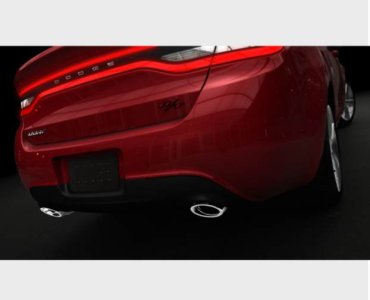
My friend and I are car lovers. Upon talking to him several days ago, he was not aware that Dodge is coming out with a new car model, called “Dart”. So I tried to send him the 2 photos (attached to this posting) via the link below. One photo is 42.0 KB and the second photo is 23.9 KB.

http://dsc.discovery.com/cars-bikes/dodge-dart-to-bow-at-detroit-carry-alfa-romeo-dna.html

Neither photo are particularly large (in my book). Since I can’t do a copy-and-paste photo into emails using FF, I had been using IE (which took almost 45 minutes to use the link, copy the 2 photos, and then send the photos pasted into an email). Yesterday, using Google Chrome, it took about 10 minutes to send these photos (attached to this posting) in 2 separate test emails.

Okay, now that you have the facts, see what you think. Yet for now, I will start using the Google Chrome (GC), since it is faster. Yet mind you, whenever I send emails to other friends, I can just use a photo attachment and I can send all of those type emails in less than 1 minute. It is only when sending the copy-and-paste photos to my friend (in an email using IE or GC), where things slow down to a snail’s pace. :( Yet due to the limitations of either my friend's computer and or AOL, this is the only reason why I have to send him copy-and-paste photos in his emails. I did try a copy-and-paste of my JUB avatar. It did not work in FF, yet when I went to GC, it worked quick and fast. Yet upon opening some of the car websites, things went back to a snail’s pace again . . . so maybe it is the car websites themselves that are downloading so slow that is the problem :grrr: . . . as that is where I am just sitting and waiting for their pages to download . . . yet it just seems that my computer almost freezes up when having the 2 windows open (the Yahoo email and any car website, when using GC and IE). Yet this is happening for “EVERY” car website when I have two windows open using IE or GC. When I went to a Yahoo news story website (using Google Chrome), it went to the site very quick. I was then able to copy-and-paste the news story photo in an email in less than 10 seconds. In general, once a page downloads, I can copy-and-paste the photo into the email within seconds, yet again, it is the car websites that are downloading sooooo slow. Yet I did not know this and nor did I ever think about this, until you (Trinket) asked where was the slowdown occurring. So based on your last posting, I was able to pinpoint it for you now. Yet in my case, I don’t think the photo size is the issue. However, Trinket, I will download that Picture Resizer, as that will come in handy and be very helpful to me in general. Thanks for the recommendation of it, as it looks very user friendly. Upon looking at Photosizer, that looks a bit too complicated for me to use. MAJOR FROWN!!! :( :cry:

In regards to AOL, my friend is part of a family plan, where his brother pays for the AOL service, but my friend (who lives about 3 miles away from his brother) can use it for free . . . however it is dial-up. Which my friend is okay with, since he probably does not even use the internet 5 hours per week.

Borg69unimatrix, in regards to sending my friend a link. I thought about that a few years ago, however since he is using dial-up, it would take him too long to find and figure out what photos specifically I wanted to share with him, when he has to wait for the long page download. So the copy-and-paste method helps in speeding things up for him. Yet it is a pain in the ass to send photos to my friend this way :grrr:, however I do love him and he is worth the trouble. (*8*)

AstareGod, I only send my friend Internet based photos. Since he can not see any attached photos, I can’t send him photos that I take with my digital camera. So I have to wait until he comes over to my house, to show him photos that I took with my camera. Yet I rather not display my photos online (via photobucket or flickr), because I rather have more privacy. Yet that would be too much trouble to go through, just to post a few occasional photos online and have my friend use a link to get to them. I love my friend, but I don’t love him enough to go through that much trouble to basically have a photobucket or flickr page, just to post photos that he would exclusively see. LOL!!!
hysterical.gif
Yet that is a great idea though.

Thanks you Guys, I appreciate the help. ..|

Wilson
 

Attachments

  • DD201301.jpg
    DD201301.jpg
    42.1 KB · Views: 27
  • DD201302.jpg
    DD201302.jpg
    23.9 KB · Views: 24
AOL doesn't advertise this, but it is FREE FREE FREE. Your friend(s) don't have to pay for anything on it. And no reason why they should. It's just a glorified browser/e-mail service over inflated with bells and whistles no one wants or needs. If he uses the excuse of it's built in virus protector, AVAST is a FREE one, and extremely good. (Avast.com).

Within the website in question, you should be able to right mouse click on the actual picture, and chose "Copy image location", and link directly to the picture ONLY... and not vaguely the site it's contained in - similarly as how pictures are attached here within JUB from external web sites-

627239P.jpg


No upload! ;)
 
Do you use an online email service like google's gmail, hotmail, yahoo! or something else? Each of these have different upload and download times depending on when they're busy. Of these, I've found gmail to be the best in terms of speed of upload and download, plus it autoscans for viruses as well.

But it really doesn't account for the slowness you've been having. Unless there is a routing problem near you, in which case you may need to contact your ISP.

Try finding out what your internet connection speed is first.
 
Borg69unimatrix, my friend’s brother has some sort of paid AOL plan with them, that I guess he feels is worthwhile to pay for it. Yet my friend can get free dial-up internet usage as part of his brother’s paid family plane. Other than that, I do not know any of the details as to why my friend’s brother prefers AOL vs. the other ISPs that are out there.

When you said “you should be able to right mouse click on the actual picture, and chose "Copy image location", and link directly to the picture ONLY... and not vaguely the site it's contained in - similarly as how pictures are attached here within JUB from external web sites- “ Well I have tried to do that, but I have only had disastrous results :eek: :cry:, where the photo never worked in the link at another website location. MAJOR FROWN!!! I can only guess since I am not very computer literate, I must have done something wrong. :cry: Over the years, I have heard so many people say how easy it is to do as you suggested (copy the image location link), but I just could never make that work for me. MAJOR FROWN!!! So I don’t try to do that method any longer.

Star-warrior, I have only used Yahoo email to send emails to my friend that has an AOL email account. Yet again, I only paste photos into the emails that I send to my friend, because everyone else I send photos to, can easily see and view photo attachments to the emails that I send to them. Yet again, I still think the slow running problem :grrr: ](*,) is with the automobile websites themselves. Yet I am not tech savvy at all, so I don’t know if maybe Yahoo’s email system is causing problems, when trying to do a copy (of the internet photo)-and-paste (the photo into a Yahoo email itself).

Okay, thanks you two for your continued support & help. :kiss: Yet since I am not very computer literate, I am just going to keep things simple and use Google Chrome, since again, it is working so much faster than IE, when it comes to doing the copy-and-paste photos I want to share with my friend. Yet with my limited computer skills, there is just no way in the world that I can troubleshoot this problem anymore than I have explained already, because it just sounds like someone who is computer savvy needs to sit down at my computer to figure out what might be going on. Yet this problem is not serious enough for me to hire a computer guru, yet I appreciate you all trying to figure out what “might” be making my IE and GC run so slow, when I am copying-and-pasting photos. :=D:

Wilson
 
WestCoastWilson, I agree, we all unfortunately seem to be having a bit of a barrier to helping you because the problem is hard to describe and we can't duplicate your exact symptoms (and providers) or scenario with your friend at the other end. It's the kind of problem that would probably be obvious with 2 minutes sitting at your PC and seeing it in action - if you have a tech-oriented friend you trust, they could connect remotely to your PC and you could show them or pass control of it to them (talking by phone at the same time to explain or via a chat/Skype window or something). And yeah, you can hire a computer guru from a big chain or an independent local guy that could sort it out, but at probably 1 hour labor's minimum cost, it may not be worth it. I would say if you can live with your current situation and the workaround, the behavior might change with new versions of the product/browsers, a new computer/OS on your side, new provider (for him or you), etc. Otherwise, if you do hire a computer guru for another, more serious problem, maybe you can raise this one at the same time. Good luck, sorry we couldn't help more. :(
 
Trinket, thanks so much for your continued help and support. ..| I greatly appreciate it so very much. That is okay and no need to worry about this problem. It would take a computer guru to sit down at my computer to figure out what is going on (in this case and with this problem), as I know that it is very hard to help & reply to my problems via postings here and try to have others interpret them, then maybe try to duplicate them on their computer, then try to offer me help to fix my problems. So for sure, I can see and understand the barrier problem in a case like this. LOL!!! I know that is asking for a great deal for someone to do, helping me with a problem online like this. Yet you have already help me tremendously by recommending that I get the Google Chrome browser ..|:=D:, because again, I’m able to do my copy-and-past photos into an email on that GC browser much quicker than IE. So that in itself was a blessing that I am forever thankful to you for. ;)

Yet maybe one day, I will come across a computer guru that I can get to come out to my house to have a look at this problem, however right now, I don’t have a tech-oriented friend that I know that could do as you described. :cry: Yet since this problem is not serious and does not cause any totally stoppages for any work that I do on my pc (online or offline), I am not going to worry or complain. The GC is a tremendous help to me, so I can live with this current situation and the workaround. It is all good. Yet for sure, that is excellent advice when you said “If you do hire a computer guru for another, more serious problem, maybe you can raise this one at the same time.” Trinket, that’s a GREAT idea. Best of all, you all have helped me much more than you know. :=D:

Thanks a MILLION for your continued help. :kiss:

Wilson
 
...however right now, I don’t have a tech-oriented friend that I know that could do as you described. :cry:

Well, the answer is obvious, WestCoastWilson. Clearly, you need to stage your own version of this event in your living room! ;) Computer geeks + nudity + WestCoastWilson's living room = problem solved. :gogirl:

Anyway, glad we all could at least give you some ideas and recommendations, if not the exact fix, and Merry Tech tidings of the season! (*8*)
 
Back
Top