The Original Gay Porn Community - Free Gay Movies and Photos, Gay Porn Site Reviews and Adult Gay Forums

  • Welcome To Just Us Boys - The World's Largest Gay Message Board Community

    In order to comply with recent US Supreme Court rulings regarding adult content, we will be making changes in the future to require that you log into your account to view adult content on the site.
    If you do not have an account, please register.
    REGISTER HERE - 100% FREE / We Will Never Sell Your Info

    PLEASE READ: To register, turn off your VPN (iPhone users- disable iCloud); you can re-enable the VPN after registration. You must maintain an active email address on your account: disposable email addresses cannot be used to register.

  • Hi Guest - Did you know?
    Hot Topics is a Safe for Work (SFW) forum.

Torproject

MoufOfKhaos

Look Away To The Moon.
Verified Poster
Joined
May 17, 2011
Posts
9,716
Reaction score
9
Points
0
You mean, can I never find what I downloaded onto my computer? No.

 
I have it on my computer, the only place it shows up is in a small tab on the task bar as a hidden icon. The icon looks like a small green apple. It should also show up as part of the Vidalia Bundle when you click on the all programs tab on the Windows Icon, assuming you are running a Window operating system
 
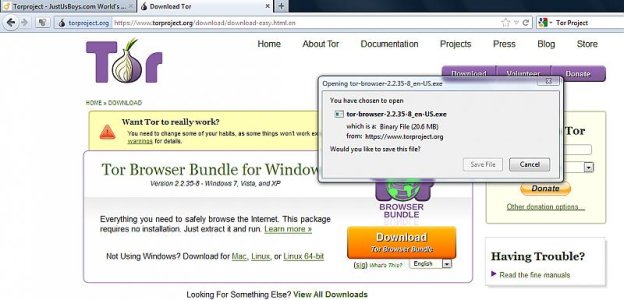
Did you really download it? Did you just click a link to a download page, but didn't click the download button to enable the download itself? I presume at some point it'll ask you whether you'd like to open the download item or to save it....
 
Did you save it? Presumably you're asked to save stuff first so you can place it either in the Download folder or somewhere else on your computer...

See pop up in screen cap.
attachment.php
 

Attachments

  • tor.jpg
    tor.jpg
    56.3 KB · Views: 94
Re: How do you undownload torproject?

Do you not know how to use the search function on your computer?
 
Re: How do you undownload torproject?

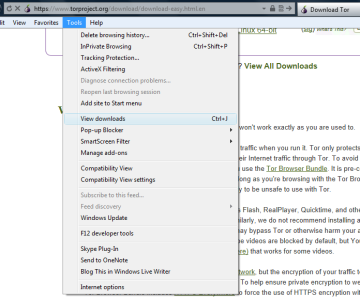
Did you download it via a browser? The browser ought to have a list of downloads, unless you cleared your cache every time you log out. For Firefox buttons "Control J" brings it up. Thereafter, you can right click to 'Open the containing folder' and delete it from the pop up window showing the folder contents.
 
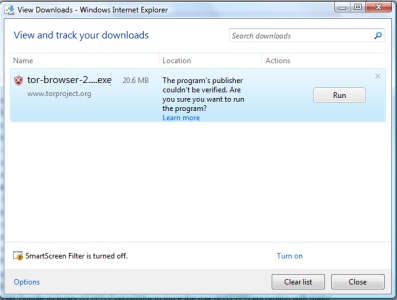
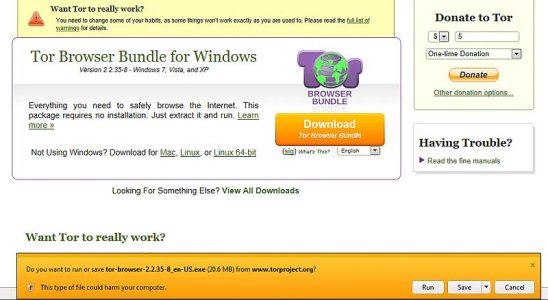
I don't use IE, but I have IE9, so here's the screen caps of what I can see on my machine.

attachment.php


I pressed the run option after clicking the orange download button above.

After the download finished, the status bar looked like this:


attachment.php


This ought to have appeared for you too, or something similar if you've got an earlier IE version (do update to latest version).


To find it

attachment.php


Now we can view it

attachment.php


If it exists, it should be there. If you've set your internet browser cache to be deleted along with the history, then the 'Run' option would have only saved a temporary file. On closing the browser, it will be lost. If you can't find it, that's probably the reason.
 

Attachments

  • ie-warning.jpg
    ie-warning.jpg
    13.1 KB · Views: 72
  • ie-downloads.png
    ie-downloads.png
    52.1 KB · Views: 75
  • ie-viewdownloads.png
    ie-viewdownloads.png
    51.2 KB · Views: 72
  • ie-tor.jpg
    ie-tor.jpg
    58.1 KB · Views: 74
Back
Top