The Original Gay Porn Community - Free Gay Movies and Photos, Gay Porn Site Reviews and Adult Gay Forums

  • Welcome To Just Us Boys - The World's Largest Gay Message Board Community

    In order to comply with recent US Supreme Court rulings regarding adult content, we will be making changes in the future to require that you log into your account to view adult content on the site.
    If you do not have an account, please register.
    REGISTER HERE - 100% FREE / We Will Never Sell Your Info

    PLEASE READ: To register, turn off your VPN (iPhone users- disable iCloud); you can re-enable the VPN after registration. You must maintain an active email address on your account: disposable email addresses cannot be used to register.

What just happened with Windows 7?

gsdx

Festina lente
JUB Supporter
50K Posts
Joined
Oct 10, 2003
Posts
57,249
Reaction score
1,622
Points
113
Location
Peterborough Ontario
And should I be concerned?

The laptop had booted up this morning as usual and I opened Firefox to my homepage. I was just about to point to a news link there when the screen when dark. I clicked the mouse and tapped some keys, but nothing happened except for the wi-fi light to go out. The little flashing light indicating hard drive activity was still flickering. And then it stopped and went out as well.

I waited a minute or so to cool both myself and the system down a bit, then plucked up the courage to hit the power button.

A new screen appeared on reboot which said Resuming Windows.

It didn't go to the login screen or even the desktop but went directly to the open Firefox browser window with my homepage still loaded into it as if nothing had even occurred.

What happened, and should I be concerned about it?
 
most likely your pressed a key combination that brought windows into suspend to disk mode.

it's quite useful for laptops .. the ram content is stored on the harddrive and as you saw, it resumes rather quickly directly to where you were.
 
most likely your pressed a key combination that brought windows into suspend to disk mode.

I wasn't touching the keyboard. I had just opened Firefox and was checking out the news stories on my home page. I was moving the cursor (via the mouse) to one of the links when the screen simply went black and the system shut down completely.

It's never happened before and I was rather grateful that it started up again without any apparent problems.


it could be a virus......

I have an anti-virus program running constantly, and it updates itself and does a complete scan daily.

And why did you include 8 porn picks in the post that didn't even show up?
 
Not sure if it's related, but . . . I did another of the endless "updates" from MS yesterday on my very old desk top (which I hadn't used for over a month). As usual, it caused it to go into all kinds of weird freefall that I'm not sure I have taken care of yet.

Did a bit of research and discovered that there was a "bad" update piece that went out from MS in February (when I had a similar mess with mine, but didn't research--just beat my way through it). The discussion I found on that one makes me even more concerned about getting and installing all the "improvements" that come out every day or so.

I'm not quite ready to dump the old monster, but I'm definitely considering putting Linux on it. God preserve us from more help from MS!
 
Not sure if it's related, but . . . I did another of the endless "updates" from MS yesterday on my very old desk top

Mine updates automatically each time I shut it down and I have no idea what is being updated. I haven't been able to find that yet.

There was also a screen which showed programmed tasks (not the task scheduler, though) and I altered the days and times on a few of them on a few different days, but I haven't been able to get back to that screen again. All I can remember is that I got to it through the Start/Help and Support buttons. Not being able to find it again has left me very :confused:

I also remember that the list of tasks (updates, I believe) were scheduled for all different times and there was a check box which was clicked by default which told the computer to basically do the tasks on boot-up if it wasn't able to do the tasks at the scheduled times.

If someone could direct me back to that screen, I would appreciate it.
 
Mine updates automatically each time I shut it down and I have no idea what is being updated. I haven't been able to find that yet.

There was also a screen which showed programmed tasks (not the task scheduler, though) and I altered the days and times on a few of them on a few different days, but I haven't been able to get back to that screen again. All I can remember is that I got to it through the Start/Help and Support buttons. Not being able to find it again has left me very :confused:

I also remember that the list of tasks (updates, I believe) were scheduled for all different times and there was a check box which was clicked by default which told the computer to basically do the tasks on boot-up if it wasn't able to do the tasks at the scheduled times.

If someone could direct me back to that screen, I would appreciate it.

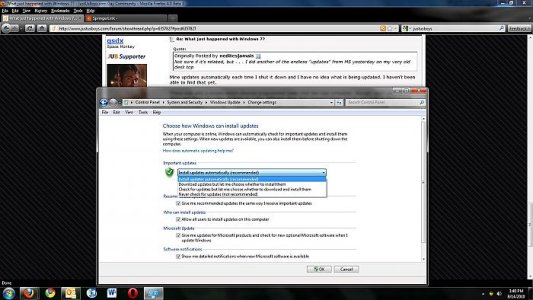
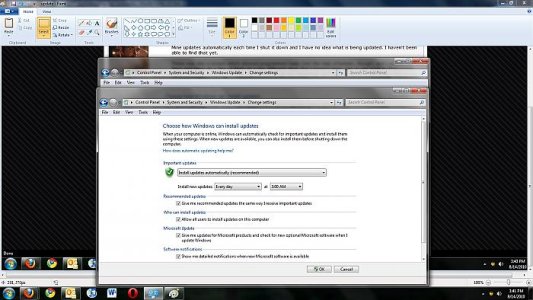
Do you mean this?
 

Attachments

  • update.jpg
    update.jpg
    58.6 KB · Views: 74
  • update 2.jpg
    update 2.jpg
    58.8 KB · Views: 58
^ Not quite. The screen I'm talking about gives a list of all the updates and when to do them, but mine are all listed at different days of the week and at different times of the night. I would have to leave the laptop 'on' 24/7 for all the updates to be done. Each update could be scheduled individually and my intention was to set them so they could be done one or two nights a week instead of each morning on boot-up.

The screen you have is for Windows updates only, and I know about that screen.
 
first this would be the first virus ever that i hear about that brings a machine down into suspend to disk mode. a virus doesn't have any profit from that. if at all they completely restart the machine.

some laptops also go into suspend to disk if you press some button the laptop, or the power button. also they are often configured to go to suspend to to disk when the battery is running very low. maybe the battery was low and you were on the ac adapter but there was a loose contact or so?
 
Sounds very much that it went into suspend to disk or more commonly called hibernate mode, as was pointed out. Most laptops use that mode to save battery life and will go to it when certain conditions are met, a key press or if the computer is idle for a set time. Go to your power settings to see if hibernate mode is enabled and what conditions trigger it. Its not a malfunction or virus the computer is supposed to do that.
 
Go to your power settings to see if hibernate mode is enabled and what conditions trigger it. Its not a malfunction or virus the computer is supposed to do that.

No, it isn't. Never has been. As I said earlier, the hard drive light was flickering and the cursor was working fine. The screen simply went dark. I'm on AC adapter and the battery is always fully charged. The light continued to flicker for about 20 - 30 seconds as I tried clicking the mouse, pressing 'any key', and even tried CTRL/ALT/Del. Nothing happened except that the system shut down entirely. I waited for a minute as I always do with a cold boot, then hit the power button. Windows opened without any pomp or circumstance and went immediately to my homepage in Firefox. No desktop. No 'Windows starting' chime. No nothing. Bang, there it was.

I'm not particularly concerned now. It's never happened before and it hasn't happened since.

Can computers have brain farts?
 
No, it isn't. Never has been. As I said earlier, the hard drive light was flickering and the cursor was working fine. The screen simply went dark. I'm on AC adapter and the battery is always fully charged. The light continued to flicker for about 20 - 30 seconds as I tried clicking the mouse, pressing 'any key', and even tried CTRL/ALT/Del. Nothing happened except that the system shut down entirely. I waited for a minute as I always do with a cold boot, then hit the power button. Windows opened without any pomp or circumstance and went immediately to my homepage in Firefox. No desktop. No 'Windows starting' chime. No nothing. Bang, there it was.

and that's exactly how a suspend to disk looks ..
 
Here I am eager to upgrade to Windows 7 from Windows Shitsta and its having issues. :(
 
No, it isn't. Never has been. As I said earlier, the hard drive light was flickering and the cursor was working fine. The screen simply went dark. I'm on AC adapter and the battery is always fully charged. The light continued to flicker for about 20 - 30 seconds as I tried clicking the mouse, pressing 'any key', and even tried CTRL/ALT/Del. Nothing happened except that the system shut down entirely. I waited for a minute as I always do with a cold boot, then hit the power button. Windows opened without any pomp or circumstance and went immediately to my homepage in Firefox. No desktop. No 'Windows starting' chime. No nothing. Bang, there it was.

I'm not particularly concerned now. It's never happened before and it hasn't happened since.

Can computers have brain farts?

I'd say that you do have a problem then as something is triggering it to hibernate when it shouldn't. Probably not a major issue unless its happening regularly. Sometimes you just get a glitch. :D
 
Here I am eager to upgrade to Windows 7 from Windows Shitsta and its having issues. :(

I wouldn't be too concerned. Windows 7 has been very stable so far, and that 'issue' I had here was a one-off.

My only problem with Windows 7 is its tendency to assume that people are stupid and don't know how to do anything so it does what it thinks you want to do even when you don't.
 
Back
Top