The Original Gay Porn Community - Free Gay Movies and Photos, Gay Porn Site Reviews and Adult Gay Forums

  • Welcome To Just Us Boys - The World's Largest Gay Message Board Community

    In order to comply with recent US Supreme Court rulings regarding adult content, we will be making changes in the future to require that you log into your account to view adult content on the site.
    If you do not have an account, please register.
    REGISTER HERE - 100% FREE / We Will Never Sell Your Info

    PLEASE READ: To register, turn off your VPN (iPhone users- disable iCloud); you can re-enable the VPN after registration. You must maintain an active email address on your account: disposable email addresses cannot be used to register.

Where is the audio cable connected to?

it's supposed to go on your sound card. or on your motherboard if you have an integrated soundcard - however not every soundcard and even less motherboards still offer the connector. with a modern OS you most likely don't really need it anyway.
 
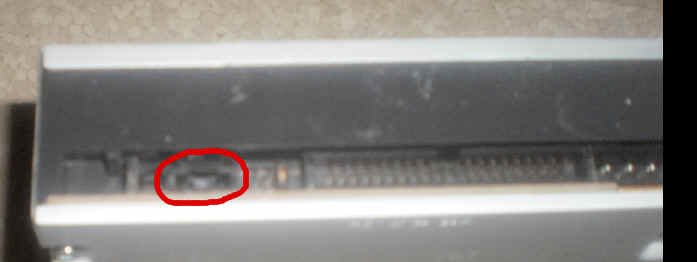
There is no place on the dvd drive to plug the audio cable. (photo below)

If you haven't figured it out yet, m1thousand, this is the connector you are looking for:

attachment.php


It is keyed to try to make sure you install it correctly. There is a tab on the plug that clips into that notch at the top of the connector on the drive. (Not all of the connector cables include the tab, however). The red wire goes on the right, viewed from the perspective of your photograph. If you install it backwards, the only thing that will happen is that the left/right orientation of the stereo speakers will be reversed.
 

Attachments

  • audioCDROM.jpg
    audioCDROM.jpg
    9 KB · Views: 139
But I cant think where the cable goes on the motherboard if that is where it goes.

Oops, sorry, I missed the motherboard part. !oops!

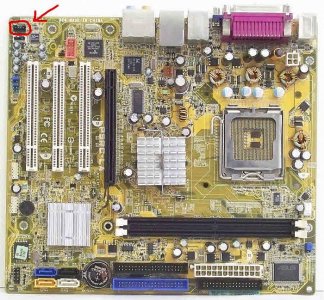
As best as I can tell, this is the motherboard in your HP (here showing the location of the sound card connector).:

attachment.php


Again, the notch at the top of the connector on the motherboard accommodates the tab on the plug, if your cable has tabs. Otherwise, the red cable goes to the right in the connector as oriented in the photograph.

If I have gotten the motherboard wrong and your mobo looks different from the picture, just look for a connector similar to the one highlighted in the picture above. It will generally be located between the PCI slots and the top left edge of the motherboard. Some mobos have two audio connectors. If that is the case, it doesn't matter which one you use - either will work.
 

Attachments

  • HP_MoBo.jpg
    HP_MoBo.jpg
    150.9 KB · Views: 130
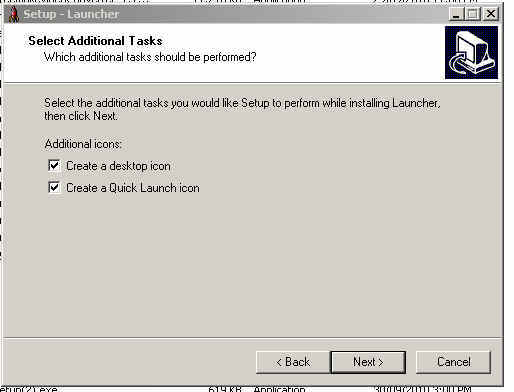
Here it is. The optional to add quick launch during setup . . . (attached)


e2315e6e791e7f0633315a60fc985995dea47a3.jpg

so :confused: just drag the link from the desktop or the startmenu into the quicklaunch bar and you have your icon.


I thought of one more question.

When I open Explorer, 'My Documents' is expanded. I have no use for it expanded. I would rather have it collapsed.

I use a folder on my desktop for all my files

Can you change the default properties so My Documents doesnt open? For example, I might want 'c drive' to open expanded. I dont but just for the sake of argument.

create a link to "explorer c:"
 
Back
Top