The Original Gay Porn Community - Free Gay Movies and Photos, Gay Porn Site Reviews and Adult Gay Forums

  • Welcome To Just Us Boys - The World's Largest Gay Message Board Community

    In order to comply with recent US Supreme Court rulings regarding adult content, we will be making changes in the future to require that you log into your account to view adult content on the site.
    If you do not have an account, please register.
    REGISTER HERE - 100% FREE / We Will Never Sell Your Info

    PLEASE READ: To register, turn off your VPN (iPhone users- disable iCloud); you can re-enable the VPN after registration. You must maintain an active email address on your account: disposable email addresses cannot be used to register.

Windows 8

cityboy-stl

JUB 10k Club
JUB Supporter
Joined
Dec 2, 2005
Posts
18,420
Reaction score
4,620
Points
113
Location
Saint Louis
I downloaded the developer preview...my God what a freaking disaster.

The Start menu is gone.
You can't toggle through your open applications
You can't even close an open application
You have these big icons for apps all over the place but you still can't find where in the hell anything is in your computer.
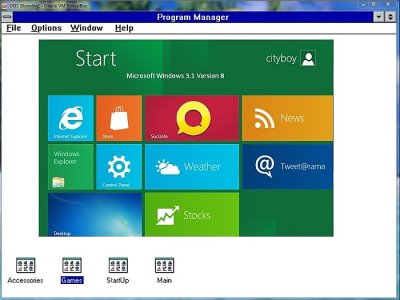
This new "metro" desktop is supposed to be so new and innovative. Ha! They've got everything grouped together on one page just like they used to. Reminds of this with a little fancier graphics and less functionality:

attachment.php


Attachments

  • Win3.1.8.jpg
    Win3.1.8.jpg
    47.4 KB · Views: 338
lol, you have the time to play around with new windows.
Good for you. :)
 
I enjoyed reading your experiences, cityboy. :) And traditionally the UI undergoes a certain amount of revision and polish based on user feedback/testing/compatibility, so it could evolve considerably. Aside from that, I've been reading that this is just the default layout and it'll be toggle-able to a more traditional look and feel.

Check out, also, Winsupersite.com's comments on the new UI. The same guy that runs that site does a nice podcast and I've started listening to them a bit to hear the Windows 8 chatter/rumors. I haven't even made the leap to Windows 7 yet - still Vista for me. :)
 
The Metro UI in Windows 8 isn't for running traditional Windows applications, and it's designed to work really well with touch devices, hence the large icons displayed in a centralised, menuless interface. The UI has been successful so far on the WP7 platform that ushered it in, and it'll be familiar to any users of those phones that go on to upgrade to Windows 8.

You're right, the Start menu is gone… from the Metro UI. To run traditional Windows apps, you are switched to the familiar Windows 7 desktop, complete with Start menu, taskbar and your icons, so users haven't really lost anything, just gained a new, touch-friendly tile interface on top, bringing with it an App marketplace and a new application suite based on web standards.

Every OS upgrade, I hear "What have they done to my precious computer?!" and when it launches, there's this quiet muttering of "Oh, that's neat." I'm not a Windows user predominently, but I'm looking forward to seeing the rest of Windows 8. Microsoft's trying something new, while appeasing current users with strong backwards compatibility.
 
^ Not in this developer preview version. There is the desktop tile that takes you a a screen that looks like the Win 7 desktop but the "start button" does not open a start menu, it takes you back to Program Manager aka. the Metro desktop. In this preview edition at least, there is no start menu.
 
Personally I can't stand the Metro UI. It's all colourful and pretty, but seems to be a strange and random hodge-podge of buttons who's placement seem illogical and without function.

Each to their own - I have a friend who uses it on his phone and loves it.
 
Windows 8 is probably a couple years away.

I know they've scheduled it for a late 2012 release. But, given Microsoft's track record with OS releases, I don't think we can reasonably expect this thing before 2013.

A lot can change in two years.
 
^ Not in this developer preview version. There is the desktop tile that takes you a a screen that looks like the Win 7 desktop but the "start button" does not open a start menu, it takes you back to Program Manager aka. the Metro desktop. In this preview edition at least, there is no start menu.


The Metro UI can be disabled via a registry hack. I googled "Disable Metro in Windows 8 Developer Preview" and made the registry change as suggested. It makes the OS usable on a desktop/laptop.

B
 
I don't like those new UI trends in ubuntu, mac os AND windows :(
 
^ Not in this developer preview version. There is the desktop tile that takes you a a screen that looks like the Win 7 desktop but the "start button" does not open a start menu, it takes you back to Program Manager aka. the Metro desktop. In this preview edition at least, there is no start menu.
Dam I thought you could.
 
You dont really think they are gonna show you what it looks like years before the time do you??
This is a figment of some ones imagination.
Dont believe a word of it!!
or
Gee youre gullible!!
 
Like my droid, I will just end up customizing the hell out it to get it the way I want.
 
Back
Top