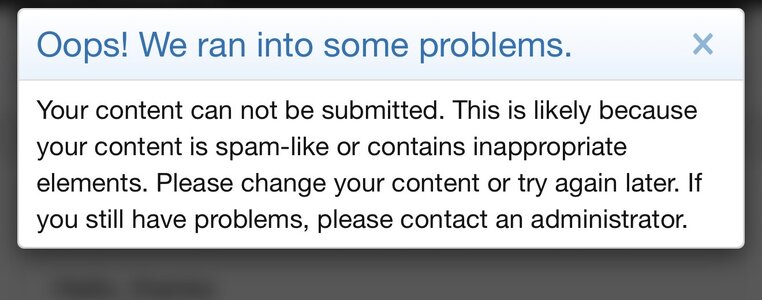
I’ve just tried, got this:I sent you a DM. You should be able to reply to it. Give it a try.


PLEASE READ: To register, turn off your VPN (iPhone users- disable iCloud); you can re-enable the VPN after registration. You must maintain an active email address on your account: disposable email addresses cannot be used to register.


I’ve just tried, got this:I sent you a DM. You should be able to reply to it. Give it a try.

Interesting. Usually, when we see this message, it's not coming from our forum software, it's coming from Cloudflare, which is the our network provider.I’ve just tried, got this:
View attachment 3398282


What is the "white thing" suddenly draped over everyone's avatars???
In some cases, cum.Snow!

In some cases, cum.
 OK putting it THAT way I'll not complain then. It just looks weird, particularly on my avatar, it totally obscures Josh Long's face!
But totally NOT that hairy chest.

I don’t think my VPN is on…. I’m on an iPad, just checked my VPN settings and it says ‘not connected’…… hmmmmInteresting. Usually, when we see this message, it's not coming from our forum software, it's coming from Cloudflare, which is the our network provider.
Let's try one thing before I open a ticket. Turn off your VPN and try replying to the message with the VPN off.


I like the avatar-snow!pozvatop said:
In this latest post, it is off. When you registered, it was on and that is what is causing some of the issues, I think. You're getting flagged as a spammer because your iCloud VPN is connecting with changing IPs.I don’t think my VPN is on…. I’m on an iPad, just checked my VPN settings and it says ‘not connected’…… hmmmm


Don't you need to have a couple-dozen or so posts before you can send PM's??KaraBulut said:Interesting. Usually, when we see this message, it's not coming from our forum software, it's coming from Cloudflare, which is the our network provider.
Let's try one thing before I open a ticket. Turn off your VPN and try replying to the message with the VPN off.
Anyone can reply to a DM.Don't you need to have a couple-dozen or so posts before you can send PM's??
I know that used to be the case.


Are you on a phone (which type?), computer or tablet?New banner is blocking the notifications tab. My fans are going to think I'm ignoring them.


I moved your post since Fab just had the same comment.Now we the decorations have apparenty displaced the area where I see notifications (e.g., your post was liked, someone responded to a thread, etc.). This seems to be because I'm using a phone--it might happen with a tablet, too?
I can get around this, since Firefox has a switch to show the desktop version of this site.