The Original Gay Porn Community - Free Gay Movies and Photos, Gay Porn Site Reviews and Adult Gay Forums

  • Welcome To Just Us Boys - The World's Largest Gay Message Board Community

    In order to comply with recent US Supreme Court rulings regarding adult content, we will be making changes in the future to require that you log into your account to view adult content on the site.
    If you do not have an account, please register.
    REGISTER HERE - 100% FREE / We Will Never Sell Your Info

    PLEASE READ: To register, turn off your VPN (iPhone users- disable iCloud); you can re-enable the VPN after registration. You must maintain an active email address on your account: disposable email addresses cannot be used to register.


  • Welcome to the Site Help Forum, Guest.

    The Site Help Forum is for questions and comments about how to use and improve JUB.
    Do not request deletion of your account here. Read the instructions in the Sticky threads for instructions on how to request a deletion of your account.

Issues with the new forum? Check in here for assistance.

That’s really strange! No idea how I managed to turn that on! Is there anything I can do? Or maybe quit the account and set it up again?
Give me a day or two to think about how to get around it.
 
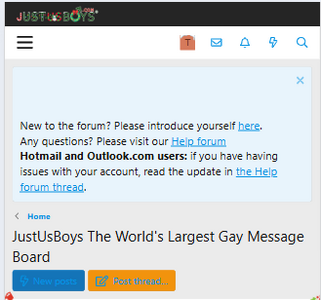
Hi. Because of the snow and the big Christmas JUB across the top of the screen I cannot access my pm’s or my profile etc.,
Can anyone help me with this please.
It's two different issues.

The holiday features can be toggled off in your user profile.

The logo issue is something that I've asked the web programmer to look at. It seems to be some sizing issue that is unique to the mobile version of the site. It is fine for users using a desktop or using a conventional web browser.
 
Will we phone users ever get our inbox, notifications and search bar back? 😞
 
Will we phone users ever get our inbox, notifications and search bar back? 😞
I heard back from the owner yesterday. He has the web guy looking at it.
 
Will we phone users ever get our inbox, notifications and search bar back? 😞
Hi! My inbox, notifications &search bar are fine, and I use the mobile version of JUB on iPhone 13 Pro (it’s the only way I EVER use it). The browser I use is Safari.
 
The header issue for mobile phone users should be resolved.

Logged on:
1766014782489.png
 
I like the "snow" and other site decorations, but it's good to know I can turn off Holiday Styling if it becomes annoying after a while.
 
I like the "snow" and other site decorations, but it's good to know I can turn off Holiday Styling if it becomes annoying after a while.
Yes you can turn it off if you don't want it on
 
How do I get full access to the site I keep getting thia message when I click on a profile
 
If you're having issues with your account or you have questions about new functionality, post here.
Hi I’m new and having two issues. In my direct messages, when I click the photo icon it asks me to enter a website address, instead of letting me upload a photo. Also, there is no way for me to start a direct message with someone.
 
Hi I’m new and having two issues. In my direct messages, when I click the photo icon it asks me to enter a website address, instead of letting me upload a photo.
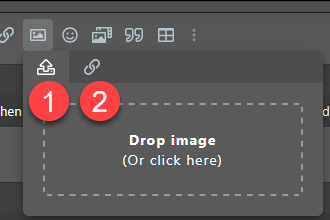
The toolbar for posts is pretty standard across different areas of the forum but the way they are formatted can be a little confusing. When you click on the Image icon on the toolbar, it opens a new window. That window has two tabs- one is a disk drive with an up arrow and the other is a link icon. The disk drive allows you to upload from your computer and the link asks for a website URL.
1768578321971.png

Also, there is no way for me to start a direct message with someone.
The response is in the post above this one- it's an anti-spam feature. There's anti-spam software on the forum that prevents spammers from joining and then sending DM spam to our members. Once the software has reviewed your posts, it will automatically start adding new features to your account.
 
The toolbar for posts is pretty standard across different areas of the forum but the way they are formatted can be a little confusing. When you click on the Image icon on the toolbar, it opens a new window. That window has two tabs- one is a disk drive with an up arrow and the other is a link icon. The disk drive allows you to upload from your computer and the link asks for a website URL.
View attachment 3470329


The response is in the post above this one- it's an anti-spam feature. There's anti-spam software on the forum that prevents spammers from joining and then sending DM spam to our members. Once the software has reviewed your posts, it will automatically start adding new features to your account.
OK thanks. For the pictures, mine doesn’t look like that. It only has the link option, could the other be missing due to anti-spam?
 
OK thanks. For the pictures, mine doesn’t look like that. It only has the link option, could the other be missing due to anti-spam?
Are you on a phone or tablet?
 
Back
Top