The Original Gay Porn Community - Free Gay Movies and Photos, Gay Porn Site Reviews and Adult Gay Forums

  • Welcome To Just Us Boys - The World's Largest Gay Message Board Community

    In order to comply with recent US Supreme Court rulings regarding adult content, we will be making changes in the future to require that you log into your account to view adult content on the site.
    If you do not have an account, please register.
    REGISTER HERE - 100% FREE / We Will Never Sell Your Info

    PLEASE READ: To register, turn off your VPN (iPhone users- disable iCloud); you can re-enable the VPN after registration. You must maintain an active email address on your account: disposable email addresses cannot be used to register.

Re installing usbs. Two hard drives not recognized

m1thousand

JUB Addict
Joined
Jun 28, 2013
Posts
6,651
Reaction score
148
Points
63
Location
Vancouver area
Hi
I have 2 external hard drives and neither are working because of USB issues I think.

Based on Trinket's advice, I just bought a blu ray burner to back up my data. I'm backing my data onto disks.

But I would still like to have these hard drives working as well

I know about looking for 'updated drivers' which didnt work.

Should I uninstall all the USB ports so they'll reinstall when I reboot?

But my keyboard and mouse are both USB so I should have a corded keyboard for the Re install. Do I need the keyboard?

Thanks
Mark
 
I forgot to say that I have a Seagate ext hard drive that is recognised when it is plugged in and usb flash drives, and ipod devices are recognised when plugged in to the front usb ports.
The blu ray burner is using 2 rear ports along with the keyboard and mouse, also in rear


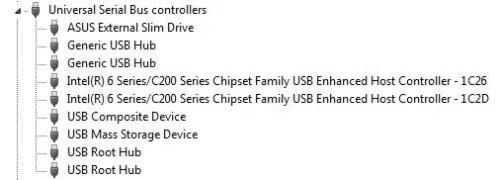
from device manager.
Ive searched for updates but found none

tumblr_mrl1e8CzhS1saa1x7o1_500.jpg
 
If it were me having these drives, I'd remove them from their enclosures (basically the shell that holds the drive, that you connect with USB) where you'd find an "ordinary" drive inside. The reason I'd do this is because it's important to isolate whether it's just the enclosure that's failing (they can do that, and often if it stops being recognized it's the enclosure's fault, nothing with the drive it contains) and the drive's totally healthy, or whether the drive is having an issue.

With the bare drive out from what surrounds it, then I'd use a docking station that connects via USB, like this model:


Or I'd use a cable that did it, like so:


The other option is buying a basic enclosure only and transfer your drive into it during this testing. Some enclosures even have a removable piece that contains the "guts" that you can lay on a table and it'll work sort of like the cable solution just above.

If you're not so comfortable and "techie" that you feel like finding the tiny screws of an enclosure and removing the drive, or using and purchasing the above docking station or cable, see if you can find a "techie" friend/family or computer shop/service that'll help you out with this. Be careful of very cheap docks, cables or enclosures, too - the power supply to them can be erratic and fail partway through transfer, the cables not quite fitting and easily coming lose, etc.

If you don't have any of the above, you could open up your desktop computer and if you have an extra SATA port (and extra SATA cable kicking around), mount the external drive you took out of the enclosure inside your system. This will again be ideal at telling you if the drive has an issue or if it's just the enclosure.
 
HI Trinket
I was going to write to you because I know you would have the answer. I just watched a video on how to dismantle the Seagate Go Flex hard drive case.
Are you saying add it into the computer as another drive?


I have my blu ray burner (as you recommended), I have 10 x 25 gbn disks and then three BD-re (recordable)

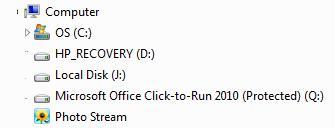
THe J drive (where Seagate is) has allowed me access to the hard drive. But I had to room to place files on my c drive. Ive converted many avi file and I literally have 1/4 hard drive empty now so that if the J drive becomes accessible again, I can transfer the files, then burn to disk

My drive is under warranty and in the video, I didnt see anything where he 'broke the warranty'. There was no tape / sticker that he broke.

I spoke two times to Seagate tech. One was able to run chkdsk and that allowed me access to the drive, but at that time, I had no free space to place hundreds of gb of files.

I ran chkdsk again and I think that is what made the drive accessible again, but then it reverted back and this is where I am now.

I guess I will open the drive and see if it can be connected as a second drive, or use a docking station (which Ill have to YUoutube because I dont know quite what you mean)

Thank you
Mark

(I did all the things like unplug the adapter, remove hard drive from base, use different usb ports, uninstalled drive in devicxe manager so it would re install drivers. Nothing worked)
 
I guess I will open the drive and see if it can be connected as a second drive, or use a docking station (which Ill have to YUoutube because I dont know quite what you mean)

My first Youtube video in my post above shows off one model of a hard drive docking station nicely, and even demonstrates placing the drive on it - have a look, and once you get a little practice, it'll feel like the most natural thing. ("That's what she said!")

Anyway, let us know how things work out! ..|
 
Hi Trinket,
Ive never known about the docking station. Does it work as if it was an external drive where data can be moved on or off of it as required or is it meant to transfer the data off the hard drive and onto your computer's drive.

I dont really want to spend much on one. Can I buy a cheaper one (for $30) versus $50. It has better features right?

I put the naked hard drive back on the base. Ill call Seagate Monday and maybe Ill get lucky and get the drive back to when it was accessible. If not, Ill get the docking station. I had moved all my videos onto the Seagate drive to free up some space on my c drive. My video captures (about 800 gb worth) and porn (size unknown ????)

And the Seagate drive couldnt be added to the computer as a second drive? For one thing, its power comes from the base.

Thank you for the great help Trinket

My computer is dusty and cob webby that Im taking it outside to dust then blast compressed air into it
 
Ive never known about the docking station. Does it work as if it was an external drive where data can be moved on or off of it as required or is it meant to transfer the data off the hard drive and onto your computer's drive.

Please view the video I originally posted for the complete concept demonstration. It just acts as a "base" that you pop your drive, upright, into. It has no storage on its own; it just has a USB interface on one side and the spacing and ports to handle the 2.5" or 3.5" drive you're bringing to it on the other. It's why I was mentioning you can go for option 2 which is a cable only, rather than a dock - both will have the same result. Your goal here is to take your own hard drive's enclosure out of the equation to properly determine what is failing; the enclosure, or the drive inside it.


I dont really want to spend much on one. Can I buy a cheaper one (for $30) versus $50. It has better features right?

Stick to brand names; as I wrote in my first reply, lesser or generic names can have issues like cables that don't quite fit (drop away), power supply that gets cut off, etc. There's not really any "features" per se of a docking station, although some models will hold two drives and assign them different drive letters.


And the Seagate drive couldnt be added to the computer as a second drive? For one thing, its power comes from the base.

Generally, most drives in an enclosure can be taken out and run from within a computer. Then it becomes like any drive your computer already has, or you would add to it.

The SATA interface will include the power connector. Most modern computers will have a SATA power connector. Here shows both the SATA port and the wider SATA power port:


And here - often the SATA cable itself may be red, and the SATA power cable will have a black end:


(The old fatter, white power interface pointed out in the first graphic is referred to as a "Molex" connector like so. Your drive may be able to take this connection if required, but it shouldn't be necessary for more modern computers):


If you don't have an extra SATA cable around, or there isn't another cable already in your case you can use, you can pick one up cheaply, and your computer's power supply may have the power cable available. Just hook up your drive this way to test it if you don't want either the docking station or external cable options.

 
Sorry, I didnt read this "Or I'd use a cable that did it, like so:" so I didnt realise it can be done with just a cable.

I have this, which is sata right?
hdd_sata_connected2.jpg


So this would work?
http://www.futureshop.ca/en-CA/prod...24b5d7fd38ea41c11c3849fen02&SearchPageIndex=1

I have hard drives with the same connection type as in the photo above.

Im rushing out for something but I might be able to get one today on the way home. Ill take my hard drives with me

Thank you Trinket
 
I bought Aluratek USb 2.0 2.5"/3.5" Sata hard drive docking enclosure. The stores had nothing else to choose from

I connect it to the computer and it wants to format the drive (the Seagate drive) where my data is

There were no instructions other than plug in, put in hard drive, plug in usb

I dont know what to do and Im really at the end of my patience with computers

The drive comes up as E and it wants to be formatted

The model number is AHDDU100F
http://helpdesk.aluratek.com/index.php?pid=knowledgebase#display_entry,true,"188"

http://aluratek.com/cms/legacy/support-library.php

and the IDE hard drive from my old computer does not lock into place in the docking station
 
My IDE hard drive doesnt work because its not on the box . . ..
Aluratek USb 2.0 2.5"/3.5" Sata hard drive docking enclosure
 
I talked to Seagate for 90 minutes.

tumblr_mrsmrgI6P31saa1x7o1_500.jpg


My hard drive is in raw file. Seagate sent me a file recovery demo which I am running now
 
What can I do about the Western Digital and Iomega 1tb external hard drives that don't get recognized?
 
My hard drive is in raw file. Seagate sent me a file recovery demo which I am running now

Yes, based on your post #9, my next suggestion would be (obviously) decline the OS's offer to format it, and fire up the Disk Manager as your screenshot shows to determine that for that physical drive, what state it's in in terms of a recognizable format or not, or if it's reverted to RAW. You've done that which is good. The NTFS table might be damaged and when the drive goes RAW, in varying ways the data can be retrieved or not, and lots of recovery tools will handle RAW. BTW, see these two prior JUB threads for tools and tips:

Disk Boot Failure (The TestDisk recommendation there is a good one)

My hard drive has been deleted - HELP!


What can I do about the Western Digital and Iomega 1tb external hard drives that don't get recognized?

I don't recall from all your posts and panic the issues with those two drives in particular? If it's because they're IDE, you can get a cable that'll handle that (or both SATA and IDE toggle) - view the second video I posted in my post #3 in this thread for a sample of that. Or, get an enclosure that can also toggle both. Enclosures like that look like this (or slight variations) inside - notice the thin red SATA cable and the wide grey IDE cable and all the proper power connectors:

 
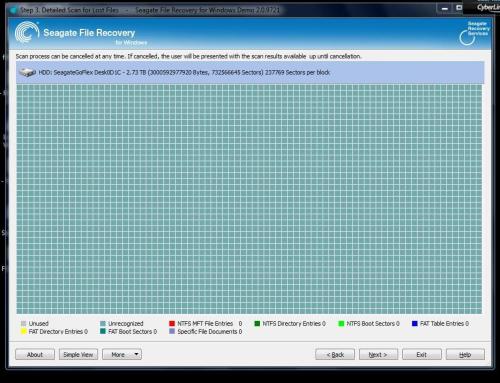
I ran the scan that Seagate wanted me to run.

The results. It comes up as unused, aka not working

tumblr_mrtsoqwv2y1saa1x7o1_500.jpg


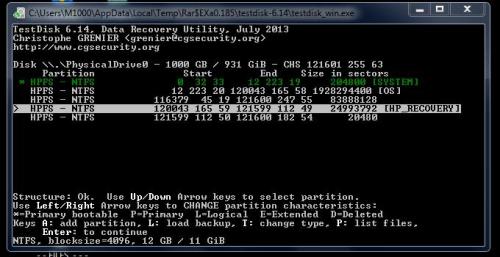
Im running test disk now. Thank you Trinket for mentioning that in the other thread


Hi
I have 2 external hard drives and neither are working because of USB issues I think.

My first priority was the Seagate drive. The other drives just sit on my desk. Im not sure if I have anything on them

Thats the latest

Back up your data ;-) I should have done it sooner
 
Im returning my blu ray burner that I just bought the other day. It wont recognise BD-R or BD-RE disks.

I did a test burn on dvd-R, which worked. But I stopped the burn, swapped to a BD-R disk and tried to burn the same data and I get the error message.

So Im going to go buy another brand since I dont know Asus and their customer support (live chat) was grindingly slow.

I was in the process of backing up my data on my c drive when I discovered this extra problem
 
Hello
I ran Recuva and some files can be saved, others cant. My fault for not backing them up. I need to go get a new blu ray burner because I dont have enough space on c drive to save receovered files.

Is there any help you can give for video files? I tried a few but it says they are corrupt.

The one thing is that I know the names of the files that are gone and and what I still have
 
blu ray burner
- I told the sales guy I was buying a blu ray burner. The disks wouldn't initialize because it wasnt a blu ray burner. It was for CDs and DVDs. Thats what 'dual combo' meant on the box. We went to see if any BD-RE were on the shelf but there were none. We were all having a blonde moment in that no one realized this was not a burner.

When I talked to two people at the manufacturer, they didn't say can't burn bd-r disks on this drive. Instead, they were puzzled as to why the error message 'won't initialize' appeared

I have a blu ray burner now (by LG). I'm backing up das and clearing space to any recovered data can be placed on the c drive.

I lucked out because I lost the bill but they took the 'Asus Dual Combo' back
 
I burned disks overnight so now I can start burning my data. I have 13 x 25 gb disks (575 GB total space) to help with that task.

Blu ray burners are not carried much where I live. Staples doesnt bother carrying them, Best Buy doesn carry them, Future shop carries them and is where I bought the writer

The Blu ray combo I accidentally bought . .

s0509455_sc7


ASUS® 6x External Slim Blu-ray Combo Drive

BDXL read only format allows users to read huge amount of data on a single Blu-ray disc, up to 100GB

- The key word is read which is not the same as write


This has to be my biggest computer blunder - buying a non writing blu ray burner


THis is what I have. It was $129 . .

tumblr_mrw83dN41m1saa1x7o1_500.jpg

(photo from Ebay)

Im putting the bad hard drive on the back burner as I organise my files on C drive and burn onto disks

Thank you so much Trinket for your help ;-)

Signed
- the guy who needs to look at boxes closer
 
The external drive is not being recognised by the computer so I am taking it in to Staples for data recovery. But as I mentioned, not only is my porn collection on that drive, but my 2,200 video captures and about 30 videos of myself jacking off. I have a bit of an exhibitionst side to me but no one has seen the videos.

I hope they dont recognise the folder 'Mark jo'

In the town where 'gay is not ok', they will have a big enough of a shock if they see the gay porn collection.


I took the bus (and because of my anxiety, I dont take the bus very often if it means being on one for more than 10 minutes) to look for the sata/ide adapter in the next town over in the big computer stores. They didnt have it but a small store, only blocks from me, had it.

$(KGrHqRHJBwFG+g9Iq+vBR1fk(PjOQ~~48_35.JPG
 
Back
Top