

The Original Gay Porn Community - Free Gay Movies and Photos, Gay Porn Site Reviews and Adult Gay Forums


-
Welcome To Just Us Boys - The World's Largest Gay Message Board Community
In order to comply with recent US Supreme Court rulings regarding adult content, we will be making changes in the future to require that you log into your account to view adult content on the site.
If you do not have an account, please register.
REGISTER HERE - 100% FREE / We Will Never Sell Your InfoPLEASE READ: To register, turn off your VPN (iPhone users- disable iCloud); you can re-enable the VPN after registration. You must maintain an active email address on your account: disposable email addresses cannot be used to register.
You are using an out of date browser. It may not display this or other websites correctly.
You should upgrade or use an alternative browser.
You should upgrade or use an alternative browser.
Using Photoshop. . .
- Thread starter TickTockMan
- Start date



TickTockMan
"Repent, Harlequin!"
Use an adjustment layer that removes the color. In the layer mask paint the areas that should keep the color white.
Thank you. I will give it a try. I'm not really all that good with computers so I will see if I can do it.












FMRob
Virgin
Another pretty simple way is to do this:
Make a copy of the whole image and past it into a new layer.
Then, for the layer that is on top, edit the hue/saturation and move the saturation bar all the way to the left so there is no color.
You end up with a black & white layer on top of the color layer (so everything looks black and white).
Then, use the eraser tool to erase the parts of the black and white image so that the color layer shows through in those parts.
Hope this helps.
Make a copy of the whole image and past it into a new layer.
Then, for the layer that is on top, edit the hue/saturation and move the saturation bar all the way to the left so there is no color.
You end up with a black & white layer on top of the color layer (so everything looks black and white).
Then, use the eraser tool to erase the parts of the black and white image so that the color layer shows through in those parts.
Hope this helps.
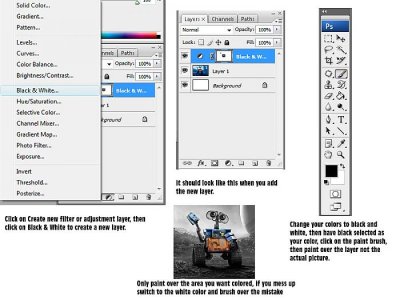

Here is a much easier way. If you're using Photoshop CS3 or higher.
Ahem ..
 ?
?Use an adjustment layer that removes the color. In the layer mask paint the areas that should keep the color white.

GamerBear
( ̄(エ) ̄)
Ahem ..
Yeah but showing a diagram makes it so much easier especially for someone who doesn't know Photoshop all that well.
Just how like I made JUB for Dummies. Helped quite a few people out I hope.

- Joined
- Jul 6, 2005
- Posts
- 41,663
- Reaction score
- 14
- Points
- 0
- Location
- Home is where the heart is
- Website
- www.myspace.com
... I made JUB for Dummies. Helped quite a few people out I hope.
It has, we refer folks there often. Can you possibly go through looking at the various tools on the system to compare with those in the screen caps, I think we had a system overhaul after some database problem a couple of years ago, shortly after you departed a while back. Maybe one or two screen caps need updating, or functions which may show up differently now.
For instance, the limiting of the number of images to a single post etc, and we don't have now is the little icons that we could add to our thread titles, a couple fo changes I recall off the top of my head... TIA
GamerBear
( ̄(エ) ̄)
It has, we refer folks there often. Can you possibly go through looking at the various tools on the system to compare with those in the screen caps, I think we had a system overhaul after some database problem a couple of years ago, shortly after you departed a while back. Maybe one or two screen caps need updating, or functions which may show up differently now.
For instance, the limiting of the number of images to a single post etc, and we don't have now is the little icons that we could add to our thread titles, a couple fo changes I recall off the top of my head... TIA
You mean that thread still exists? After two years its still floating around? I figured JUB would of advanced in its system interface that that an Admin would of deleted it ages ago.
Yeah but showing a diagram makes it so much easier especially for someone who doesn't know Photoshop all that well.
Yes, but it's not a "much easier way" - it's exactly what I wrote

GamerBear
( ̄(エ) ̄)
Yes, but it's not a "much easier way" - it's exactly what I wrote
Yeah, but a diagram re-enforces the directions and gives a visual aid, if you told me that when I first used Photoshop I'd be confused as hell.
TickTockMan
"Repent, Harlequin!"
I gave it a try. Following what was said and in that picture I couldn't figure it out. My drop downs don't look the same as those in the picture and I'm not smart enough to understand how to do it by myself.
If you have any ideas that might get me to understand, please let me know. I'm trying to do something for PRIDE, so my brother won't help me.
If you have any ideas that might get me to understand, please let me know. I'm trying to do something for PRIDE, so my brother won't help me.
I gave it a try. Following what was said and in that picture I couldn't figure it out. My drop downs don't look the same as those in the picture and I'm not smart enough to understand how to do it by myself.
That's the problem if you get instructions. You will stick to them, and never learn to find something out on your own.
You know what you want (adjustment layer). You know the tools. Now help yourself.
Use the help function, the handbook or even google.
give a man a fish and you feed him for a day. teach a man to fish and you feed him for a lifetime.


andysayshi
JUB Addict
You haven't told us which version of Photoshop you have. Adjustment layers were introduced in PS7, so you won't have that option if you have an earlier version than that.
TickTockMan
"Repent, Harlequin!"
You haven't told us which version of Photoshop you have. Adjustment layers were introduced in PS7, so you won't have that option if you have an earlier version than that.
CS2 9.0
The thing is way over my head.
TickTockMan
"Repent, Harlequin!"
I sense a pirated copy
When it comes to [STRIKE]computers[/STRIKE] anything electronic, everything is over my head.
Also I don't know if it is or not. My brother when he was in a good mood put it on my computer for me. I don't mess with stuff on my computer because I always fuck it up.

Forget that shit.
It's so over bloated it takes years to learn it in its entirety.
You will find more than you will EVER NEED with this one and it's 100% free and spyware free as well:
http://download.cnet.com/Photo-Pos-Pro/3000-2192_4-10264444.html
It's so over bloated it takes years to learn it in its entirety.
You will find more than you will EVER NEED with this one and it's 100% free and spyware free as well:
http://download.cnet.com/Photo-Pos-Pro/3000-2192_4-10264444.html


