Re: The post something funny thread.
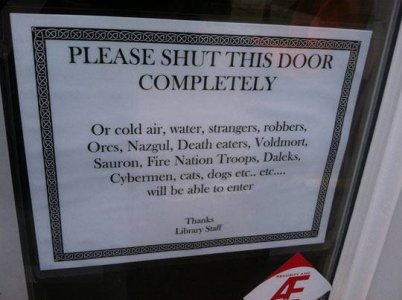
Epic Library Staff Win.
(Yes, there is one misspelling, but it is of He Who Shall Not Be Named, so we're good.)
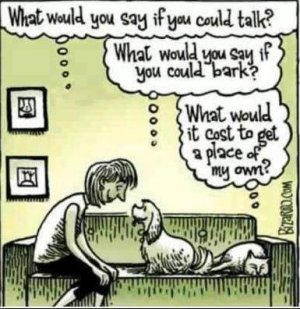
Dogs v. cats explained
(Credit: www.bizarro.com)
Now for some truth in advertising - a la George Takei (as most of the above were, too)

p.s. Deafman - re: your .gif puzzlement - when you post pics, right after entering the links, press "Go Advanced"
When it shows, click the Blue Hi-Lited A/A in the upper left corner to get a "WYSIWYG" image, including the thumbnail image(s) of the pic(s) you are about to post.
Then double click on a pic until a pop-up editor appears - click "Center" and "Full Size" then OK. Do the same to any other pics you have ready to update.
After you have done it to all of them, then press Submit Reply.
That's how you get full sized, fully functioning pics, fairly easily.
Epic Library Staff Win.
(Yes, there is one misspelling, but it is of He Who Shall Not Be Named, so we're good.)
Dogs v. cats explained
(Credit: www.bizarro.com)
Now for some truth in advertising - a la George Takei (as most of the above were, too)
p.s. Deafman - re: your .gif puzzlement - when you post pics, right after entering the links, press "Go Advanced"
When it shows, click the Blue Hi-Lited A/A in the upper left corner to get a "WYSIWYG" image, including the thumbnail image(s) of the pic(s) you are about to post.
Then double click on a pic until a pop-up editor appears - click "Center" and "Full Size" then OK. Do the same to any other pics you have ready to update.
After you have done it to all of them, then press Submit Reply.
That's how you get full sized, fully functioning pics, fairly easily.

















](/images/smilies/bang.gif "Brick wall ](*,)")